Bright-window spreadsheet keepers
You record harvest quantities and dates near a window and want to read the screen without leaning around reflections. Screen finish, brightness adjustment and the freedom to reposition the display matter here.


For harvest logs beside a bright window, start with a matte or anti-glare screen, adjustable brightness and a position that keeps window reflections out of view. A 27-inch QHD monitor is a practical choice for routine spreadsheets; consider 4K if you regularly work across dense records and photos. Neither resolution nor a brightness specification removes the need to manage reflections at the desk.
You record harvest quantities and dates near a window and want to read the screen without leaning around reflections. Screen finish, brightness adjustment and the freedom to reposition the display matter here.
You work across spreadsheets, sowing notes and crop photos. Consider how much detail you need visible at once, while still checking how the screen handles light at your desk.
You connect a laptop at the same desk where you keep your harvest records. Check the laptop and monitor connection together, as well as whether the stand lets you move the screen away from reflections.
Check where the window appears in the screen before deciding how much resolution you need. Then match the monitor’s connections and stand adjustment to the laptop and desk you actually use.
| Concern | What to check | Who this matters to |
|---|---|---|
| Daylight readability | Check the screen finish, brightness controls and whether the stand lets you turn the panel away from reflected window light. | I need to read dates and quantities beside the window without shifting position to see past reflections. Roughly 50% of consumers put reflection control first. |
| Record detail | Compare QHD and 4K at the screen size you want, and try a comfortable text-scaling setting. | When I compare dense tables with notes or photos, I want enough detail visible without making text uncomfortable to read; around 30% of consumers prioritise workspace for detailed records. |
| Laptop desk setup | Confirm the laptop’s USB-C video capability, the monitor’s power delivery and the stand adjustment you need. | I want to connect my laptop without giving up the ability to reposition the display as daylight changes. About 20% of consumers place laptop connection and desk flexibility first. |
A bright panel can still show a distracting image of the window. Brightness figures and HDR labels do not describe the whole desk setup.
Look for a suitable screen finish and room to reposition the display. If possible, check where reflections fall at the desk during its brightest part of the day.
A USB-C port alone does not establish that the laptop can send video to the monitor or receive enough power from it.
Check the required video standard in the laptop documentation, then compare the monitor’s power-delivery rating with the laptop’s charging requirement.
If the connection cannot perform both jobs, you may still need a separate charger, suitable cable or dock.
A routine harvest log may not need the extra detail, while text on a 27-inch 4K display may need scaling to remain comfortable.
Choose resolution around the records you open together: QHD is worth considering for straightforward logging; 4K becomes more relevant for dense tables and photos.
Pressure, excess liquid and unsuitable chemicals can damage a monitor surface.
Follow the manual for the exact model. LG advises switching off and unplugging before cleaning, while BenQ warns against ethanol, rubbing alcohol and bleach on its monitor surfaces.
These model lines illustrate different specifications to check; a brand name alone does not establish how a screen will look beside your window.
BenQ’s GW2790QT is a 27-inch QHD example for a laptop-based record-keeping desk. BenQ UK specifies a matte IPS screen, 350-nit typical brightness, an adjustable stand and USB-C power delivery.
LG’s 27UP85ZK-W is a 27-inch 4K IPS example for working across detailed records and photos. LG UK lists an adjustable stand and USB-C charging up to 90 W.
Dell’s U2725QE is a 27-inch 4K hub-monitor example for a more permanent desk. Dell UK identifies an anti-glare, anti-reflective IPS Black screen surface.
These monitors cover QHD and 4K record-keeping choices, alongside larger-screen options. Check each model’s screen surface, positioning and laptop connection against your own window-side desk before choosing.
 No image available
Consider this WQHD model for routine harvest spreadsheets if its screen finish and stand adjustment work at your desk.
If you plan to connect a laptop through USB-C, check its video compatibility and the monitor’s power-delivery rating before relying on one cable.
 No image available
The 32-inch 4K format is worth considering if you want room for detailed harvest records and photos; check that the larger screen fits your desk and viewing distance.
Confirm the applicable brightness specification and the laptop connection you intend to use rather than treating the HDR designation as a solution to window reflections.
 No image available
This 4K OLED model is an option to assess if detailed records and crop photos are central to your work.
For a bright-window desk, check its typical brightness and screen positioning rather than using a peak-brightness figure to judge daylight readability. Confirm USB-C video and charging compatibility if you need them.
 No image available
The 27-inch 4K format may suit dense harvest tables where you want a more compact screen than a 32-inch model.
Check the screen coating for window-side use: the variant’s “Matte Black” colour description does not identify its panel finish. Confirm USB-C functions separately if a laptop connection matters.
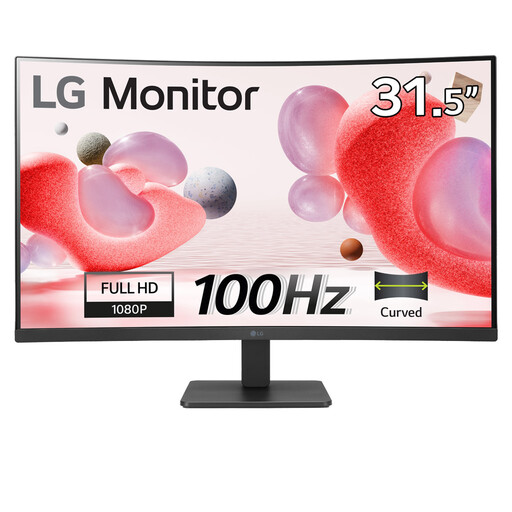 No image available
Consider this anti-glare model if a 32-inch viewing area matters more to you than fitting fine detail into harvest spreadsheets.
Its Full HD resolution and stated 250 cd/m² brightness make record detail and the light at your desk particularly important checks. Confirm that its available positioning suits the window.
Position it so the window does not appear as a distracting reflection in the panel. Adjust the screen angle and height, then set brightness for the light at your desk; the Health and Safety Executive advises considering the whole workstation, including its equipment and working conditions.
A 350-nit specification can be a useful comparison point for a bright indoor desk, but it cannot guarantee readability when the window reflects in the screen. Box.co.uk’s July 2026 bright-room guide discusses roughly 300–400 nits or more for rooms with reflections; also check the screen finish, brightness adjustment and where the display can be placed.
Not necessarily: QHD is worth considering for routine logging, while 4K becomes more useful when you regularly view dense tables, several documents or crop photos together. At 27 inches, check that text remains comfortable at the scaling setting you intend to use.
Only if the laptop and monitor support the required video connection and the monitor supplies enough power for that laptop. Check the laptop’s USB-C video capability, the monitor’s power-delivery rating and the cable required for both functions.
Follow the instructions for your exact model and avoid pressure or spraying liquid directly onto the panel. LG advises switching off and unplugging before cleaning; BenQ warns against ethanol, rubbing alcohol and bleach on its monitor surfaces.