Detail-focused budget trackers
If you compare monthly trends, formulas and several charts at once, consider whether QHD or 4K gives your spreadsheet enough usable space at a comfortable text size.


For household-spending charts, choose a monitor whose resolution gives you enough room for your usual spreadsheet view and whose stand fits your study desk. A compact QHD screen suits a smaller desk, while a 27-inch QHD or 4K screen is worth considering for more detailed tables and charts; check text scaling before choosing 4K. If you use a laptop, confirm its video output and charging requirements before relying on a USB-C connection.
If you compare monthly trends, formulas and several charts at once, consider whether QHD or 4K gives your spreadsheet enough usable space at a comfortable text size.
If your laptop stays on a study desk, a USB-C monitor may simplify the connection. Check that the laptop supports video over USB-C and that the monitor’s stated charging output meets its needs.
If you update spending figures periodically, Full HD may provide enough room for your charts and documents. Compare the workspace at your preferred text size before paying for a higher resolution.
For a quiet study, start with the spreadsheet view you need, then check how the screen fits your desk and connects to your computer.
| Concern | What to check | Who this matters to |
|---|---|---|
| Spreadsheet and chart detail | Compare native resolution, screen size and your preferred text scaling. Check that your computer can output the chosen resolution. | If I keep formulas and charts open together, I need to read labels without constantly rearranging windows. Around 31% of consumers put spreadsheet and chart detail first. |
| Study-desk positioning | Check the stand’s height, tilt, swivel and pivot options, and measure the available desk space. | At a fixed study desk, I want to position the screen for the way I sit and read. Comfortable placement is the main concern for around 31% of consumers. |
| Laptop connection | Confirm USB-C video support and compare the monitor’s power-delivery rating with the laptop’s charging requirement. | When I bring a laptop to the desk, I would rather connect the display and charging through one compatible cable. Around 23% of consumers prioritise a simpler laptop connection. |
| Occasional use | Compare the current purchase terms, included stand and cables, and whether Full HD provides enough workspace. | If I review household spending only now and then, I need readable charts without buying features I will rarely use. Keeping the choice proportionate comes first for around 15% of consumers. |
A larger screen does not necessarily have a higher pixel density. BenQ UK lists its 27-inch GW2790 at 1920 × 1080 and 82 PPI, compared with 2560 × 1440 and 109 PPI for the 27-inch GW2790QT.
Compare size and native resolution together, then consider how spreadsheet text looks at the scaling you intend to use.
A one-cable setup depends on both the laptop and monitor. Dell specifies up to 90W power delivery for the P2425DE, while BenQ specifies 65W for the GW2790QT.
Check the laptop’s USB-C video capability and charging requirement, as well as which cable is supplied.
Flicker-free and low-blue-light features do not replace a suitable screen position, manageable glare and breaks. The Health and Safety Executive’s display-screen guidance addresses workstation setup and reflections in a work context.
Adjust the screen and lighting for your desk rather than choosing on eye-care branding alone.
HDR and gaming-oriented features do not establish whether a monitor has enough usable space for household-spending tables and charts.
Check resolution, stand adjustment and compatible inputs first; consider entertainment features if you will use the monitor for those activities too.
Dell’s P2425DE and P2425HE illustrate compact business-monitor options for a study desk and laptop connection.
BenQ’s 27-inch GW2790QT and GW2790 provide QHD and Full HD options for different spreadsheet workloads.
LG’s 27UP650K-W is a 27-inch 4K option for readers considering a higher-resolution workspace.
These monitors cover QHD, 4K and ultrawide ways to view household-spending charts. Choose by the space your spreadsheets need, then check desk fit, connection requirements and any quiet-operation details that matter to you.
 No image available
Consider this 27-inch 4K model if you regularly inspect detailed tables and charts. Check your preferred text scaling, the connections your computer needs and its suitability for a quiet room.
 No image available
Consider this WQHD model for regular spreadsheet and chart review. If a laptop connection is part of your setup, check video compatibility and charging requirements; also assess text scaling and quiet-room suitability.
 No image available
Consider the larger 4K screen if your desk can accommodate it and you want room to inspect detailed charts. Check desk depth, viewing distance, 4K output and scaling; confirm laptop charging compatibility and quiet-room suitability separately.
 No image available
Consider this 4K model for detailed spreadsheet labels and charts. Check whether its stand adjustment suits your desk, whether your computer supports the resolution, and whether its operation suits a quiet study; the Eye Care name is not a health guarantee.
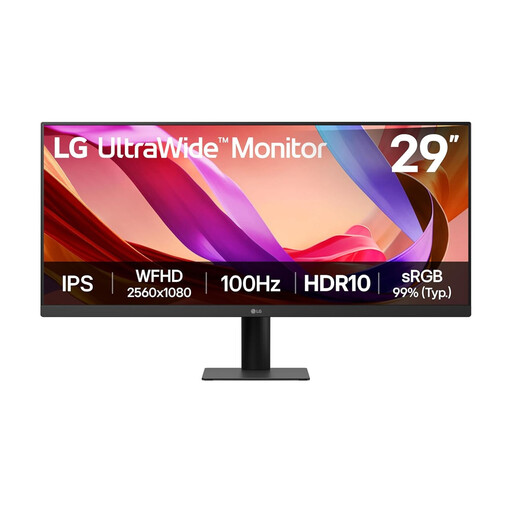 No image available
Consider the ultrawide format if you prefer charts or windows alongside one another. Its stated resolution is 2560 × 1080; check whether that gives your spreadsheets enough detail, whether the screen fits your desk and whether its operation suits a quiet study.
No: consider screen size and resolution together. BenQ UK lists its 27-inch GW2790 at 1920 × 1080 and 82 PPI, and its 27-inch GW2790QT at 2560 × 1440 and 109 PPI. Decide whether you need a larger physical display, more pixel detail or both.
It can if the laptop supports video over that USB-C connection and the monitor’s power delivery meets its charging needs. Dell specifies up to 90W for the P2425DE, while BenQ specifies 65W for the GW2790QT; check your laptop’s requirements before planning a one-cable desk.
The Health and Safety Executive does not identify a particular monitor type for personal household budgeting. Its display-screen-equipment guidance concerns work use, including workers who use a screen daily for continuous periods of an hour or more. For personal use, you can still arrange the screen, desk and lighting for comfortable viewing without treating those employer duties as a personal monitor specification.
Use an appropriate electrical-equipment collection route rather than putting the monitor in ordinary waste. GOV.UK’s guidance on waste electrical and electronic equipment describes the UK framework; check a local-authority recycling service or retailer take-back route for its acceptance conditions.