What to check when buying
For a sales dashboard beside a bright window, deal with reflections first, then decide how much screen space and laptop connectivity the desk needs.
| Concern |
What to check |
Who this matters to |
| Glare and changing daylight |
Check the screen’s surface finish and brightness controls; plan the screen position and window covering. |
When daylight reflects across my dashboard, I need to control the light before judging the display itself. Roughly 42% of consumers put glare control first. |
| Space for dense sales data |
Compare 4K and QHD resolution at the screen size you want, then consider scaling at your viewing distance. |
If I keep several tables and charts open together, I want enough usable space without making text uncomfortable to read. About 33% of consumers prioritise dashboard workspace. |
| Laptop connection |
Confirm USB-C video support and compare the monitor’s power-delivery limit with the laptop’s charging requirement. |
At a laptop-led desk, I want fewer connections without losing display output or the charging power I need. Around 25% of consumers make single-cable integration their primary concern. |
Joybuy monitor choices
These monitors offer different screen sizes and resolutions to consider for a sales-dashboard desk. Check the surface, positioning and connections of the exact model against your window and laptop setup before choosing.
 No image available
ASUS ProArt Display PA32UCG-K 32-inch 4K monitor
Consider this larger screen if your dashboard layout needs room for several views; check that a 32-inch display fits your desk and viewing distance.
The product name specifies a 4K IPS Mini LED display, Thunderbolt 3 and HDMI 2.1.
Confirm the screen finish, adjustment controls and laptop charging capability for your particular setup; do not rely on a quoted peak-brightness figure to resolve window glare.
View on Joybuy
 No image available
ASUS ProArt PA278CV WQHD monitor
Consider this WQHD model if your dashboard remains comfortable without the extra pixels of 4K; check the layout you use most often.
The product name specifies an IPS WQHD display.
Check its screen finish and stand movement for your window position, and confirm USB-C video and charging requirements if you use a laptop.
View on Joybuy
 No image available
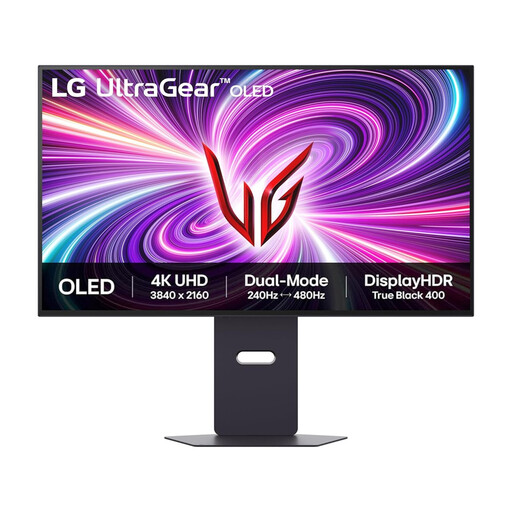
LG UltraGear OLED 32GS95UV-B 32-inch 4K monitor
This gaming model may be worth considering if you also want a 32-inch 4K screen for dashboard work, provided its desk fit and connections suit you.
The product name specifies an OLED display, DisplayPort and HDMI 2.1.
Check the screen’s behaviour in your room and the controls you need for changing daylight; its gaming features alone do not answer the glare question.
View on Joybuy
 No image available
ASUS Eye Care VY27UQ 4K UHD monitor
Consider this 4K option if fitting detailed dashboard content on one screen matters to you.
The product name specifies 4K UHD resolution and a 60Hz refresh rate.
For a window-side desk, check the surface finish, available stand adjustments and whether its display controls are convenient as daylight changes.
View on Joybuy
 No image available
iiyama ProLite XUB2792UHSU-B6 27-inch 4K monitor
Consider this 27-inch 4K model if you want a detailed dashboard view without moving to a larger screen.
The product name specifies a 4K UHD LED monitor with a 16:9 aspect ratio.
Check the screen surface and display controls for your lighting, and confirm the required video connection and charging capability before planning a single-cable laptop desk.
View on Joybuy
Common questions
Will a brighter monitor fix glare from a nearby window?
No, brightness alone cannot control reflections from the window. The Health and Safety Executive advises arranging the desk and screen to avoid glare or bright reflections; screen finish and adjustable brightness are additional considerations once the position and daylight are addressed.
Does DisplayHDR 400 mean a monitor will suit a sunlit desk?
Not necessarily. VESA DisplayHDR 400 defines a display-performance tier, not how a particular window will reflect in the screen. Check the surface, stand adjustment and desk position separately.
Do I need 4K for a sales dashboard?
Choose 4K if the extra pixels help you keep dense tables, charts or multiple panes usable at your preferred scaling. QHD may be enough for a simpler layout; compare both at your normal viewing distance if possible.
Can a USB-C monitor replace my laptop charger and dock?
Only if the laptop supports the required USB-C video connection, the monitor supplies sufficient charging power and it has the ports you need. Dell lists up to 140W for the U2725QE, LG up to 90W for the 27UP85ZK-W and BenQ 65W for the GW2790QT; compare the exact monitor and laptop specifications before relying on one cable.
What should an employer check for a regular display-screen workstation?
For workers who regularly use display screen equipment as a significant part of normal work, the Health and Safety Executive says employers must assess workstations and reduce risks. Where applicable, the UK display-screen-equipment schedule calls for adjustable brightness and contrast, an easily swivelled and tilted screen, and freedom from reflective glare and reflections that cause discomfort.


