For reading census records beside a bright window, prioritise a matte or anti-glare screen that you can reposition, and plan how to control light from the window. A 27-inch 4K display gives you more pixels for fine scans and multiple document panes than a 27-inch Full HD display, but QHD or Full HD may suit you if larger text, one document at a time or laptop capability matters more. No brightness rating or screen coating guarantees that a reflected window will disappear.
Who this setup suits
Family-history researchers working in daylight
If a nearby window reflects across census images, screen position and lighting matter alongside monitor specifications. The Health and Safety Executive advises adjusting screens and lighting to avoid reflections and glare, including repositioning a screen or using blinds.
Readers comparing detailed records
Small handwriting, narrow columns and several open sources make resolution and usable screen space worth checking. Dell and LG list 3840 × 2160 resolution for cited 27-inch 4K models; BenQ lists 1920 × 1080 for its 27-inch GW2790. Text size and viewing distance still affect which layout is comfortable.
Laptop-based home researchers
A USB-C desk connection is useful only if the laptop can send video through that port and the monitor supplies enough power for the laptop. BenQ lists 65 W power delivery for the GW2790QT; compare any monitor's stated rating with your own laptop's requirements.
What to check before buying
Start with the window reflection and where you can position the screen. Then choose the resolution for the records you read, before checking stand movement and laptop connections.
27-inch 4K
Consider it when: You regularly inspect fine scans or keep several records visible at once.
Trade-off: You may need larger operating-system text, and extra pixels will not remove a window reflection.
27-inch QHD
Consider it when: You want more pixels than Full HD but also value an adjustable stand or a compatible one-cable laptop setup.
Trade-off: At the same screen size, QHD has fewer pixels than 4K; USB-C charging also depends on the laptop and monitor.
27-inch Full HD
Consider it when: You usually read one document with larger text rather than closely comparing fine scans.
Trade-off: Its lower pixel count leaves less detail and room for side-by-side records than QHD or 4K at 27 inches.
| Concern | What to check | Who this matters to |
|---|
| Window reflections |
Check the exact screen coating and whether the stand or a compatible mount allows you to turn the display away from the window. Plan for blinds or a different desk position if needed. |
If daylight falls across a faint scan, I need to control the reflection rather than rely on brightness alone. Around 36% of consumers put reflection control first. |
| Text and workspace |
Compare native resolution at the screen size you want, and check that your computer can output it. Try the text scaling you expect to use. |
When I compare handwriting with transcriptions in separate panes, I want enough detail and space to keep both readable. Detail and workspace come first for around 29% of consumers. |
| Screen positioning |
Check the stated height, tilt, swivel and pivot movements you need; if using an arm, confirm its mounting compatibility. |
For long sessions, I need to move the screen into a comfortable position without leaving it facing the window. Around 21% of consumers prioritise positioning. |
| Laptop connection |
Confirm video-output support, the required cable and any USB-C power-delivery rating against your laptop's specifications. |
If I connect a laptop at this desk, I want the display and charging arrangement to work without relying on the wrong port or cable. Connection simplicity is the primary concern for around 14% of consumers. |
Buying pitfalls
-
Choosing by brightness alone
A stated brightness figure cannot tell you whether your window will appear as a distracting reflection on the screen.
Consider coating, screen movement and light control together. The Health and Safety Executive recommends adjusting screens and lighting to avoid glare; try repositioning the display or using blinds before assuming a replacement is needed.
-
Assuming USB-C means one-cable compatibility
A USB-C socket does not, by itself, establish that your laptop sends video through it or that a monitor can supply enough charging power.
Check the laptop's video-output support and power requirement against the monitor's USB-C specification.
An incompatible connection may mean using a suitable adapter, dock or separate laptop charger.
-
Treating eye-comfort features as a complete desk setup
A feature described as low-blue-light or flicker-related does not resolve a reflected window or an awkward screen position.
Give lighting, physical adjustment and changes of activity their own attention during long reading sessions.
-
Choosing a large Full HD screen without checking detail
A 27-inch Full HD display has fewer pixels than 27-inch QHD or 4K, which matters when you need to inspect fine handwriting or arrange records side by side.
Compare the resolutions at your usual viewing distance and text size; Full HD may still suit occasional reading of one enlarged document.
Monitor brands to consider
Dell
Dell's cited business and UltraSharp monitors illustrate 27-inch 4K options with screen adjustment and USB-C connectivity.
- Dell UK lists anti-glare coating, 350 cd/m² brightness, height, pivot, swivel and tilt adjustment, and USB-C power delivery up to 90 W for the P2723QE.
- Dell labels the P2723QE unavailable. Use its specifications as a checklist, then confirm the coating, stand and connections of any model you are considering now.
BenQ
BenQ's cited home-monitor models cover QHD USB-C and Full HD matte-screen options for different document-reading needs.
- BenQ lists the 27-inch QHD GW2790QT with a height-adjustable stand and 65 W USB-C power delivery.
- BenQ lists the 27-inch GW2790 at 1920 × 1080 and 250 nits. Check whether that resolution gives you enough detail for the records you usually inspect.
LG
LG's cited UltraFine models provide examples of 27-inch 4K IPS displays for a document-focused desk.
- LG UK lists anti-glare treatment, 350 cd/m² typical brightness and height, pivot and tilt adjustment for the 27UL850; it lists 4K IPS and USB-C power delivery up to 90 W for the 27U730A-B.
- The 27UL850 is discontinued. Check the screen coating, stand movement and ports of the exact model you intend to buy rather than transferring its features to another LG display.
Joybuy monitors for record reading
These monitors offer different resolution and desk-setup options for checking records. Match the exact screen surface, available adjustment and computer connection to your window-side workspace before choosing.
 No image available
ASUS ProArt PA278CV IPS WQHD monitor
Consider this WQHD model if you want a document-reading workspace without choosing 4K. Check the screen coating and stand movements for your window position, and confirm USB-C video and charging compatibility if you plan to connect a laptop.
View on Joybuy
 No image available
ASUS ProArt PA27DCE-K OLED 4K UHD monitor
Consider its 4K resolution if you frequently enlarge fine scans or arrange multiple records, allowing for text scaling where needed. Check the screen surface and stand adjustment against your window position; compare a typical brightness specification rather than treating a peak figure as equivalent.
View on Joybuy
 No image available
iiyama ProLite XUB2792UHSU-B6 27-inch 4K UHD monitor
The 27-inch 4K format is worth considering for closely comparing census images and text. Confirm the screen coating before choosing it for a bright window: Matte Black describes the colour, not necessarily the display surface. Check stand movement and laptop connections for your desk.
View on Joybuy
 No image available
MSI MD272UPSW 27-inch 4K UHD Smart Monitor with Google TV
This 27-inch 4K IPS model may suit detailed record viewing if its screen surface and positioning work beside your window. Its name specifies USB-C with 65 W power delivery; confirm that your laptop supports video through the connection and that 65 W meets its charging requirement.
View on Joybuy
 No image available
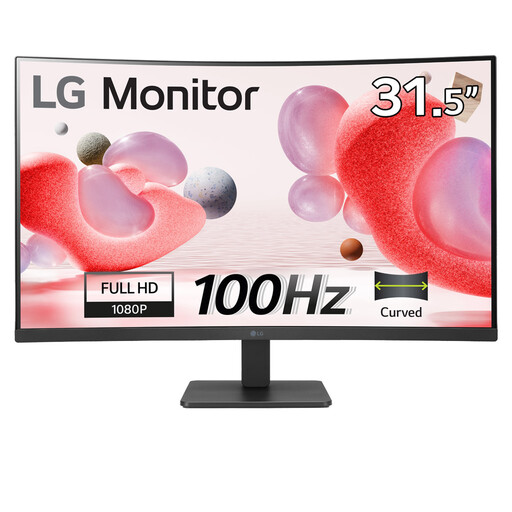
LG 32MR50C-B 32-inch curved Full HD anti-glare monitor
Consider this 32-inch Full HD VA model if a larger screen and its stated anti-glare surface suit your desk. Full HD offers fewer pixels for close inspection or side-by-side records than higher-resolution options; check the stand adjustment and where the curved screen can sit relative to the window.
View on Joybuy
Frequently asked questions
Will a brighter monitor solve reflections from my window?
Not by itself: a brightness rating does not establish how the screen will handle a reflection in your room. The Health and Safety Executive recommends adjusting screens and lighting to avoid glare, including repositioning a screen or using blinds. Check coating and stand movement as well as stated brightness.
Is a 27-inch 4K monitor worth choosing for census records?
It is worth considering if you regularly inspect fine scans or compare several records at once. At 27 inches, 3840 × 2160 provides four times the pixels of 1920 × 1080, as illustrated by the cited Dell and BenQ specifications; you may still prefer QHD or Full HD for larger text or one record at a time. Check that your computer can output the resolution you choose.
Can USB-C handle my laptop display and charging through one cable?
Only if the laptop supports video output through its USB-C port and the monitor's power delivery meets the laptop's needs. For example, BenQ specifies 65 W for the GW2790QT. Check the exact laptop, monitor and cable specifications before planning a one-cable desk setup.


