For checkout testing at a shared desk, a height-adjustable 27-inch QHD monitor is a sensible starting point; choose a USB-C hub model if your laptop and daily desk changes make its display, charging and peripheral connections useful. A larger multi-PC screen makes more sense when simultaneous views are central to the work, while a colour-focused display is chiefly relevant when visual approval is part of testing. Check laptop compatibility, charging power, desk fit and screen positioning before choosing.
Who needs which setup?
Hot-desk checkout testers
If you move between shared desks, focus on a laptop connection you can repeat easily, access to the peripherals you use and a screen you can reposition. The Health and Safety Executive includes hot-desking in its display-screen-equipment guidance.
Browser and device-comparison testers
If you keep checkout layouts, responsive states or test sessions visible together, weigh the workspace offered by a QHD display against the desk space needed for a larger multi-PC arrangement. Dell specifies four FHD partitions via iMST for its U4323QE, a model-specific option for separate views.
Visual approval testers
If testing also involves approving imagery, brand colours or a design hand-off, stated colour coverage and calibration become useful criteria. BenQ lists these features for its PD3225U; they do not establish how a page will look on every customer device.
What matters when choosing?
For checkout testing at a shared desk, decide whether you need straightforward browser workspace, repeatable laptop docking, several simultaneous device views or controlled visual review. Whichever route fits, leave enough room to position the screen for each user.
27-inch QHD USB-C hub monitor
Choose when: Frequent desk changes make one connection for a compatible laptop, display and desk peripherals valuable.
Allow for: Laptop charging and video still depend on the laptop, cable and monitor's stated capabilities.
Straightforward 27-inch QHD monitor
Choose when: Browser and document workspace matters more than replacing a separate laptop charger or dock.
Allow for: A USB-C socket need not provide enough power for your laptop; LG specifies up to 15 W for the 27U631A-B.
Large multi-PC display
Choose when: Several device or test-session views need to remain visible together; Dell specifies multi-PC connections and four FHD partitions for the U4323QE.
Allow for: Its 42.5-inch screen needs enough desk space to be positioned comfortably.
Colour-focused 4K display
Choose when: Approving checkout imagery or brand colours is a regular part of the work, not just an occasional check.
Allow for: BenQ's stated calibration and colour coverage for the PD3225U cannot guarantee identical rendering on shoppers' devices.
| Concern |
What to check |
Who this matters to |
| Desk changes and charging |
Check the laptop's USB-C video support against the monitor connection, then compare its charging requirement with the monitor's Power Delivery rating. |
Changing desks often, I want to reconnect my laptop and peripherals without rebuilding the setup each time. Around 31% of consumers put that connection need first. |
| Simultaneous test views |
Consider screen size alongside resolution; check multi-PC inputs or partitioning if separate sources need to stay visible. |
When comparing browser windows or checkout states, I need enough usable space to see them together. Keeping multiple views visible comes first for around 25% of consumers. |
| Fit for changing users |
Check stand adjustment and usable desk depth so the screen can be placed appropriately for each user. |
At a desk used by different people, I need to reset the screen position without struggling for space. Around 25% of consumers prioritise that workstation fit. |
| Visual approval |
Check the stated colour coverage and calibration features if approving imagery or brand colours is part of the role. |
If I sign off checkout imagery as well as its function, a controlled view of colour matters to my decision. That approval need leads for around 19% of consumers. |
Mistakes to avoid
-
Assuming every USB-C monitor replaces a laptop dock
A USB-C connection does not tell you how much charging power it provides. Dell specifies 90 W Power Delivery for the U2724DE, while LG specifies up to 15 W for the 27U631A-B.
Compare the laptop's charging needs and video support with the monitor's port and the cable you intend to use.
If the connection cannot meet those needs, you may still have to use the laptop charger or a separate dock.
-
Choosing a large screen before measuring the desk
Dell's U4323QE is a 42.5-inch multi-PC display. Its viewing arrangements are useful only if the shared desk also allows a comfortable screen position; the Health and Safety Executive advises placing a screen directly in front of the user, with its top around eye level and roughly an arm's length away.
Measure the usable desk width and depth and consider where each user would sit before selecting a large display.
-
Treating a comfort feature as a substitute for setup
Features such as LG's Reader Mode and Flicker Safe do not position a screen for changing users. Health and Safety Executive guidance also addresses workstation arrangement for display-screen-equipment users, including people who hot-desk.
Choose hardware you can position appropriately and adjust the workstation when you change desks; treat panel features as supplementary.
-
Choosing colour specifications for functional testing alone
BenQ's stated colour coverage and factory calibration for the PD3225U are relevant to controlled creative review, but do not establish an advantage when the task is checking forms, payment paths or browser behaviour.
Make colour coverage a deciding factor when visual approval is a recurring requirement; otherwise concentrate on workspace, connections and positioning.
Relevant brands to consider
Dell
Dell's UltraSharp U2724DE and U4323QE illustrate two different shared-office routes: laptop docking at a conventional desk and a larger multi-PC layout.
- Dell specifies 90 W USB-C Power Delivery, Ethernet, a USB hub and an adjustable stand for the U2724DE.
- The U4323QE offers four FHD partitions via iMST, but its 42.5-inch screen calls for careful desk-fit and positioning checks.
LG
The LG 27U631A-B represents a 27-inch QHD IPS option for browser-focused work where laptop charging need not come from the monitor.
- LG specifies USB-C display connectivity, Reader Mode and Flicker Safe for this model.
- Its stated Power Delivery is up to 15 W, so check the laptop's charging needs rather than assuming one-cable power.
BenQ
The Creative Pro PD3225U is relevant when checkout testing includes colour-sensitive creative review and design hand-off.
- BenQ states that this model is factory calibrated, with 98% P3, 99% sRGB and 99% Rec.709 coverage.
- Those manufacturer specifications do not guarantee how checkout content will appear on every customer device and are less central to functional-flow checks alone.
Joybuy monitors for these needs
These monitors offer different starting points for shared-desk checkout testing, from QHD browser work to wider layouts. Match the connection and screen arrangement to your laptop, testing tasks and available desk space; the product order is not a ranking of which setup is right for every tester.
 No image available
Acer Predator X49X 49-inch QD-OLED monitor
Consider this wide-screen format if keeping several checkout views visible is important, but measure the shared desk and assess the viewing position before choosing a 49-inch display.
The product title specifies a 32:9 curved QD-OLED screen, Double Quad HD resolution and HDMI, DisplayPort and USB-C connections. Check the exact port functions and charging requirements against your laptop.
View on Joybuy
 No image available
ASUS ProArt PA24ACRV QHD IPS monitor
This is a QHD option to consider when you want a more compact shared-desk arrangement; check that its screen area accommodates the browser views you use most often.
The product name identifies a QHD IPS panel. If connecting desk peripherals through the monitor matters, confirm the exact regional configuration before buying.
View on Joybuy
 No image available
ASUS ProArt PA278CV WQHD IPS monitor
Consider this model for QHD checkout and browser work at a shared desk, while checking that its connections suit each laptop using the space.
The product name identifies a WQHD IPS panel. Before relying on a single USB-C cable, confirm video compatibility and the charging power your laptop requires.
View on Joybuy
 No image available
MAG 274QP QD-OLED X24 27-inch monitor
This QHD option may suit a shared desk where checkout work includes visual review; do not treat its gaming-focused specifications as evidence of an advantage for functional QA.
The product name states a 2560 × 1440 QD-OLED screen and 240 Hz refresh rate. Check USB-C video capability and laptop charging needs separately before planning a one-cable setup.
View on Joybuy
 No image available
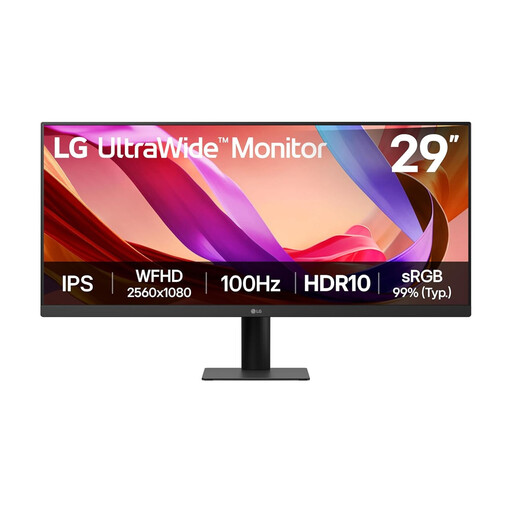
LG UltraWide 29U511A 29-inch IPS monitor
The wide format is worth considering if you arrange browser windows side by side; check whether its vertical workspace and screen position suit your checkout-testing routine.
The product name states 2560 × 1080 resolution, a 100 Hz refresh rate and DisplayPort and HDMI connections. Confirm that the stand provides the adjustment needed at your shared desk.
View on Joybuy
Questions about shared-desk monitors
Does checkout testing at a shared desk require a particular monitor size?
Choose the size around your tasks and the space available, rather than treating a particular dimension as a shared-desk requirement. The Health and Safety Executive includes hot-desking in its display-screen-equipment guidance; check that each user can position the chosen screen appropriately.
Where should I position the monitor at a shared desk?
Place it directly in front of you and adjust it to a comfortable viewing position. Health and Safety Executive guidance describes a standard setup with the screen top around eye level and the screen roughly an arm's length away; reassess the arrangement when moving desks.
Will any USB-C monitor charge my work laptop?
No: compare the monitor's stated Power Delivery rating with your laptop's charging needs, and check video and cable compatibility too. Dell specifies 90 W for the U2724DE, whereas LG specifies up to 15 W for the 27U631A-B, despite both models offering USB-C connectivity.
Do I need a colour-calibrated screen to test a checkout page?
Not for functional checkout-flow checks alone; it becomes more relevant if you also approve brand colours, product imagery or design hand-off. BenQ states that its PD3225U has factory calibration and specified colour-space coverage, but those features cannot ensure identical rendering on every shopper's device.


