What to check before buying
Start with the space available for a comfortable screen position, then decide whether laptop connections or colour review will change how you work. The concerns below distinguish consumers by the need they would put first when choosing a monitor for classroom-slide editing.
| Concern |
What to check |
Who this matters to |
| Readable, adjustable workspace |
Check desk depth and stand adjustment. For 4K text, try a comfortable display-scaling setting. |
If I edit slides for long stretches, I need to read small elements without placing the screen awkwardly. Around 42% of consumers put readable workspace and positioning first. |
| Laptop connection |
Confirm USB-C video support, the monitor’s power-delivery rating and the laptop’s charging requirement. |
Moving my laptop between a study desk and teaching equipment makes a simpler desk connection valuable. For around 33% of consumers, that connection is the primary concern. |
| Colour review |
Compare stated colour coverage and check what calibration equipment is included; view important slides on the classroom display too. |
When slides rely on photographs or branded colours, I want to inspect those visuals before presenting them. Colour checking comes first for around 25% of consumers. |
Monitors for slide-editing desks
These Joybuy choices include 27-inch and larger 4K monitors for editing slides at a study desk. Compare their stated connections and screen sizes against your laptop, desk space and need to review visual materials.
 No image available
BenQ MA270UP 27-inch 4K USB-C Mac monitor
Consider this model if you want a 27-inch screen for slide layouts and use a compatible laptop.
Its product name specifies a 4K UHD Nano Glossy IPS panel, USB-C and a height-adjustable stand. Check laptop video and charging compatibility before planning a one-cable setup.
View on Joybuy
 No image available
iiyama ProLite XUB2792UHSU-B6 27-inch 4K monitor
This 27-inch model is an option when desk space and detailed slide work are your main considerations.
Its product name specifies 4K UHD and a matte black finish. If you need laptop video or charging through USB-C, confirm those functions for this exact model before buying.
View on Joybuy
 No image available
LG 27UP650K 27-inch 4K IPS monitor, white
Consider this model for slide editing if HDMI or DisplayPort suits your computer connection.
Its product name specifies 95% DCI-P3 coverage, DisplayHDR 400, built-in speakers, HDMI and DisplayPort. Check the connection you intend to use rather than assuming a one-cable USB-C laptop setup.
View on Joybuy
 No image available
BenQ MA320UP 32-inch 4K USB-C Mac monitor
The larger panel may suit editing slides beside notes if your desk allows a comfortable viewing distance.
Its product name specifies a 4K UHD Nano Glossy IPS panel, USB-C and a height-adjustable stand. Check laptop compatibility before relying on USB-C charging.
View on Joybuy
 No image available
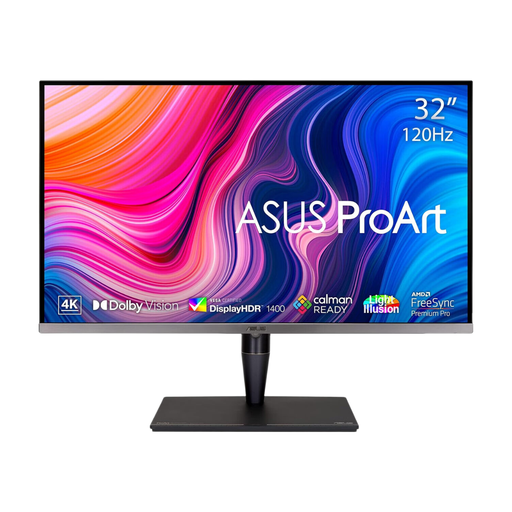
ASUS ProArt Display PA32UCG-K 32-inch 4K monitor
This larger display is worth considering if visual-material review is part of your slide work and the desk can accommodate it.
Its product name specifies an IPS Mini LED panel, Thunderbolt 3 and HDMI 2.1. Check the exact video and charging functions needed for your laptop before planning a single-cable connection.
View on Joybuy
Frequently asked questions
Is a 27-inch or 32-inch monitor more practical for editing slides?
A 27-inch 4K model is a sensible starting point when desk depth is limited; consider a 31.5- or 32-inch model when you want more physical space for slides and notes and can position it comfortably. The Health and Safety Executive advises keeping a display about an arm’s length away, with its top around eye level.
Will one USB-C cable carry video and charge my laptop?
Only if the laptop supports video output through its USB-C port and the monitor and cable provide the required functions. Compare the monitor’s stated power delivery with your laptop’s charging needs; BenQ specifies 90 W power delivery for the PD3205U, but that figure alone does not establish compatibility with your laptop.
Do ordinary classroom slides need a wide-colour-gamut monitor?
Not necessarily; colour-oriented specifications matter more when you review photographs, video or branded assets. LG specifies 95% DCI-P3 coverage for the 27UP85ZK-W, but monitor coverage does not guarantee that a classroom projector will show the same colours.
Do UK workplace screen rules determine which monitor I must buy?
No particular monitor model is required by the Health and Safety Executive guidance cited here. The Health and Safety Executive says employers must assess workstations when workers use display screen equipment daily as part of normal work, continuously for an hour or more; that assessment considers the workstation and working conditions, not just the monitor.


