Detailed slide-layout editors
If you regularly arrange images, tables and notes alongside reference windows, compare the space offered by a 27-inch QHD screen. Dell UK lists the P2725D at 2560 × 1440.


A compact Full HD IPS monitor is a sensible choice for ordinary slide edits, while a 27-inch QHD IPS screen offers more pixel space when you keep detailed layouts, notes and reference windows open together. USB-C charging is a separate decision: choose it for a compatible laptop only after checking the monitor’s port functions and power delivery. For routine desk use, consider screen adjustment and the whole workstation as well as display features.
If you regularly arrange images, tables and notes alongside reference windows, compare the space offered by a 27-inch QHD screen. Dell UK lists the P2725D at 2560 × 1440.
If you move a laptop between classrooms or desks, a compatible USB-C monitor could simplify display, peripheral and charging connections. Dell UK and LG UK list up to 90W power delivery for the P2425HE and 27BA850-B respectively.
If you mainly revise ordinary slides, compare compact Full HD IPS models and check their stand adjustment before choosing extra connectivity. LG UK lists an adjustable stand for the 24BA550-B; stand movement varies by model.
Start with the space your slide-editing tasks require, then check how the monitor will connect to your computer and fit your desk.
| Concern | What to check | Who this matters to |
|---|---|---|
| Space for detailed layouts | Compare native resolution and screen size; check that the computer can drive the intended resolution. | If I keep slide elements and source material open together, I want room to see both without constantly switching windows. Around 33% of consumers put workspace first. |
| Positioning and glare | Check height and tilt adjustment, then consider desk position and reflections. | At a desk used routinely or shared with colleagues, I need to position the screen for my setup rather than rely on an eye-comfort label. Around 25% of consumers prioritise positioning and glare control. |
| Laptop connection | Check the USB-C port’s video and charging functions, its power-delivery limit and the laptop’s requirements. | When I bring a laptop to a shared desk, I want fewer connections to manage each time I sit down. Roughly 25% of consumers make laptop connectivity their primary concern. |
| Simple slide editing | Confirm the native resolution, available inputs and stand movement on the exact model. | If I mainly make straightforward edits, I would rather choose the screen and connections I need than add docking features I will not use. Around 17% of consumers put simplicity first. |
USB-C ports have different roles. Dell UK lists up to 90W power delivery for the P2425HE, but describes the P2425H’s downstream USB-C port as data-only, with up to 15W power delivery.
Match the exact port’s video and charging functions to your laptop, and check its power requirement before planning a one-cable desk setup.
A 27-inch screen is not necessarily QHD. LG UK lists the 27BA850-B at 1920 × 1080, while Dell UK lists the 27-inch P2725D at 2560 × 1440.
For detailed slide work, compare native resolution alongside screen size and the space available on your desk.
The Health and Safety Executive advises considering the workstation and arranging the desk and screen to avoid glare or bright reflections. A monitor feature cannot account for the chair, lighting and desk arrangement on its own.
Use stand adjustment to position the screen, then consider the complete workstation for routine use.
BenQ UK lists tilt adjustment and VESA 100 × 100 mm mounting for the GW2490. That gives different positioning options from a monitor supplied with a height-adjustable stand.
If height adjustment matters, check the supplied stand or confirm that an appropriate mount will fit the monitor and desk.
A separate arm or riser may be needed to achieve the position you want.
Dell UK lists both a compact Full HD USB-C hub model and a 27-inch QHD model in the lines considered here.
LG UK lists an adjustable 24-inch office monitor and a 27-inch business monitor with USB-C connectivity and conferencing hardware.
BenQ UK lists the GW2490 as a compact Full HD IPS option for straightforward display connections.
These monitors cover compact and larger-format screens relevant to classroom slide editing. Compare each model’s display format with your layout needs, then confirm the connections and stand arrangement required at your desk.
 No image available
Consider this for slide editing at a compact desk if its WUXGA display format suits your layout. Check the exact USB-C video and charging functions against your laptop before relying on a one-cable setup.
 No image available
Consider this WQHD model if detailed slide layouts and reference windows are your priority. Check that your computer supports the intended display setup, and confirm USB-C charging requirements separately.
 No image available
Consider this WQHD option when you want room for slide content and reference windows at a fixed desk. Check its dimensions against your available space, and confirm the computer connection and any laptop-charging requirement before buying.
 No image available
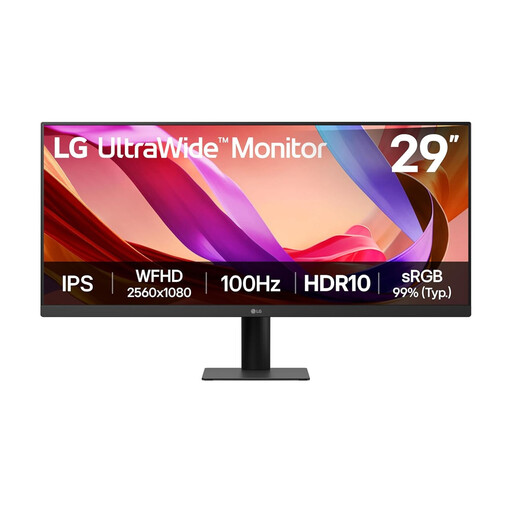
Consider this wide-format display if you want slide content and reference material side by side. Its product name specifies a 29-inch UWFHD IPS screen and 100Hz refresh rate; check stand movement and desk fit if positioning is important.
Yes, if you routinely keep detailed layouts, notes and source documents open together. Dell UK lists its 27-inch P2725D at 2560 × 1440; a compact Full HD screen remains an option when that additional workspace is not your priority.
It can when the exact monitor port, cable and laptop support the required video and charging functions. Dell UK and LG UK list up to 90W power delivery for the P2425HE and 27BA850-B, while Dell UK describes the P2425H’s downstream USB-C port as data-only.
No. The Health and Safety Executive says employers must assess workstations for workers who use display screen equipment daily as a significant part of their normal work. Screen adjustment helps with positioning, but the desk, furniture, work conditions and individual needs also matter.
Arrange the desk and screen to avoid glare and bright reflections, as the Health and Safety Executive advises. Check the screen position in the lighting where you work, using stand adjustment where available.
Treat built-in speakers as an option for desk-side audio preview, not as an assumed classroom sound system. BenQ UK lists 2W × 2 speakers for the GW2490 and LG UK lists speakers for the 24BA550-B; check your classroom’s audio requirements separately.