Start with a 27-inch 4K monitor that you can position comfortably as the desk height changes, using an adjustable stand or a compatible monitor arm. Consider USB-C if a compatible laptop needs video and charging through one cable; consider a 21:9 ultrawide when keeping several review panes visible matters more than a compact desk footprint.
Who these choices suit
Standing-desk code reviewers
If you alternate between sitting and standing or share a desk, screen positioning deserves attention before extras such as a hub. The Health and Safety Executive advises placing the top of the screen level with your eyes and the screen about an arm’s length away; an adjustable stand or compatible arm gives you ways to achieve that position.
Single-cable laptop developers
If you reconnect a laptop whenever you move to the desk, a monitor offering compatible video output and charging over USB-C may reduce cable handling. Check the laptop’s video connection and charging requirement against the exact monitor rather than assuming every USB-C port does the same job.
Multi-pane review workers
If you keep a diff, source files, tests and documentation open together, decide whether a compact 27-inch 4K workspace or the continuous horizontal space of a larger 21:9 screen fits your window layout and available desk space.
What matters when choosing
For code review at a standing desk, establish where the screen can sit at both desk heights, then choose the workspace layout and laptop connection you need. A larger screen does not remove the need to check viewing distance and text scaling.
| Concern |
What to check |
Who this matters to |
| Screen position |
Check stand height and tilt, or VESA compatibility and the intended arm’s weight limit. |
When I raise the desk, I need the screen to remain at a comfortable height rather than looking up or down at it; roughly 36% of consumers put adjustable positioning first. |
| Readable workspace |
Compare screen size and native resolution, then check text scaling in your operating system. |
If I spend long sessions reading changed lines and comments, I want enough room for the text without making it uncomfortably small; around 29% of consumers prioritise a readable code workspace. |
| Laptop connection |
Confirm compatible USB-C or Thunderbolt video output and compare laptop charging needs with the monitor’s stated power delivery. |
When I connect a laptop at the desk, I would rather manage one suitable cable than reconnect a display lead and charger separately; approximately 21% of consumers make that connection their primary concern. |
| Side-by-side panes |
Check aspect ratio, resolution, monitor dimensions and the width and depth available on the desk. |
If I keep an editor, diff and reference material visible together, I value a continuous wide layout enough to accommodate a larger screen; roughly 14% of consumers put simultaneous panes first. |
Mistakes to avoid
-
Choosing a fixed-height screen without checking its position
Changing desk height can change where the display sits relative to your eyes. The Health and Safety Executive advises keeping the top of the screen level with your eyes and the screen about an arm’s length away; keyboard and mouse placement matter too.
Check the supplied stand’s adjustment and any VESA mounting option. If you plan to use an arm, check its weight rating and whether the desk can accommodate it.
A separate arm or stand may be needed if the supplied stand cannot reach a suitable position.
-
Assuming a USB-C socket guarantees one-cable operation
Video capability and power delivery vary by monitor and laptop. BenQ UK lists 65W power delivery for the PD2705U, while Dell UK lists up to 90W for the U2725QE; neither figure establishes compatibility with a particular laptop.
Check the laptop’s supported video mode and charging requirement, the monitor’s port specification and the cable you intend to use.
-
Ordering an ultrawide before measuring the desk
A larger 21:9 display needs room for its screen and stand as well as your keyboard and intended viewing distance. Its layout may suit several panes, but it is not a substitute for positioning the screen properly.
Compare the monitor’s dimensions and weight with usable desk space and, if relevant, the arm’s rated capacity.
Depending on the workstation, a different mount or more desk depth may be needed.
-
Taking a product page as a stock guarantee
Availability can change even while information about a model remains online. On 7 October 2026, Joybuy described its LG 27UP850K-W listing as no longer available.
Check availability for the exact model before ordering, and compare specifications rather than treating a similarly named variant as interchangeable.
Brands to consider
These examples show how specifications differ between particular monitor models; they do not describe every display made by each brand.
Dell
Dell’s UltraSharp U2725QE and U3824DW illustrate two different workspace formats for code review.
- Dell UK lists the 27-inch 4K U2725QE with height and pivot adjustment, a 120Hz refresh rate and up to 90W power delivery.
- The larger U3824DW has a 37.5-inch, 3840 × 1600 ultrawide display; allow for its footprint and check whether its layout suits your text scaling.
BenQ
BenQ’s 27-inch 4K PD2705U and MA270U are relevant when stand adjustment and USB-C connectivity matter.
- BenQ UK lists 110 mm of height adjustment and 100 × 100 mm VESA mounting for the PD2705U.
- BenQ UK lists 65W USB-C power delivery for the PD2705U and 90W for the MA270U. Check the exact model against your laptop’s requirements.
LG
LG’s 27UP850K-W is a 27-inch 4K option with an adjustable stand and USB-C connectivity.
- LG UK lists height, pivot and tilt adjustment, alongside USB-C charging of up to 90W for this model.
- Confirm laptop compatibility and current availability for the exact 27UP850K-W before choosing it.
Joybuy monitors for these setups
These Joybuy choices include 27- and 32-inch 4K monitors and a 34-inch ultrawide. Compare each screen’s positioning options, workspace shape and connection requirements with your standing-desk setup.
 No image available
BenQ MA270UP 27-inch 4K USB-C monitor
Consider this for a compact 4K code workspace where you need to adjust the screen as the desk moves.
The product name specifies a height-adjustable stand and USB-C. Check the exact video functions and charging capability against your laptop before planning a one-cable setup.
View on Joybuy
 No image available
Dahua 32-inch 4K curved OLED monitor
Consider the larger 4K screen if you have room for a 32-inch display at your standing desk.
The product name specifies 3840 × 2160 resolution, a 165Hz refresh rate, Type-C 65W and a USB hub. Check screen positioning, compatible video output and whether 65W meets your laptop’s charging requirement.
View on Joybuy
 No image available
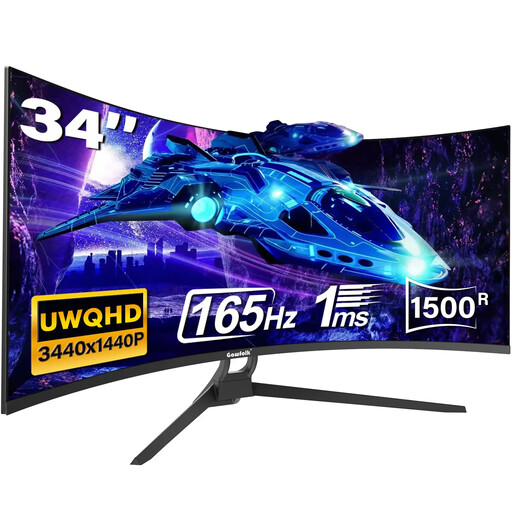
Gawfolk 34-inch 21:9 curved ultrawide monitor
Consider this format if keeping review panes side by side is more important to you than a compact screen.
The product name specifies a 34-inch 21:9 ultrawide display and VESA mounting. Check the supplied stand’s adjustment, mount compatibility and exact port functions before relying on it for positioning or a one-cable laptop connection.
View on Joybuy
Common questions
Which monitor adjustment matters most at a standing desk?
The useful adjustment is the one that lets you position the screen appropriately at the desk heights you use, whether that comes from the stand or a compatible arm. The Health and Safety Executive advises keeping the top of the screen level with your eyes and placing the screen about an arm’s length away; check keyboard and mouse position as part of the same setup.
Can one USB-C cable carry the picture and charge my laptop?
Yes, if the laptop and monitor support a compatible video connection and the monitor’s power delivery meets the laptop’s charging requirement. Dell UK and LG UK list up to 90W for the U2725QE and 27UP850K-W respectively, while BenQ UK lists 65W for the PD2705U; check your exact laptop and cable before relying on one connection.
Should I choose a 38-inch ultrawide instead of a 27-inch 4K monitor for code review?
Choose the larger 21:9 format if continuous horizontal space for several panes is your priority and the desk can accommodate it. A 27-inch 4K format occupies less desk space; check your preferred window layout, text scaling and screen position rather than choosing by diagonal size alone.


