Start with a monitor that gives chart labels enough detail and lets you position the screen away from window reflections; a 27-inch 4K display is one starting point, not a requirement for every desk. Compare screen finish, stand adjustment and connections alongside brightness: the Health and Safety Executive advises arranging screens and lighting to avoid reflections and glare, so a brightness figure alone cannot settle the choice.
Who this suits
Bright-window chart reviewers
If daylight falls on your screen while you inspect small labels, trend lines and dashboards, consider both the screen surface and where the stand lets you place it. The Health and Safety Executive advises arranging screens and lighting to avoid reflections and glare.
Single-laptop analysts
If your charts, peripherals and laptop share one desk, a USB-C or Thunderbolt connection may be useful. Check the laptop’s video-output and charging requirements against the exact monitor and cable before planning a one-cable setup.
Colour-sensitive report creators
If chart review also involves preparing graphics or visual reports, compare colour modes and their adjustment controls as well as the monitor’s position beside the window.
What to prioritise
Start with the reflection at your actual viewing position, then decide how much chart workspace you need and whether laptop integration matters to your desk.
| Concern | What to check | Who this matters to |
|---|
| Reflections and contrast |
Compare the exact model’s screen finish and stand adjustment; work out where window reflections will fall. |
If daylight falls across my chart labels, I need to reposition the display and manage the light rather than rely on brightness alone; around 46% of consumers put reflection control first. |
| Chart detail and workspace |
Check native resolution, physical size and how display scaling works at your viewing distance. |
When I keep tables and charts open together, I need legible labels without crowding my desk. Roughly 36% of consumers put chart detail and working space first. |
| Laptop connection |
Match video support, power-delivery rating and cable requirements to your laptop. |
For a laptop-led desk, I want one connection only if it carries video and meets my charging needs; about 18% of consumers give laptop integration first priority. |
Buying pitfalls
-
Treating brightness as a cure for window glare
A brightness rating does not tell you where a window will reflect on the panel. The Health and Safety Executive advises arranging screens and lighting to avoid reflections and glare.
Check the window’s position from your seat and whether the stand or a suitable mount would let you change the screen angle. Consider how you will control the daylight if a reflection remains.
-
Overlooking controls locked by a colour preset
ASUS UK Support says that sRGB mode on applicable ProArt monitors does not allow brightness or other colour-setting adjustments. That could matter if you need to change brightness as daylight changes.
Check the manual for the exact monitor and the colour mode you intend to use.
-
Assuming any USB-C port will suit your laptop
A monitor’s USB-C port alone does not establish that it can carry your laptop’s video signal and meet its charging requirement.
Compare the laptop’s requirements with the monitor’s video support and power-delivery rating, then check the cable specification.
-
Choosing screen size before measuring the desk
A display that takes up more of the desk may be difficult to place away from reflected window light or at a comfortable viewing distance.
Measure the available width and depth, note the window direction, and check the stand’s positioning options before choosing a size.
Brands to consider
Dell
UltraSharp 27-inch 4K hub monitors are relevant if you want chart workspace and desk connectivity in one display.
- Dell UK specifies a 3000:1 contrast ratio and an anti-glare, anti-reflective surface for the U2725QE; its U2723QE specifications list 400 cd/m² brightness and 90 W USB-C power delivery.
- Those model-specific specifications do not establish how reflections will appear at your window-facing desk.
BenQ
The PD-series includes 4K displays for buyers combining chart review with visual-report work.
- BenQ UK specifies a matte screen, 350-nit typical brightness, 90 W USB-C power delivery and height, pivot, swivel and tilt adjustment for the PD2706U.
- The stated brightness is not a guarantee against reflections from a nearby window.
ASUS
ProArt displays are worth considering when colour-sensitive reports accompany chart review.
- ASUS UK specifies a 4K IPS panel, colour modes, an adjustable stand and 96 W USB-C power delivery for the PA279CRV.
- ASUS UK Support says sRGB mode on applicable ProArt monitors restricts brightness adjustment; check the exact model and mode if you expect to change brightness during the day.
Monitor choices on Joybuy
These monitors offer different screen sizes and formats for chart-review desks, from 27-inch 4K models to a 49-inch ultrawide. Match the format to your available space, then check reflections and positioning at the window.
 No image available
Acer X Predator X49X 49-inch curved QD-OLED monitor
Consider this ultrawide format if you want charts side by side and can position a large curved screen around the window and your viewing distance.
- 49-inch, 32:9 QD-OLED display with an 1800R curve and Double Quad HD designation.
- Check ordinary-use brightness and where reflections fall across the wide panel before choosing it for a bright desk.
View on Joybuy
 No image available
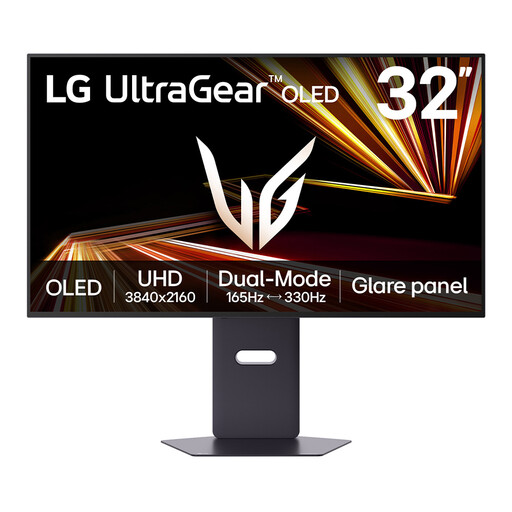
LG UltraGear 32GX850A-B 32-inch 4K OLED monitor
This is a larger 4K option for detailed charts if a 32-inch screen fits your desk and can be placed clear of troublesome reflections.
- The product name specifies OLED, 4K UHD and Dual Mode with a maximum 330 Hz refresh rate.
- If dashboards will remain on screen for long periods, check the manufacturer’s OLED image-retention guidance. Confirm the connections you need for a laptop setup.
View on Joybuy
 No image available
iiyama ProLite XUB2792UHSU-B6 27-inch 4K monitor
This 27-inch format is worth assessing if you want 4K chart detail without allocating desk space to a larger screen.
- The product name specifies a 4K UHD LED monitor; its Matte Black wording describes the finish, not necessarily the screen surface.
- Confirm the screen’s reflection treatment and whether you can position the display away from the window.
View on Joybuy
 No image available
ASUS EYE CARE VY27UQ 4K UHD 60 Hz monitor
Consider this model if 4K chart detail is your starting requirement and you can confirm that its positioning options suit your window-facing desk.
- The product name specifies 4K UHD and 60 Hz.
- Check the screen finish and stand adjustment against the reflection angle at your seat.
View on Joybuy
 No image available
AOC Q32V4 31.5-inch 2K IPS monitor
This larger-screen option may suit charts and tables if its native resolution gives you enough label detail at your preferred viewing distance.
- The product name specifies a 31.5-inch IPS display and uses a 2K designation.
- Confirm the exact native resolution, stand adjustment and placement options before choosing it for a bright-window desk.
View on Joybuy
Questions about your setup
Will a brighter monitor solve glare from a nearby window?
Brightness alone cannot tell you whether a window will reflect on the screen. The Health and Safety Executive advises arranging screens and lighting to avoid reflections and glare, so assess the screen surface, available adjustment and desk position together.
Is 27-inch 4K enough for reviewing statistical charts?
A 27-inch 4K monitor is a starting point for detailed chart labels, but whether it gives you enough usable workspace depends on viewing distance, display scaling and how many charts or tables you keep open together. Check those needs against your desk depth before moving to a larger screen.
Can one USB-C cable connect the monitor and charge my laptop?
It can if the laptop supports the required video connection and the monitor’s power delivery meets its charging needs. Dell UK and BenQ UK specify 90 W for the U2723QE and PD2706U respectively, while ASUS UK specifies 96 W for the PA279CRV; check your laptop and cable against the exact model.
Could a colour preset stop me adjusting brightness?
Yes, on applicable ProArt monitors: ASUS UK Support says sRGB mode restricts brightness and other colour-setting adjustments. Check the controls available in the exact monitor’s intended mode if you need to respond to changing daylight.


