For family-history research that involves comparing several records at once, a 27-inch QHD monitor is a useful starting point if the desk can accommodate it: the 2560 × 1440 Dell and LG examples offer more pixel workspace than BenQ’s cited 1920 × 1080 Full HD model. For longer sessions, consider screen position as well as resolution. If you use a laptop, check its USB-C video support and charging requirement before choosing a monitor for a single-cable setup.
Who is this for?
Multi-window record researchers
If you compare scans, transcriptions, browser sources and a family tree side by side, start by considering how much screen space the desk can accommodate. The 27-inch QHD models described by LG UK and Dell UK provide a relevant point of comparison.
Long-session home-office users
If you spend extended periods reading or transcribing records, choose a screen you can position within the whole workstation. The Health and Safety Executive advises placing the top of the screen at eye level and the display about an arm’s length away.
Laptop-first researchers
If you want fewer cables on the desk, check both USB-C video compatibility and charging power. LG UK lists up to 15W power delivery for the 27U631A-B; whether that meets your needs depends on your laptop.
What matters when choosing?
Start with the space needed for your usual record-reading workflow, then check where the screen can sit on your desk. Consider USB-C charging only in relation to the laptop you will connect.
| Concern | What to check | Who this matters to |
|---|
| Room for several records |
Compare native resolutions: the cited 27-inch QHD models are 2560 × 1440, rather than the cited Full HD model’s 1920 × 1080. |
I want a scan, notes and my family tree visible without constantly changing windows. Around 36% of consumers put that multi-window workspace first. |
| Screen position |
Check the stand’s adjustments or whether a suitable monitor arm is needed. The Health and Safety Executive advises an eye-level screen top and roughly an arm’s-length viewing distance. |
For long transcription sessions, I need the display to sit comfortably with my desk and chair. Comfortable positioning is the primary concern for around 29% of consumers. |
| Laptop connection |
Confirm USB-C video support and compare the monitor’s power-delivery rating with the laptop’s charging requirement. |
I would like one cable at my desk, but I also need to know whether it can charge my laptop. Around 21% of consumers place connection and charging needs first. |
| Fit on a smaller desk |
Measure desk width and depth, then compare screen size and native resolution. BenQ UK lists its compact GW2490TC as a 23.8-inch Full HD model. |
With limited desk space, I would rather check that the screen fits than choose size alone. For around 14% of consumers, a compact setup is the main priority. |
Buying pitfalls
-
Choosing by screen size alone
A 27-inch screen is not necessarily QHD. LG UK and Dell UK describe the cited QHD models as 2560 × 1440, while BenQ UK lists the smaller GW2490TC at 1920 × 1080.
Check native resolution alongside physical size if you plan to arrange several sources on screen.
-
Assuming USB-C will fully charge a laptop
USB-C power delivery varies by monitor. LG UK lists up to 15W for the 27U631A-B, so the presence of the connector alone cannot establish charging suitability.
Check that the laptop supports video through its USB-C port, then compare its charging requirement with the monitor’s stated output.
You may still need to use the laptop’s own charger.
-
Relying on eye-care modes instead of screen placement
Reading or flicker-reduction modes do not determine the screen’s height or viewing distance. The Health and Safety Executive’s workstation guidance addresses positioning as part of display-screen use.
Set up the screen, lighting and breaks for your work before treating display modes as an additional preference.
Brands to consider for these monitor types
Dell
Dell’s UltraSharp U2724DE is a 27-inch QHD option for a home-office setup that needs a more adjustable stand and hub connections.
- Dell UK lists 2560 × 1440 resolution and height adjustment for the U2724DE.
- Check whether its Thunderbolt 4 connections and USB power delivery suit your laptop before choosing it for a one-cable setup.
LG
LG’s 27U631A-B combines a 27-inch QHD IPS display with USB-C connectivity for general home-office use.
- LG UK lists 2560 × 1440 resolution and a tilt-adjustable stand.
- Its stated USB-C power delivery is up to 15W; check the laptop’s charging requirement rather than assuming the monitor can replace its charger.
BenQ
BenQ’s GW2490TC is a compact Full HD home-office option for a smaller desk or a workflow centred on one document at a time.
- BenQ UK lists a 23.8-inch 1080p display.
- Its 1920 × 1080 resolution provides fewer pixels for arranging windows than the cited 2560 × 1440 QHD models.
Joybuy monitor choices
These monitors offer different screen sizes, resolutions and connection options for a family-history desk. Match the display to your record-reading workflow, available space and computer rather than choosing by a single feature.
 No image available
ASUS ProArt PA278CV IPS WQHD
Consider this WQHD option if comparing records across several windows is a priority.
Check the stand adjustments against your preferred screen position, and confirm USB-C video compatibility and charging output if you plan to connect a laptop through one cable.
View on Joybuy
 No image available
ASUS ProArt PA24ACRV IPS QHD
This QHD option is worth comparing if you want room for detailed records but need to assess how the monitor will fit your desk.
For laptop use, check USB-C video support and whether the stated charging output meets your computer’s requirements.
View on Joybuy
 No image available
Dahua 32-inch 4K 165Hz Curved OLED Monitor
If you want a large display for arranging research windows, measure desk space and check your preferred viewing distance before choosing this curved model.
The product name states 3840 × 2160 resolution and Type-C 65W. Check computer video compatibility and its charging requirement; the stated 165Hz refresh rate is not, by itself, a reason to choose it for document work.
View on Joybuy
 No image available
BenQ MA320UP Nano Glossy IPS 4K UHD 32-inch Mac Monitor
Consider its large 4K display if you want to keep several sources visible and have room to position a 32-inch monitor.
The product name specifies USB-C and a height-adjustable stand. Because it is presented as a Mac monitor, check compatibility and required connections for your own computer.
View on Joybuy
 No image available
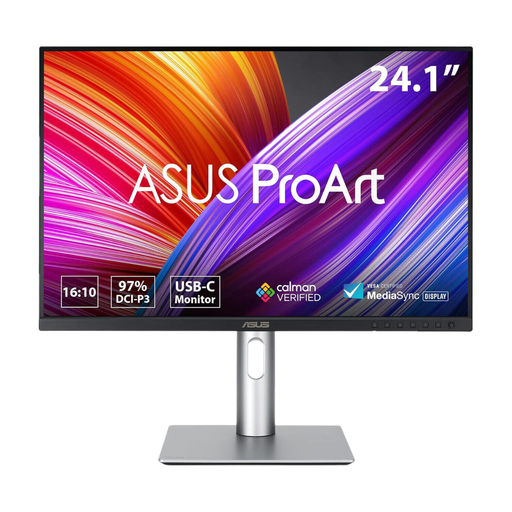
ASUS ProArt PA248CRV IPS WUXGA
This WUXGA option is one to consider when your research desk calls for a more compact document display rather than a 27-inch QHD setup.
Check whether its screen area suits your usual number of open records. If using USB-C with a laptop, confirm video and charging compatibility.
View on Joybuy
Frequently asked questions
Do UK display-screen rules apply to family-history research at home?
The Health and Safety Executive says the Display Screen Equipment Regulations apply to workers who use display screens daily for continuous periods of an hour or more. For family-history research outside work, its screen-positioning guidance can still help you arrange your desk.
Where should I position a monitor for long reading sessions?
The Health and Safety Executive advises placing the top of the screen level with your eyes, with the screen directly in front of you and about an arm’s length away. Check whether the included stand lets you achieve that position or whether you need a suitable monitor arm.
What energy information should I look for when buying a monitor online?
For products within the UK energy-labelling rules, the Department for Energy Security and Net Zero and the Office for Product Safety and Standards say an energy label must be displayed at the point of sale, including on a website. Check the listing’s label and product information when comparing in-scope displays.
What should I do with an old monitor?
Check the retailer’s electrical-equipment take-back options and your local authority’s electrical-waste service. The Office for Product Safety and Standards and the Department for Environment, Food and Rural Affairs describe the UK WEEE framework as regulating electrical and electronic equipment to reduce waste.


