Choose a QHD monitor if your main task is arranging records, notes and browser windows, or consider 4K if inspecting fine detail in scans and maps drives the upgrade. At a shared desk, check stand adjustment, screen finish and laptop connections as well as resolution; a monitor cannot address the whole workstation setup on its own.
Who needs which setup?
Researchers examining detailed records
If you regularly inspect handwriting, certificates or historic maps, consider a 27-inch 4K IPS monitor when fine detail is the main reason to change screens. Dell Technologies and LG Electronics specify 27-inch 4K IPS models; check whether your computer can drive the chosen display and whether text remains comfortable at your preferred scaling.
Researchers organising several windows
If you work between a family tree, source records, notes and spreadsheets, a 27-inch QHD IPS monitor offers a document-focused route without making maximum scan detail the priority. Dell Technologies and HP specify QHD models with adjustable stands, which are worth considering when different people use the desk.
Laptop users at shared desks
If you frequently connect and disconnect a laptop, a USB-C hub monitor may reduce cable changes. Dell Technologies and BenQ specify models with laptop power delivery, but confirm your laptop's video output, charging needs and required connections before relying on a single-cable setup.
What matters when choosing?
Decide which task most affects your choice: inspecting fine detail, arranging working windows, connecting a laptop or avoiding features you will not use. Then check how the monitor will fit the shared desk.
| Concern |
What to check |
Who this matters to |
| Fine detail |
Compare native resolution at the screen size you want; check laptop output and comfortable text scaling. Dell Technologies and LG Electronics specify 27-inch 3840 × 2160 IPS models. |
If I spend much of my time reading handwriting or inspecting maps, I want enough detail to examine the source without choosing solely by screen size. Around 31% of consumers put fine-detail viewing first. |
| Working space and positioning |
Check native resolution, desk fit and the stand's stated height, tilt, swivel and pivot adjustments. Dell Technologies and HP specify adjustable 27-inch 2560 × 1440 models. |
Keeping a record beside my notes matters more to me than the finest image detail, and I need to position the screen for the desk I am using. Around 31% of consumers prioritise this working arrangement. |
| Laptop connection |
Confirm USB-C video support, the laptop's charging requirement and any needed hub or multi-display functions on the exact devices. |
When I move between desks, reconnecting a laptop and its peripherals is the part of the setup I most want to simplify. For around 23% of consumers, connection convenience comes first. |
| Practical feature choice |
Decide which resolution, stand adjustments and inputs you will use. BenQ specifies its 27-inch GW2790 as Full HD, rather than QHD or 4K. |
I mainly need an external screen for straightforward record reading and would rather not choose docking or display features that do not serve that task. Around 15% of consumers put that practical fit first. |
What is easy to overlook?
-
Choosing by diagonal size alone
A 27-inch screen does not tell you its resolution. The cited manufacturer specifications include 27-inch Full HD, QHD and 4K models, which offer different numbers of desktop pixels at the same diagonal size.
Choose resolution around your actual work: reading records and arranging windows, or closely inspecting scans and maps.
-
Assuming every USB-C connection does the same job
A USB-C socket does not establish that your laptop can send video, receive sufficient power or use the monitor's other connections. Dell Technologies specifies up to 90W power delivery on the P2725DE and P2725QE; BenQ specifies 65W on the GW2790QT.
Check the exact laptop's port capabilities, charging requirement and any multi-monitor needs against the monitor and cable before choosing a single-cable setup.
An incompatible setup may still call for a separate charger, adapter, dock or cable.
-
Treating a stand or eye-comfort label as the whole workstation solution
Screen positioning is only one part of using a shared workstation. The Health and Safety Executive says assessments for relevant workers consider equipment, furniture, working conditions and the work itself.
Arrange the display, chair, desk and lighting together. If the UK workplace display-screen-equipment rules apply to your work, use your employer's workstation assessment process.
-
Confusing screen adjustment with privacy
An adjustable stand lets you change the display's position, but it does not itself prevent someone nearby from seeing confidential family documents.
Check workplace confidentiality requirements and whether desk placement or a separate physical privacy filter is appropriate.
A filter can be an additional item to fit and carry if you regularly change desks.
Brands to consider for these monitor features
Dell
Dell Technologies specifies 27-inch QHD and 4K USB-C hub monitors relevant to document work and laptop-based desks.
- The P2725DE is specified as a 2560 × 1440 IPS model with height, tilt, swivel and pivot adjustment and up to 90W USB-C power delivery. The P2725QE is a 4K option with up to 90W delivery and RJ45 Ethernet.
- Check the exact laptop and cable before relying on charging, video or multi-display functions.
HP
HP's E27u G5 is a QHD USB-C monitor to consider when an adjustable office display is the priority.
- HP specifies a 27-inch 2560 × 1440 anti-glare display, height, tilt, swivel and pivot adjustment, a USB-C cable in the box and a three-year limited warranty for the E27u G5.
- HP says the connected video hardware must support the monitor's native QHD mode.
BenQ
BenQ offers distinct QHD USB-C and Full HD monitor options relevant to different family-history tasks.
- BenQ specifies the GW2790QT with QHD resolution, a USB-C hub, 65W laptop power delivery and height, tilt, pivot and swivel adjustment.
- The separate GW2790 is specified as a 27-inch 1920 × 1080 IPS model; do not assume it has the GW2790QT's resolution or connections.
LG
LG's 27U730A-B is a 4K IPS option to consider when viewing detailed source images is a priority.
- LG Electronics specifies a 27-inch 3840 × 2160 anti-glare display and USB-C power delivery up to 90W for the 27U730A-B.
- Check the exact variant's stand adjustment and ports alongside your laptop's connection needs.
Joybuy monitor choices
These monitors cover QHD and 4K choices for records and scans, plus a WUXGA option if you prefer a different desktop layout. Their stands, screen finishes and laptop connections need checking against the shared desk you will actually use.
 No image available
ASUS ProArt PA278CFRV QHD IPS 100Hz
Consider this QHD option if arranging records and notes matters more to you than choosing a 4K display.
The product name specifies an IPS panel and 100Hz refresh rate. If you need a one-cable laptop setup, confirm USB-C video and charging on the exact variant before relying on them.
View on Joybuy
 No image available
BenQ MA270UP 27-inch Nano Glossy 4K IPS USB-C
Consider this 4K option if examining detailed scans is your priority, provided its glossy finish suits the shared office's lighting.
The product name specifies a 27-inch IPS display, Nano Glossy finish and USB-C. Check the laptop's USB-C video and charging compatibility, and whether the screen finish works at your desk.
View on Joybuy
 No image available
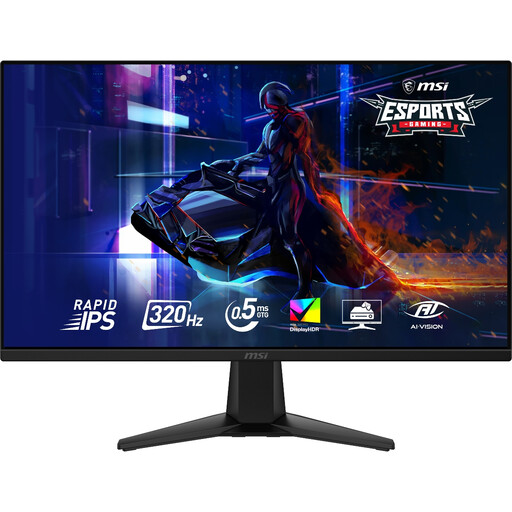
MAG 275QF X32 27-inch WQHD Rapid IPS 320Hz
This WQHD option is worth considering for working between records and notes if its physical positioning suits the shared desk.
The product name specifies 2560 × 1440 resolution, a Rapid IPS panel and 320Hz refresh rate. Confirm the stand adjustments and required laptop connections before choosing it for a frequently shared workspace.
View on Joybuy
 No image available
ASUS Eye Care VY27UQ 4K UHD 60Hz
Consider this 4K model if scan detail is central to your research and its desk-positioning options meet your needs.
The product name specifies 4K UHD and 60Hz. Check the stand adjustment, screen finish and any laptop connections you require on the exact variant.
View on Joybuy
 No image available
ASUS ProArt PA248CRV WUXGA IPS
This WUXGA option is worth considering if your desk arrangement calls for a different screen layout from the 27-inch QHD and 4K routes.
The product name specifies WUXGA resolution and an IPS panel. Confirm the screen dimensions and the exact variant's USB-C video and charging functions if those determine your choice.
View on Joybuy
Questions about shared-desk monitors
Is QHD or 4K more useful for family-history research?
QHD is a practical choice when you mainly arrange documents and browser windows; 4K is worth considering when inspecting fine detail in scans and maps is the main task. Check that your computer supports the chosen resolution and that text remains comfortable at your preferred scaling.
Will a USB-C monitor charge my laptop and replace a dock?
Not necessarily: video, charging and peripheral connections must work with your exact laptop and monitor. Dell Technologies specifies up to 90W USB-C power delivery on the P2725DE and P2725QE, while BenQ specifies 65W on the GW2790QT; compare those specifications with your laptop's needs and check any required multi-display support.
Do display-screen-equipment rules apply at a shared office desk?
They can apply to workers who use display screen equipment daily for continuous periods of an hour or more. The UK Health and Safety Executive says employers must assess workstations for relevant users, including shared-desk arrangements; this does not mean every private family-history researcher needs a formal workplace assessment.
Does an anti-glare screen solve problems with office lighting?
No: screen finish is only one consideration. The Health and Safety Executive also advises arranging screens and lighting to avoid reflections and glare, so assess where the display will sit before choosing a finish.


