What matters when choosing
Start with the space you need for records and notes, then decide whether finer scan detail, laptop connections or screen positioning should take priority. Check display scaling on your computer too: more pixels do not automatically make text comfortable to read.
| Concern |
What to check |
Who this matters to |
| Space for records and notes |
Compare native resolution at the screen size you want, and check whether display scaling leaves your windows usable. |
When I cross-check a record against a tree and my notes, I want to see them together without constant window switching. Roughly 36% of consumers would put that workspace need first. |
| Fine document detail |
Compare 27-inch 4K and 5K specifications, then confirm your computer and cable can deliver the intended resolution. |
Small handwriting and map labels are the parts of my research I most need to inspect, though a poor scan will remain poor. For about 29% of consumers, document detail is the primary concern. |
| Laptop connections |
Match USB-C video support and power-delivery wattage to your laptop; check hub ports if you need them. |
I want to connect my laptop at the desk without managing separate display and charging leads, provided the devices work together. Around 21% of consumers would make that connection need their priority. |
| Screen positioning |
Check the stand’s stated height, tilt and pivot adjustments against your desk setup. |
During longer sessions, I need to place the screen comfortably rather than rely on an eye-care label alone. That positioning need would come first for roughly 14% of consumers. |
Monitor examples from external sources
These examples retain the supplied composite order, which gives priority to screen detail and multi-window use rather than overall value. Specifications come from the named manufacturers and Joybuy; the positions are not a third-party ranking or a conclusion that one monitor suits everyone.
| Rank |
Monitor |
Main specifications |
Reason to consider |
Platform |
| 1 |
Samsung ViewFinity S8 S80HF 27-inch 5K (LS27H804EFAXXU) |
27-inch 5K display; 218 pixels per inch. |
Samsung Business UK specifies these details for researchers prioritising fine document detail. Confirm your computer and cable can drive the intended display mode. |
Samsung UK Business |
| 2 |
Dell UltraSharp U2725QE 27-inch 4K Thunderbolt Hub Monitor |
27-inch 4K IPS Black display; anti-glare surface; adjustable stand. |
Dell UK lists this combination for a 4K desk setup. Check its exact connection and charging features against your laptop. |
Dell UK |
| 3 |
BenQ PD2705U 27-inch 4K USB-C Monitor |
3840 × 2160 IPS display; 65W USB-C power delivery; height adjustment and pivot. |
BenQ UK specifies features relevant to a laptop desk and adjustable screen position, though its colour-oriented tools may not matter for text-heavy research. |
BenQ UK |
| 4 |
Samsung Essential S4 S40GD 27-inch Full HD (LS27D400GAUXXU) |
27-inch 1920 × 1080 IPS display. |
Joybuy lists this as a Full HD option for someone chiefly using one window or an additional screen. Its native resolution offers fewer pixels than the 4K and 5K examples. |
Joybuy |
Joybuy monitors for this research setup
These monitors offer 4K displays for examining records and working with notes. Their panel types and stated connections differ, so choose against your own computer and desk requirements rather than assuming each supports the same laptop setup.
 No image available
BenQ MA270UP 27-inch Nano Glossy IPS 4K USB-C Monitor
The 27-inch 4K format suits a desk where you compare a record with a tree or notes. Its name specifies an IPS panel, USB-C and a height-adjustable stand; check the functions you need against your exact computer, particularly for a one-cable setup.
View on Joybuy
 No image available
iiyama ProLite XUB2792UHSU-B6 27-inch 4K Monitor
Its named 27-inch 4K format is worth considering if you keep record images and research notes on screen together. Check the stand’s adjustments for your desk and confirm the required laptop video and charging connections before relying on USB-C.
View on Joybuy
 No image available
LG 27UP650K 27-inch 4K IPS Monitor, White
The named 27-inch 4K IPS display fits a record-and-notes workspace. Its title lists HDMI and DisplayPort; confirm your computer can provide the display output you want and check the connection arrangement separately if laptop charging at the desk matters to you.
View on Joybuy
 No image available
ASUS ProArt PA27DCE-K 4K OLED Monitor
This 4K option may suit detailed record viewing, but its OLED panel brings a practical consideration for research pages left static for long periods. The listing advises avoiding prolonged static images at high brightness to reduce burn-in risk; also confirm any laptop video or charging functions you require.
View on Joybuy
 No image available
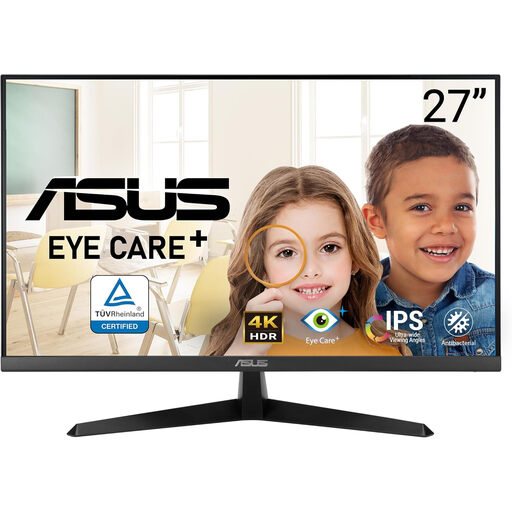
ASUS Eye Care VY27UQ 4K 60Hz Monitor
The named 4K display is relevant if you want room for digitised records and notes. Check whether the stand provides the positioning your desk needs; an eye-care label alone does not establish a comfortable workstation.
View on Joybuy
Common questions
Is a 4K monitor worth considering for family-history research?
Yes, particularly if you regularly compare a record image with notes, a tree or index results. The cited 27-inch 4K models have 3840 × 2160 native resolution, against 1920 × 1080 for the cited Full HD model; check display scaling for readable text, and do not expect 4K to repair a poor scan.
When does a 5K monitor make sense?
Consider 5K when fine document detail is a higher priority than the additional features you might choose on a 4K model, and your computer and cable support the intended display mode. Samsung Business UK specifies 218 pixels per inch for its 27-inch ViewFinity S80HF; that specification alone does not make it the right purchase for every researcher.
Will any USB-C monitor charge my laptop?
No: match the monitor’s stated USB-C video and power-delivery functions to your laptop and cable. BenQ UK specifies 65W power delivery for the PD2705U, while LG UK describes charging up to 90W for the 27UP850K-W under its applicable connection conditions; check the exact model rather than applying either rating to another monitor.
Do display-screen equipment rules apply to a family-history desk?
Private hobby use alone is not established as covered work by the Health and Safety Executive’s guidance. The HSE says the UK display-screen equipment rules apply to workers who use such equipment daily for continuous periods of an hour or more, including eligible home workers; if you also use this desk for qualifying work, ask your employer about its assessment process.


