Who this setup suits
The right monitor depends on whether daylight reflections, detailed records or a laptop connection cause the biggest difficulty at your desk.
Bright-window dashboard users
If maintenance schedules, utility readings or camera views stay on screen through the day, start with the window and screen angle. The Health and Safety Executive advises arranging desks and screens to avoid glare and bright reflections.
Detailed records and manual readers
Invoices, plans, PDFs and photographs make resolution and a positionable screen relevant. Compare how comfortably you can read your usual documents, rather than choosing on gaming specifications.
Laptop-based home workers
If household tracking sits alongside laptop work, USB-C display and charging may simplify the desk. A one-cable arrangement still depends on the laptop's video support and charging requirement.
What to prioritise
Assess reflections at the intended desk first, then the stand's positioning range. Compare resolution and laptop connections against the records and devices you actually use.
| Concern |
What to check |
Who this matters to |
| Window reflections |
Look for an anti-glare or matte screen and adjustable brightness and contrast. Check the proposed screen angle when daylight is strongest. |
When a dashboard stays visible beside a bright window, I need to read it without a reflection covering the information; roughly 46% of consumers put glare control first. |
| Screen positioning |
Compare height, tilt and swivel adjustment with your desk space and viewing position; check pivot if you read long documents vertically. |
For recurring checks at the same desk, I need a screen I can position comfortably as my posture or the light changes. Around 36% of consumers prioritise positioning. |
| Records and laptop use |
Compare QHD and 4K at the screen size you want. For one-cable use, confirm USB-C video compatibility and the monitor's power delivery against your laptop's requirements. |
If I regularly inspect dense manuals or connect a work laptop, readable detail or a simpler connection matters most; approximately 18% of consumers give that need priority. |
The Health and Safety Executive recommends arranging the desk and screen to avoid glare or bright reflections. Manufacturer specifications show why the other checks are model-specific: Dell UK lists adjustable 27-inch 4K models, while BenQ UK lists a 27-inch QHD GW2790QT with a matte panel and USB-C power delivery. A higher resolution does not remove a reflection from a window-facing screen.
Buying pitfalls
-
Choosing brightness without changing the desk setup
Bright reflections can still obscure a screen when it faces the window. The Health and Safety Executive advises arranging the desk and display to avoid glare.
Check the intended position during the brightest part of the day. Turn the screen away from the window where possible and consider blinds or curtains before relying on a display change.
-
Assuming anti-glare means reflection-proof
A matte or anti-glare surface is one part of a bright-room setup, not a substitute for managing intrusive light.
Check the screen surface alongside stand adjustment and the available desk angles. Plan how you will control window light if reflections remain in your line of sight.
-
Choosing USB-C by connector shape alone
Video support and charging capacity must suit the particular laptop. BenQ UK rates the GW2790QT's USB-C power delivery at 65 W; LG UK rates the 27UP850K-W at up to 90 W.
Compare the laptop manufacturer's video and charging requirements with the monitor's connection specifications before planning a one-cable setup.
If the connection does not meet both needs, you may still need the laptop's charger, another video cable or a separate dock.
-
Confusing similarly named monitor variants
A model name matters when screen surfaces, stands, ports and charging capabilities affect your desk setup. A product page alone is not a dependable indication of current availability.
Confirm the full model number, relevant specifications and live availability immediately before purchasing.
Brands and models to consider
These are model-specific reference points for comparing the bright-window, document-reading and laptop-connection needs above, not endorsements of entire brand ranges.
Dell
Dell UK lists both the 27-inch 4K S2725QS and the more extensively equipped 4K U2725QE for adjustable home-workspace setups.
- The S2725QS is listed with an anti-glare surface and height, pivot, swivel and tilt adjustment. The U2725QE adds anti-glare and anti-reflective treatment, an ambient-light sensor and up to 140 W power delivery.
- The U2725QE's sensor does not resolve direct window reflections. Check whether its hub and charging capabilities serve devices you use.
BenQ
The BenQ UK GW2790QT is a 27-inch QHD option for a matte screen, adjustable positioning and a compatible laptop connection.
- BenQ UK specifies a 2560 × 1440 IPS panel, 350-nit typical brightness, 110 mm height adjustment, tilt, swivel, pivot and 65 W USB-C power delivery.
- QHD has fewer pixels than 4K at the same screen size. Check whether 65 W meets your laptop's charging requirement.
LG
The LG UK 27UP850K-W is a 27-inch 4K IPS reference for detailed records and USB-C use with a compatible laptop.
- LG UK lists USB-C power delivery of up to 90 W, plus height, pivot and tilt adjustment.
- Confirm current availability and whether the supplied adjustment range and USB-C charging meet your setup's needs.
Joybuy monitor choices
These choices include 4K monitors for detailed home-maintenance records and a 29-inch ultrawide option for a wider browser-based view. For any of them, check reflections at your desk and confirm the positioning or laptop connections you need.
 No image available
ASUS ProArt PA27DCE-K OLED 4K UHD
Consider this model if detailed manuals and the ability to change screen position matter at your desk.
Check whether its USB-C video and charging capabilities meet your laptop's requirements before planning a one-cable connection. A matte surface still calls for sensible window-facing placement.
View on Joybuy
 No image available
iiyama ProLite XUB2792UHSU-B6 27-inch 4K UHD
This is a 4K option to consider for detailed spreadsheets and manuals when changing the screen position is also important.
Matte Black describes the finish, not necessarily the screen coating. Confirm the display's glare treatment and, if connecting a laptop, its USB-C charging capacity.
View on Joybuy
 No image available
ASUS Eye Care VY27UQ 4K UHD 60 Hz
Consider the VY27UQ for reading detailed maintenance records if its available screen positioning suits your desk.
Check the screen surface and the adjustment range you require, particularly if daylight reaches the display from an awkward angle.
View on Joybuy
 No image available
LG UltraGear 27G810A-B 27-inch 4K IPS Dual Mode
This 4K model may suit detailed record viewing if you also want a screen whose position can be changed at the desk.
Its gaming-oriented Dual Mode is not a substitute for checking the screen surface, brightness controls and stand range for bright-window use.
View on Joybuy
 No image available
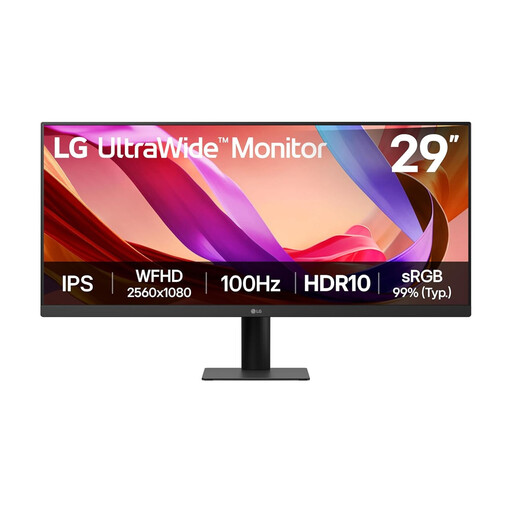
LG UltraWide 29U511A 29-inch UWFHD 1080p IPS
Consider this ultrawide format if you prefer a wider view of browser-based maintenance records to the finer detail of a 4K screen.
Its stated matte, anti-glare surface is relevant beside a window, but check the stand adjustments you need and avoid placing the display directly in reflected light.
View on Joybuy
Common questions
Will a brighter monitor fix reflections from a nearby window?
Not by itself. The Health and Safety Executive advises arranging the desk and screen to avoid glare or bright reflections; try changing the screen angle and controlling window light, then adjust brightness and contrast to suit the room.
Do home-working display-screen rules apply to household tracking?
Personal home-maintenance tracking alone does not establish that employment rules apply. The Health and Safety Executive says UK display screen equipment rules can apply to employees working at home on a permanent or long-term basis; where applicable, the employer should assess the work setup.
Which monitor adjustments matter beside a bright window?
Start with a screen you can angle away from reflections and position comfortably. Check tilt and swivel, then height adjustment or pivot if your desk position or document use calls for them; also check that brightness and contrast are easy to adjust as daylight changes.
Can USB-C replace my laptop charger and video cable?
It can only do both jobs if the laptop supports video over USB-C and the monitor provides sufficient charging power. BenQ UK rates the GW2790QT at 65 W power delivery and LG UK rates the 27UP850K-W at up to 90 W; compare the relevant monitor rating with your laptop manufacturer's requirements.


