What matters when choosing
Control reflections at the desk before deciding how much resolution or brightness the monitor needs. For the 27-inch options discussed here, 4K provides more pixels than QHD; a professional display adds features that may matter only in more demanding light or work setups.
27-inch 4K office display
Choose when: You regularly keep provider pages, PDFs and detailed tables open together and want more pixels at a 27-inch size.
Keep in mind: If you rely on USB-C charging, its power-delivery rating and your laptop’s video support must match your setup.
27-inch QHD office display
Choose when: Browser and document work takes priority over fitting the most detail onto a 27-inch screen.
Keep in mind: QHD has fewer pixels than 4K at the same size, so compare fine text at the scaling you normally use.
Higher-brightness professional display
Choose when: Strong daylight remains difficult after repositioning the screen, and you also have a use for professional connectivity or calibration features.
Keep in mind: Extra brightness does not eliminate direct reflections, and specialist features may add little to broadband-plan reading.
| Concern |
What to check |
Who this matters to |
| Reflections and daylight |
Look for a stated matte, anti-glare or low-reflection finish. Compare typical brightness for the exact models, and consider where the window sits relative to the screen. |
If window light catches the screen while I read contract terms, I need to deal with reflections before adding other features. Around 42% of consumers put daylight readability first. |
| Detailed text and tables |
At 27 inches, compare 4K resolution of 3840 × 2160 with QHD resolution of 2560 × 1440 using your usual text scaling. |
When I keep several provider pages and PDFs in view, I want the small details to remain legible without constant window switching; around 33% of consumers prioritise text detail. |
| Laptop and desk setup |
Check USB-C video support, the monitor’s power-delivery rating, cable requirements and the stand adjustments you need. |
For a laptop-led desk, I want to place the screen comfortably and avoid relying on the wrong cable or charger. Roughly 25% of consumers make connection and positioning their primary concern. |
Joybuy monitors for this setup
These monitors offer different screen sizes and resolutions for reading plans at a desk. Check screen finish, room-light suitability and laptop compatibility for the particular model before choosing one for a bright-window position.
 No image available
ASUS ProArt PA27DCE-K OLED 4K UHD
Consider this 4K OLED model if detailed plan pages are your priority. For a bright-window desk, check its typical brightness and screen finish; if tariff tables remain on screen for long periods, review the model’s OLED image-retention guidance. Confirm USB-C video and charging compatibility before planning a one-cable setup.
View on Joybuy
 No image available
ASUS ProArt PA278CV IPS WQHD
This IPS WQHD model is an option when 4K text density is not your priority. Check how fine print looks at your usual viewing distance, confirm the screen finish for the window position, and match any USB-C charging requirement to the model’s stated power delivery.
View on Joybuy
 No image available
ASUS ProArt Display PA32UCG-K 32-inch 4K IPS Mini LED
The 32-inch 4K screen offers a larger workspace for provider pages and documents. Confirm its typical brightness before judging it for daylight use: the stated peak-brightness figures conflict. Check USB-C video and charging functions against your laptop rather than relying on the connector alone.
View on Joybuy
 No image available
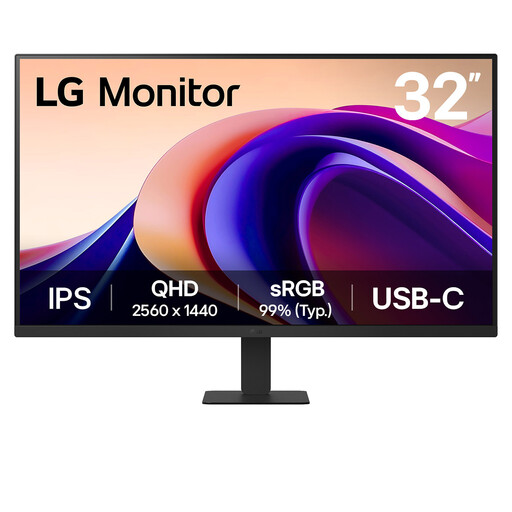
LG 32U631A 32-inch QHD IPS
This larger QHD monitor may suit a desk where you prefer a 32-inch screen for browsing plans. Compare fine text at your normal viewing distance with a 4K alternative. Its product name lists USB-C, but check the video and charging functions your laptop requires.
View on Joybuy
 No image available
MSI MD272UPSW 27-inch 4K IPS Smart Monitor
The 27-inch 4K screen is relevant to detailed tariff tables, and the product name specifies USB-C 65W power delivery. Before placing it beside a bright window, check its screen finish and typical brightness; also confirm that your laptop supports USB-C video and that 65W meets its charging requirement.
View on Joybuy
Common questions
Will an anti-glare monitor solve reflections from a bright window?
Not by itself. PC Monitors explains that a matte surface diffuses ambient light, but window position, room light and viewing angle still matter. Plan the screen position to avoid direct reflections before relying on extra brightness.
Is 4K useful for comparing broadband plans?
A 27-inch 4K monitor is worth considering if you often view several provider pages, PDFs or dense tables together. It has more pixels than a 27-inch QHD monitor, though QHD remains an option when that extra text detail is not your priority; compare both at your usual scaling.
What should I check before using one USB-C cable with my laptop?
Confirm that the laptop supports USB-C video output and that the monitor’s charging limit meets its requirement. Check the exact model’s data and video functions and the cable needed: LG specifies charging up to 90W for the 27UP850K-W, while BenQ specifies power delivery up to 65W for the GW2790QT.
How can I compare monitors’ energy information?
Use the energy label and product information for the exact electronic display rather than assuming similarly sized monitors have the same consumption. GOV.UK’s April 2026 guidance describes point-of-sale energy labels, including on websites, for products within scope.


