What matters when choosing a monitor?
For this desk position, check reflections and screen placement first, then the space needed for readable code and transcripts; assess laptop connections and other features against the setup you actually use.
| Concern |
What to check |
Who this matters to |
| Reflections and daylight |
Look for stated matte or anti-glare treatment and a stand you can reposition; assess the screen’s angle to the window. |
I lose my place in a transcript when daylight reflects off the screen, so controlling reflections is my first priority. Around 37% of consumers put that need first. |
| Text and workspace |
Compare screen size, native resolution, 16:9 or taller layouts, and comfortable text scaling. |
Keeping code and a long transcript readable without constant scrolling matters more to me than extra connections; around 27% of consumers prioritise text and workspace. |
| Laptop connection |
Confirm display-over-USB-C or Thunderbolt support and whether the monitor’s stated charging output meets the laptop’s needs. |
I switch between interview preparation and other laptop work and want fewer desk connections to manage. Roughly 18% of consumers make laptop connectivity their primary concern. |
| Feature priorities |
Identify which stand, display and connection features you will use, including any accessories your setup would require. |
I want the screen to handle transcript reading without choosing specialist features I will not use; for around 18% of consumers, keeping to the essentials comes first. |
Monitor brands to consider
These product lines illustrate different display shapes, stand features and laptop connections; check the specification of the exact model rather than assuming a feature applies across a brand.
Dell
Dell’s UltraSharp range includes conventional 27-inch displays for readers considering QHD or 4K text workspace and, on selected models, hub connectivity.
- Dell UK lists the U2725QE as a 27-inch 4K Thunderbolt hub monitor with an ambient-light sensor and 120Hz refresh rate.
- The U2724D is a different, QHD model. Compare the exact model’s resolution, surface and connections rather than treating UltraSharp specifications as interchangeable.
BenQ
BenQ’s RD programming displays include a taller format for readers who want more vertical room for code and transcripts.
- BenQ UK specifies a 3:2, 3840 × 2560 display and Nano Matte coating for the RD280UA.
- The RD280UA’s listed refresh rate is 60Hz. BenQ’s coding and eye-care descriptions are its own product positioning, not independent evidence of an improvement in reading comfort.
HP
HP’s E-Series includes a conventional 27-inch 4K office-monitor option for readers who want anti-glare treatment and stand adjustment.
- HP Support lists anti-glare treatment, an ambient-light sensor and height, tilt, swivel and pivot adjustment for the E27k G5.
- Check the exact product number and its USB-C charging details before planning a laptop setup around this model.
LG
LG has 27-inch 4K IPS monitors for readers considering a standard wide display with a USB-C laptop connection.
- LG UK lists a 27-inch 4K IPS panel and USB-C power delivery up to 90W for the 27U730A-B.
- Check surface treatment and stand movement on the exact LG model; the presence of USB-C does not establish compatibility with every laptop.
Joybuy monitors for transcript and code work
These monitors offer different stated resolutions and screen sizes for reading transcripts alongside code. For a desk by a bright window, confirm the exact model’s surface treatment, stand movement and laptop connections before choosing.
 No image available
ASUS ProArt PA27DCE-K 4K UHD OLED
Consider this 4K UHD OLED model if detailed transcript and code text is a priority, subject to a comfortable scaling setting.
For the bright-window position, check its screen treatment and stand adjustment. Confirm the exact brightness specification and USB-C charging output before relying on either for your setup.
Joybuy
 No image available
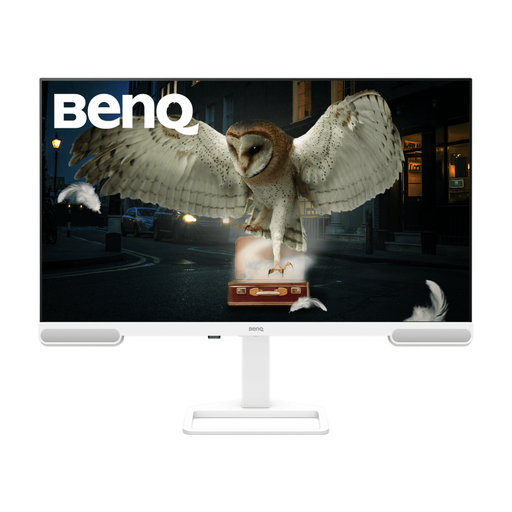
BenQ EW3290U 31.2-inch 4K UHD, White
The stated 31.2-inch, 3840 × 2160 display is worth considering if you want room for transcript and code windows and have desk space for it.
Check the supplied stand’s adjustment options for your window position. If laptop charging matters, confirm the connection and its stated output against your laptop.
Joybuy
 No image available
iiyama ProLite XUB2792UHSU-B6 27-inch 4K UHD
This stated 27-inch 4K UHD model is an option for readers who prefer a conventional-sized display for transcript and code text.
Confirm its screen-surface treatment for the bright-window desk and check the exact USB-C charging output if you intend to connect a laptop with one cable.
Joybuy
 No image available
ASUS ProArt PA248CNV IPS WUXGA
Consider this IPS WUXGA model if its text size and workspace suit the way you arrange your transcript and editor.
It is not presented as a 4K model. Check its screen-surface treatment for reflections and confirm laptop display and charging compatibility before planning a single-cable setup.
Joybuy
 No image available
BenQ GW2791 27-inch IPS Full HD 100Hz
This 27-inch Full HD model may suit transcript reading if its displayed text size and available workspace meet your needs.
Compare its Full HD resolution with higher-resolution options at your preferred scaling, and check the supplied stand’s height adjustment if screen positioning is important.
Joybuy
Questions about monitors by a bright window
Will an anti-glare monitor solve reflections from a window?
Not on its own: screen treatment may reduce reflected distractions, but direct glare can still interrupt reading. The Health and Safety Executive advises arranging the desk and screen away from bright reflections and using curtains or blinds where needed.
Should I choose 27-inch 4K or a taller 3:2 monitor for transcripts?
Choose according to the space you need at a comfortable text size: a 27-inch 4K screen provides a conventional wide layout, while a 3:2 screen gives more vertical room for long passages. BenQ UK specifies a 3:2, 3840 × 2560 display for the RD280UA; check its dimensions against your desk and preferred window arrangement.
Can one USB-C cable show my laptop screen and charge it?
Yes, if the laptop and monitor support compatible USB-C display and charging functions and the charging output meets the laptop’s needs. LG UK describes display, data and charging over a compatible connection on its specified model, but check those functions and the cable for the exact devices you intend to use.
Does UK workplace screen guidance apply to interview preparation at home?
The Health and Safety Executive says display-screen-equipment law applies to workers, including home workers; employer duties should not be assumed to apply to a private study setup. Its practical advice on avoiding reflections is useful when arranging a home desk.
What should I do with an old monitor?
Check an appropriate retailer take-back or local electrical-equipment collection route when replacing it. GOV.UK describes UK waste electrical and electronic equipment rules as supporting recovery, reuse and recycling; confirm local acceptance arrangements before taking the monitor in.


