What matters when choosing?
For revision-quiz work, decide how much space you want for notes, questions and previews, then check whether the screen can sit comfortably on your desk. Laptop connections and quiet-room requirements can narrow the choice further.
| Concern |
What to check |
Who this matters to |
| Quiz-building workspace |
Compare native resolution and screen size against your desk space; the cited 27-inch examples include both 2560 × 1440 QHD and 1920 × 1080 Full HD. |
If I want notes, question fields and a preview in view while editing, the available workspace is my starting point. Roughly 36% of consumers put that need first. |
| Screen position and glare |
Check stand-height adjustment where needed, and whether the screen’s position and room lighting will avoid reflections. |
During longer reading sessions, I need a screen I can position without working around glare. Around 29% of consumers make screen position and glare their primary concern. |
| Laptop connection |
Confirm USB-C video support, the monitor’s power-delivery limit and whether a suitable cable is supplied. |
If I build quizzes from a laptop, I want the display connection to work without assuming it will also replace my charger. Approximately 21% of consumers prioritise that connection question. |
| Quiet-room suitability |
Check whether the exact model has speakers and audio controls; ask about operational noise if it is decisive for your room. |
In a shared quiet study, I need to know what audio I can control and cannot judge silence from a speaker listing. Roughly 14% of consumers place that uncertainty first. |
Brands to consider
These models illustrate different feature combinations; check the specifications of the exact monitor you intend to buy.
Dell
Dell’s S2722DC is a 27-inch QHD USB-C reference for a laptop-centred desk.
- Dell UK specifies a 2560 × 1440 IPS panel, height, pivot, swivel and tilt adjustment, and USB-C power delivery up to 65W.
- Dell UK lists the cited S2722DC as unavailable. Check the specifications and availability of any alternative model independently.
BenQ
BenQ’s GW2790T provides a 27-inch Full HD example for consumers prioritising stand adjustment and reading-oriented modes.
- BenQ lists height, tilt, pivot and swivel adjustment, alongside ePaper and low-blue-light and flicker-related features.
- Its specified 1920 × 1080 resolution differs from QHD. Display modes do not replace suitable positioning and breaks.
LG
LG’s 27U631A-B pairs a 27-inch QHD IPS display with USB-C connectivity and a tilt-adjustable stand.
- LG specifies 2560 × 1440 resolution, USB-C display connectivity and power delivery up to 15W.
- LG does not specify height adjustment for this stand and says the USB-C cable is not included. Check whether 15W meets your laptop’s needs.
Joybuy monitor choices
These monitors offer different screen sizes, resolutions and connection features for building revision quizzes at a desk. Match each one to your available space, screen-position needs and laptop rather than treating gaming or entertainment features as a requirement for text work.
 No image available
Dahua 32-inch 4K 165Hz Curved OLED Gaming Monitor
Consider this if you have room for a large, curved display while working across quiz materials; check that its size and shape suit your desk.
The product name specifies 3840 × 2160 resolution and Type-C 65W. Confirm laptop video and charging compatibility before planning a single-cable setup; the 165Hz gaming specification does not establish a benefit for static quiz work.
View on Joybuy
 No image available
ASUS PROART PA278CV IPS WQHD Monitor
Consider this model if an IPS WQHD display fits the workspace you want for editing and reviewing quizzes.
Before relying on it for a laptop desk setup, confirm the exact connection, USB-C charging power and stand adjustment you require.
View on Joybuy
 No image available
BenQ MA320UP Nano Glossy IPS 4K UHD 32-inch Mac Monitor
Consider this large-screen option if your desk can accommodate it and its Mac-focused positioning fits the device you use for quiz work.
The product name specifies USB-C and a height-adjustable stand. Confirm the exact variant’s USB-C capabilities and your device compatibility before relying on either a video or charging connection.
View on Joybuy
 No image available
MSI MD272UPSW 27-inch 4K UHD Smart Monitor with Google TV
Consider this 27-inch 4K option if its display size fits your quiz-building desk and you also want the named smart features.
The product name specifies USB-C 65W and Dolby Audio. Check USB-C video compatibility and your laptop’s charging requirement; audio features do not establish quiet operation.
View on Joybuy
 No image available
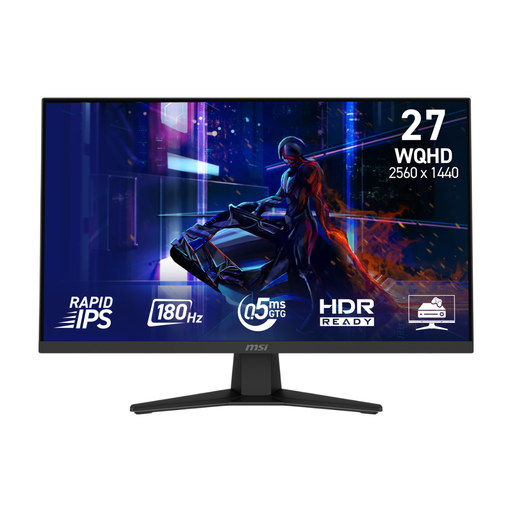
MSI MAG 274QF 27-inch WQHD Gaming Monitor
Consider this 27-inch WQHD model if that screen specification suits your quiz workspace and you do not need its gaming features for text work.
Check the stand adjustment you need and how you will connect your laptop; do not infer USB-C connectivity from the gaming specifications in the product name.
View on Joybuy
Frequently asked questions
Should I choose a 27-inch QHD or Full HD monitor for revision quizzes?
Choose according to the workspace and stand adjustment you need, rather than assuming either resolution is the answer for everyone. Dell and LG specify 2560 × 1440 for the cited QHD models, while BenQ specifies 1920 × 1080 for its GW2790T; compare those specifications with your desk space and preferred screen position.
Will one USB-C cable display my laptop and charge it?
It can only do both if your laptop supports the required USB-C video connection and the monitor supplies suitable charging power. Dell specifies up to 65W for the S2722DC; LG specifies up to 15W for the 27U631A-B and says its USB-C cable is not included.
Do reading modes or low-blue-light features remove the need for breaks?
No. Those are model-specific display features, not replacements for arranging the screen and lighting or changing activity during long sessions. Health and Safety Executive display-screen guidance addresses workstation use and breaks separately.
What should I check for a monitor used in a quiet shared study?
Check the exact model’s speakers and audio controls, and clarify any operational-noise concern before buying. A speaker specification does not tell you whether other sounds from the monitor will be audible in your room.
How should I dispose of an old monitor?
Check your local authority’s electrical recycling guidance and any take-back service offered by the retailer. GOV.UK defines electrical and electronic equipment by its dependence on electricity; confirm the available disposal route for your monitor locally.


