Students comparing costs and doing coursework
If your screen is mainly for browser tabs, documents and spreadsheets, a compact Full HD monitor may cover your everyday tasks without making gaming or creator features the starting point.


For holiday-cost comparisons and coursework on a small student-room desk, start by considering a compact 23.8–24-inch Full HD monitor. Check that it connects to your laptop and sits at a comfortable height; prioritise a higher refresh rate if smoother motion matters for your other uses, rather than treating it as a requirement for spreadsheets.
If your screen is mainly for browser tabs, documents and spreadsheets, a compact Full HD monitor may cover your everyday tasks without making gaming or creator features the starting point.
Screen position deserves particular attention when your chair and desk offer little flexibility. The Chartered Institute of Ergonomics and Human Factors advises placing the screen at a height that supports a comfortable, neutral neck posture.
If the same monitor will also be used for video or casual games, a 100Hz model may be worth considering once desk fit and laptop connectivity are settled. BenQ UK and LG UK list 100Hz options among the models discussed here.
Work out how much space the monitor can occupy and what you need to display, then check its connection to your laptop. Treat screen adjustment and refresh rate according to how you will use the desk.
| Concern | What to check | Who this matters to |
|---|---|---|
| Unnecessary features | Decide whether Full HD provides enough room for your usual windows before considering a higher-resolution display. | If I mainly compare holiday costs and complete coursework, I want screen features I will actually use. Around 31% of consumers put avoiding unnecessary monitor features first. |
| Desk fit and screen position | Measure the desk and stand footprint; check height adjustment or compatible mounting if the supplied stand cannot position the screen comfortably. | At a fixed desk, I need to place the screen at a comfortable height without crowding my workspace. For around 25% of consumers, desk fit and positioning are the primary concern. |
| Laptop connection | Match the laptop’s video output to the monitor’s inputs, and check whether the required cable or adapter is supplied. | When I move between comparison sites, documents and spreadsheets, I need the monitor to work with my laptop. Connection and everyday workflow come first for around 25% of consumers. |
| Motion for mixed use | Check the refresh rate available through the connection you will use, rather than relying on the headline rate alone. | I study on the same screen that I use for video and casual games, so smoother motion matters alongside my coursework. Around 19% of consumers put this mixed-use need first. |
Dell UK lists height, tilt, swivel and pivot adjustment for the S2425HS, while LG UK describes tilt adjustment for the 24MR400-B. Screen size alone tells you little about positioning.
Check the exact stand functions and footprint. If you plan to use an arm, confirm the monitor’s mounting specification and that the mounting arrangement suits your desk.
A riser or compatible arm may be needed if the supplied stand cannot bring the screen to a comfortable height.
The refresh rate you can use depends on the laptop output and selected connection. Dell UK specifies Full HD at up to 100Hz through the S2425HS HDMI inputs.
Check your laptop’s external-display modes against the monitor’s inputs and confirm which cable is supplied.
A compatible adapter or dock may be needed for a laptop without a matching output.
LG UK lists Reader Mode and Flicker Safe for the 24MR400-B, but those feature names do not establish how comfortable a particular workstation will be.
Set the screen at a suitable height and adjust its brightness for the room; consider display settings as part of that setup, not a replacement for it.
The GW2490 is one compact option for browser research and coursework. BenQ UK specifies a 23.8-inch IPS Full HD panel, 100Hz refresh rate and two HDMI inputs.
The S2425HS illustrates a choice centred on positioning. Dell UK specifies a 23.8-inch Full HD IPS display with height, tilt, swivel and pivot adjustment.
The 24MR400-B combines a 23.8-inch IPS Full HD panel with 100Hz refresh rate and AMD FreeSync, according to LG UK.
These monitors offer different starting points for a student-room desk: compact displays for comparison work, options to consider when screen positioning matters, and models with features for mixed study and entertainment. Check each variant against your laptop and available desk space.
 No image available
Consider this model for holiday-cost research and coursework if you also need to adjust the screen’s position at your desk.
Check that its connection suits your laptop and confirm which cable is included.
 No image available
Consider this QHD model if you want to compare sites and work on documents at a student-room desk where screen positioning matters.
Confirm laptop connectivity and the included cable before ordering.
 No image available
This 24-inch model is an option to examine for browser comparisons and coursework when desk setup is a priority.
Confirm its stand functions and refresh rate before buying: the listed 60Hz and 100Hz refresh-rate figures conflict.
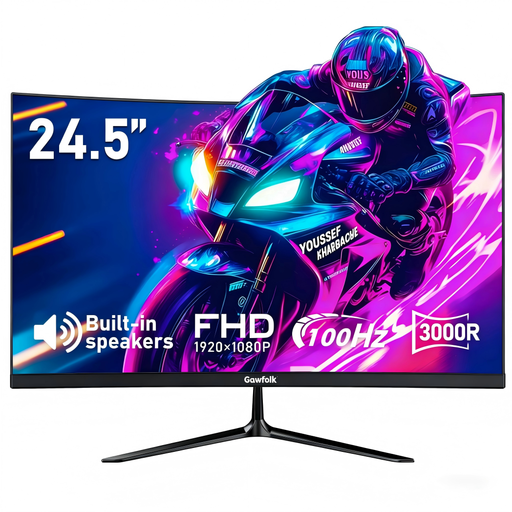 No image available
Consider this curved model if the same desk screen will serve for study and casual play, and its shape fits your space and viewing preference.
The product name specifies 3000R curvature, 1ms MPRT, integrated speakers, AMD FreeSync and HDMI. Check that your laptop supports the intended 100Hz connection, and confirm the mounting pattern before choosing an arm.
 No image available
This is another model to consider for browser-based holiday comparisons, coursework and everyday viewing.
Before choosing it for a fixed desk, check its connection to your laptop and whether its screen-positioning options meet your needs.
It can be enough if you mainly use browser pages, documents and spreadsheets on a small desk. BenQ UK, Dell UK and LG UK each specify approximately 24-inch Full HD models discussed here; consider more desktop space if you regularly need several windows visible side by side.
Choose height adjustment, or plan for a suitable riser or arm, if your desk and chair cannot place the screen comfortably. The Chartered Institute of Ergonomics and Human Factors advises a screen height that supports a neutral neck posture; check the exact monitor’s adjustment range and mounting compatibility.
No: 100Hz is not a requirement for documents, spreadsheets or comparison sites. It may matter more if you also value smoother scrolling or casual gaming, provided your laptop and the selected connection support that refresh rate.