For reviewing survey results, choose a monitor around the task that most constrains your work: inspecting dense tables, positioning the screen for long sessions, connecting a laptop or comparing several sources at once. Check native resolution, desk fit and the exact connection requirements before paying for a larger panel or features your workflow may not use.
Who needs what from a survey-review monitor?
Dense-table survey reviewers
If you regularly check cross-tabs, spreadsheet rows, coded answers, charts and source documents, consider both native resolution and how comfortably you can position the screen. A larger diagonal alone does not settle either question.
Laptop-centred analysts
If most review work starts on a laptop, monitor connections, peripheral ports and charging may affect your desk setup. Check what your particular laptop and cable support before planning around one connection.
Multi-source comparison users
If you compare survey platforms, workbooks or reporting views across computers, check whether the monitor can display the inputs you need or switch control between them. Those features are less relevant to a one-computer workflow.
What matters when choosing a monitor?
Start with the material you need to see and where the screen can sit. Then check connections against the computers you actually use.
| Concern | What to check | Who this matters to |
|---|
| Detailed workspace |
Compare native resolution, usable screen area and the scaling you expect to use; check whether the panel fits your desk. |
If I need tables and reference documents visible together, the space available for detail drives my choice. Around 31% of consumers put detailed workspace first. |
| Laptop connection |
Check the laptop’s video output, the monitor’s ports and power delivery, and the cable required. |
When I work primarily from a laptop, I want a connection that meets its display and charging needs. For around 23% of consumers, laptop connectivity is the main priority. |
| Multiple sources |
Confirm the supported inputs, simultaneous-view options and KVM connections needed for your devices. |
If I routinely compare work from separate computers, switching or displaying those sources matters more than simplifying a single-laptop desk. Roughly 15% of consumers prioritise multi-source comparison. |
| Screen placement |
Check adjustment range, viewing distance and whether the stand, clamp or mount fits the desk. |
During long review sessions, I need to place the screen comfortably without fighting the desk layout. Screen positioning comes first for around 31% of consumers. |
Common buying mistakes
-
Choosing by screen size alone
A larger diagonal does not tell you the native resolution or whether the screen will sit at a practical distance. The Health and Safety Executive advises placing the top of the screen around eye level and the screen about an arm’s length away.
Compare resolution, stand footprint and desk depth together, then check whether you can position the screen as intended.
-
Assuming every USB-C connection does the same job
USB-C on a monitor does not by itself establish that your laptop can send video through it or receive enough charging power. LG specifies up to 60 W power delivery for the 32UN880K-B, while Dell specifies up to 140 W EPR for the U3225QE.
Compare your laptop’s video and charging requirements with the exact monitor and cable before relying on a single-cable setup.
You may still need a separate charger, dock or cable if that setup cannot meet your requirements.
-
Ordering a clamp-mounted screen without checking the desk
LG’s 32UN880K-B uses an Ergo C-clamp arrangement, so its adjustment options are useful only if the installation suits your desk.
Check the desk edge, rear clearance and installation instructions before choosing a clamp, grommet or compatible mounting arrangement.
If the desk cannot accommodate the intended mount, a different installation arrangement may be needed.
-
Choosing multi-computer features for one-computer work
Picture partitions and KVM switching address particular multi-source workflows; they do not replace checking whether a screen’s size and connections suit your everyday work.
List the computers and views you need at the same time before deciding whether those features belong on your shortlist.
Relevant monitor brands
Dell
Dell’s UK UltraSharp range includes a 27-inch QHD Thunderbolt hub model, a 32-inch 4K Thunderbolt hub model and a 42.5-inch 4K multi-PC display. They represent different desk and input arrangements, not interchangeable choices.
- Dell’s model specifications offer examples of laptop connectivity and, on the U4323QE, multi-PC viewing with four FHD partitions.
- Check the exact model’s resolution, ports, charging requirements and footprint rather than assuming those features apply across the range.
LG
LG’s 32UN880K-B is a 31.5-inch 3840 × 2160 IPS example with USB-C connectivity and an adjustable Ergo C-clamp stand.
- LG specifies extend, retract, swivel, pivot, height and tilt adjustment, plus USB-C power delivery up to 60 W.
- Check that the clamp fits your desk and that the connection and charging capacity meet your laptop’s requirements.
BenQ
BenQ’s RD280UA offers a 3:2 layout to consider when long lists and vertical document space matter more than a wider display arrangement.
- BenQ specifies a 3840 × 2560 panel, KVM switching, USB-C power delivery up to 90 W and 100 × 100 mm VESA support.
- Check whether the narrower layout suits your dashboards and whether its KVM connections and mounting arrangement fit your setup.
Joybuy monitors for desk-based survey review
These monitors offer 4K or WQHD display choices for reviewing survey tables and documents at a desk. Compare their stated resolution and connections with your computer, then check the stand and screen size against your available space.
 No image available
Dahua 32-inch 4K 165 Hz curved OLED monitor
Consider this 32-inch screen if you want a 3840 × 2160 display for tables and documents and have room for its curved format.
The product name specifies Type-C 65 W and a USB hub; confirm your laptop’s video mode and charging requirements before planning a single-cable setup. Its gaming refresh-rate features are not a reason on their own to choose it for survey review.
View on Joybuy
 No image available
iiyama ProLite XUB2792UHSU-B6 27-inch 4K monitor
This 27-inch 4K model is worth considering when detailed documents need to fit on a smaller screen than a 32-inch option.
Check its physical depth and the stand’s positioning range against your desk. If laptop charging matters, confirm the required connection and power delivery before buying.
View on Joybuy
 No image available
ASUS ProArt Display PA32UCG-K 32-inch 4K monitor
Its named 32-inch 4K format may suit review work involving detailed tables alongside documents, provided the screen fits your desk.
The product name lists Mini LED and Thunderbolt 3, but confirm the exact laptop connection and charging arrangement. Its HDR and colour-production features need not drive a purchase for ordinary survey review.
View on Joybuy
 No image available
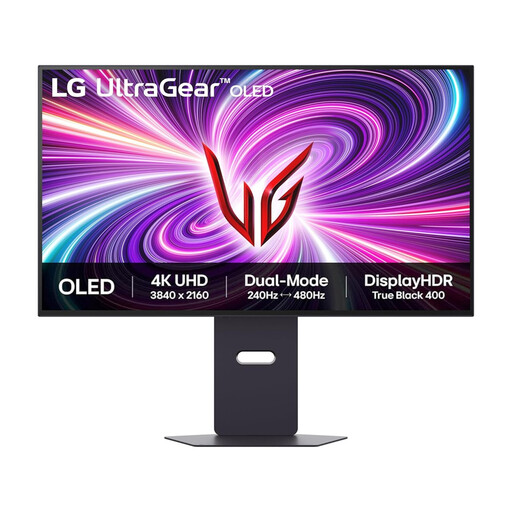
LG UltraGear 32GS95UV-B 32-inch 4K OLED monitor
Consider the named 32-inch 4K display if that screen size fits your survey-review desk and document layout.
The product name lists DisplayPort and HDMI 2.1. Check the connections your computer needs; its gaming refresh modes do not establish an advantage for reviewing survey data.
View on Joybuy
 No image available
ASUS ProArt PA278CV IPS WQHD monitor
This WQHD option is worth considering if its workspace accommodates the tables and documents you review; compare that requirement directly with the 4K choices above.
Check its stand positioning and the connections your laptop needs. Confirm charging power and compatibility before relying on it for laptop charging.
View on Joybuy
Questions about survey-review monitors
Do UK display-screen rules specify a monitor model for survey work?
No particular monitor model is specified in the Health and Safety Executive guidance cited here. Its display screen equipment guidance concerns workers who use screens daily for continuous periods of an hour or more; choose a monitor that can be positioned appropriately for the workstation rather than treating one model name as a requirement.
Where should I position a monitor for long review sessions?
The Health and Safety Executive advises placing the top of the screen level with your eyes and the screen about an arm’s length away. Check whether the stand, desk or a compatible mount lets you achieve that position.
Will any USB-C monitor charge my laptop?
No: charging depends on the monitor’s power delivery and your laptop’s requirements, while video also depends on the supported connection and cable. LG specifies up to 60 W for the 32UN880K-B and Dell up to 140 W EPR for the U3225QE; check compatibility for the exact combination you intend to use.
Do I need a multi-input display to review survey results?
Not if your review work takes place on one computer and you do not need simultaneous sources on the monitor. If you routinely compare separate computers, check the inputs and viewing arrangement you need; Dell specifies multi-PC partitions on the U4323QE, while BenQ specifies KVM switching on the RD280UA.


