What matters when choosing?
Start with the desk position and the artwork’s intended output. Then compare screen finish, colour-management features and laptop connectivity against the need you would put first.
| Concern |
What to check |
Who this matters to |
| Daylight reflections |
Check the screen surface and whether you can position the display away from bright reflections; plan how to control light from the window. |
If reflected light obscures fine vector edges at my desk, I need a workable screen position before extra brightness. Around 36% of consumers put reflection control first. |
| Colour-managed review |
Confirm the colour space required for delivery and the exact model’s colour mode and calibration method. |
When my artwork is assessed for print or another controlled colour workflow, repeatable colour review is my priority. Roughly 29% of consumers put that need first. |
| Laptop workspace |
Check USB-C or Thunderbolt video support, the laptop’s charging requirement and the monitor’s stated Power Delivery rating. |
I want my laptop connected while I work with artwork and tool panels, without assuming one cable will meet every power requirement. Around 21% of consumers prioritise the connected workspace. |
| Right-sized colour features |
Match the monitor’s colour mode to web, print or other intended output rather than choosing by a headline display feature alone. |
If my final review is for web-oriented artwork, I want the required colour mode without choosing a specialist calibration workflow I will not use. About 14% of consumers put that fit first. |
Relevant brands to consider
These examples illustrate different monitor workflows; the features described belong to the named models, not every display made by each brand.
BenQ
BenQ’s SW272U is a 27-inch 4K colour-management option for artwork review. BenQ specifies 99% Adobe RGB and P3 coverage.
- The SW272U combines hardware calibration, a Nano Matte surface and a supplied shading hood for a controlled review setup.
- Its stated 400-nit typical brightness and surface treatment do not remove the need to control reflections from the window.
EIZO
The 27-inch 4K ColorEdge CG2700X is aimed at colour-managed creative work. EIZO specifies 500 cd/m² brightness and a built-in calibration sensor.
- Scheduled calibration can reduce the work involved in maintaining a colour-critical setup.
- Check the conditions attached to EIZO’s colour and brightness guarantee, including operating hours, brightness and colour temperature; a brighter panel still needs reflection-aware placement.
ASUS
The 27-inch 4K ProArt PA279CRV pairs a non-glare screen with 99% Adobe RGB and DCI-P3 coverage, according to ASUS.
- ASUS states factory calibration to Delta E < 2 and USB-C Power Delivery up to 96 W for this model.
- Its stated typical brightness is 350 cd/m², so controlling window reflections remains important; factory calibration should not be confused with a built-in calibration sensor.
Dell
Dell’s 27-inch 4K UltraSharp U2725QE focuses on laptop docking and desktop use, with an ambient-light sensor and anti-glare and anti-reflective treatment.
- Dell states a 3000:1 contrast ratio, 120 Hz refresh rate and Power Delivery up to 140 W for the U2725QE.
- For print-colour review, confirm that this exact model supports your required colour space and calibration workflow rather than assuming docking features cover those needs.
Joybuy product choices
These monitors cover several ways to review vector artwork, from creative displays to web-oriented and laptop-focused options. Check each screen’s finish and colour workflow against your desk position and intended output; the models are not interchangeable for print review.
 No image available
ASUS ProArt PA27DCE-K OLED 4K UHD
Consider this OLED 4K monitor if detailed artwork review is your priority. Before using it beside the window, check that its screen finish suits the desk position; if laptop charging or monitor-level calibration matters, confirm those capabilities for this exact model.
Joybuy
 No image available
ASUS ProArt Display PA32UCG-K 32-inch 4K HDR IPS Mini LED
The 32-inch 4K format is worth considering if you want a larger canvas for artwork and tools. Check that it fits your desk and verify its brightness specification before comparing it with other displays; the stated peak-brightness figures conflict. Confirm laptop charging requirements separately.
Joybuy
 No image available
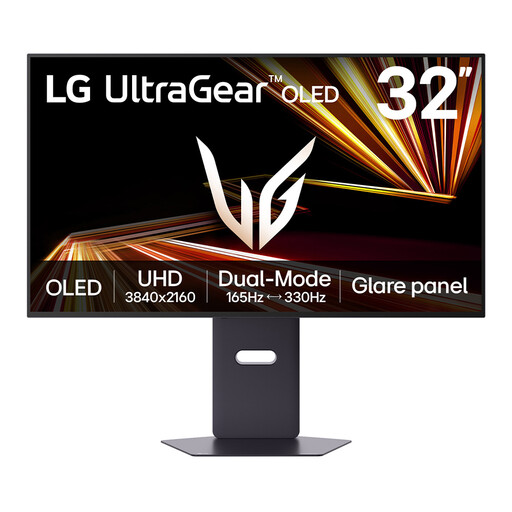
LG UltraGear 32GX850A-B 32-inch OLED 4K UHD Dual Mode
This 32-inch 4K gaming monitor may suit a workspace shared between artwork review and gaming. If print-colour decisions are central to your work, check its Adobe RGB coverage and calibration workflow; also assess the screen surface in your intended window-side position.
Joybuy
 No image available
BenQ MA270UP Nano Glossy 27-inch 4K IPS USB-C monitor for Mac
The 27-inch 4K display and USB-C connection make this a candidate for a Mac-based artwork desk. Its Nano Glossy finish deserves particular attention beside a bright window: assess whether you can keep reflections off the screen, and check the laptop’s video and charging compatibility.
Joybuy
 No image available
ASUS Eye Care VY27UQ 4K UHD 60 Hz
Consider this 4K monitor for web-oriented vector review if its colour mode meets your delivery requirements. Check its screen surface for the window-side desk and confirm the colour space and calibration method before relying on it for print work.
Joybuy
Frequently asked questions
Will a brighter monitor solve reflections from a window?
No brightness rating guarantees a reflection-free screen. The Health and Safety Executive advises positioning the desk and display to avoid glare and bright reflections, then adjusting curtains or blinds as needed; compare monitor brightness only after planning that setup.
Do I need hardware calibration for vector artwork?
Hardware calibration is worth considering when repeatable, colour-critical review is part of the job, particularly for print or controlled creative delivery. BenQ lists hardware calibration for the SW272U, while EIZO specifies a built-in calibration sensor for the CG2700X; for web-oriented work, start by checking the exact monitor’s required colour mode.
Can a USB-C monitor replace my laptop charger and dock?
It can only do so if the laptop supports the monitor’s video connection and the stated Power Delivery rating meets its charging needs. Check the ports and peripherals you intend to connect as well; otherwise, keep the laptop charger or use a compatible dock.
What product marking should I check when buying a monitor for the UK?
Check the marking and documentation for the place where the monitor will be supplied and used. GOV.UK guidance updated in August 2026 says CE marking continues to be recognised alongside or instead of UKCA marking in Great Britain where the applicable regime allows it; Northern Ireland has a distinct, EU-aligned framework, so confirm the intended market and documentation with the seller or manufacturer.
What should I do with an old monitor?
Use an appropriate electrical-equipment reuse or recycling route rather than ordinary household waste. GOV.UK describes the UK’s waste electrical and electronic equipment rules as encouraging recovery, reuse and recycling; check which retailer take-back or local-authority service is available to you.


