What matters when choosing
Start with the space your editing windows need, then check whether the monitor will fit your seated position and computer connection. Treat reading modes as an additional consideration, not a substitute for a workable screen position.
| Concern |
What to check |
Who this matters to |
| Text workspace |
Compare native resolution at the same screen size and check that your computer can drive it. Try a comfortable text-scaling setting. |
If I keep article copy, formatting controls and a preview visible together, I need room for the panes without making the text too small. Around 36% of consumers would put workspace first. |
| Screen positioning |
Check stand-height adjustment or mounting options against your seated eye height, desk depth and any clamp position. |
On a shallow or awkwardly arranged desk, I need to place the screen at a usable height and distance before its other features matter. Positioning would be the main concern for roughly 29% of consumers. |
| Laptop connection |
Match USB-C display support and monitor power delivery to the laptop’s ports and charging needs; check the required cable and peripherals. |
If I disconnect my work laptop between sessions, I want a connection that fits my laptop and keeps reconnection straightforward. About 21% of consumers would prioritise that need. |
| Reading features |
Check the exact model’s matte coating and stated flicker-free, low-blue-light or reading modes alongside your lighting and screen placement. |
During long stretches of reading and editing, I want display settings that suit my room without neglecting the rest of my workstation. For around 14% of consumers, reading features would come first. |
Brands to consider
These product lines illustrate different features to check; their inclusion does not establish availability or suitability across every model from each brand.
Dell
Dell’s UltraSharp U2724DE is a reference point for a 27-inch QHD laptop desk with an integrated hub.
- Dell lists a 2560 × 1440 IPS Black display, height and pivot adjustment, Thunderbolt 4 and up to 90 W power delivery for this model.
- If you use a desktop with separate connections, check whether you would use the hub before choosing a feature-heavy monitor.
BenQ
BenQ’s GW Eye-Care range includes office monitors with stated reading and visual-comfort modes.
- BenQ lists a 27-inch 1920 × 1080 IPS panel, matte coating, ePaper mode, flicker-free and low-blue-light features for the GW2790P.
- The GW2790P’s listed stand adjustment is tilt only; check mounting options if you need to change screen height.
LG
LG’s 27QN880 Ergo is relevant when an adjustable, clamp-mounted screen position is central to the desk setup.
- LG lists a QHD IPS display, C-clamp or grommet mounting, multiple stand movements and USB-C power delivery up to 60 W for the 27QN880.
- Check that your desk accepts the mount and confirm the terms for the exact variant and seller.
Joybuy monitor choices
These monitors offer QHD, 4K or Full HD options for help-centre editing. Compare each display with your usual window layout, and check screen positioning and quiet-room suitability for the exact model.
 No image available
ASUS ProArt PA278CV IPS WQHD monitor
Consider this WQHD option if you want room for formatting panes and previews while keeping text scaling comfortable.
Check the exact stand arrangement, laptop connection and charging requirements before relying on it for a compact desk setup. If silence is essential, confirm its acoustic characteristics and the seller’s return terms.
Joybuy
 No image available
ASUS Eye Care VY27UQ 4K UHD 60Hz monitor
Consider this 4K option if additional pixel workspace is useful for your editing layout; check how the text looks at a comfortable scaling setting.
4K is not a requirement for help-centre formatting. Confirm the screen-positioning options and exact-model acoustic characteristics if either is important to your study.
Joybuy
 No image available
BenQ GW2791 27-inch IPS Full HD 100Hz monitor
This Full HD option suits straightforward document editing if your usual panes fit comfortably on screen.
Its stated 27-inch IPS display has a 100Hz refresh rate and 5ms response-time figure. At this size, Full HD has less pixel workspace than QHD; check the screen-height arrangement and acoustic characteristics for your study.
Joybuy
 No image available
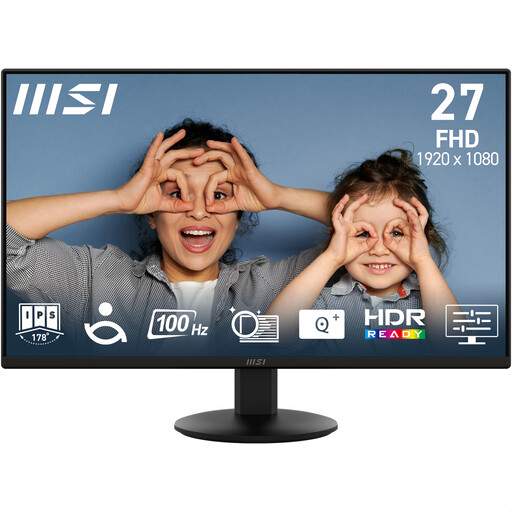
MSI PRO MP272L 27-inch FHD IPS 100Hz monitor
This Full HD option is worth considering for routine help-centre editing when fitting several high-resolution panes on screen is not your priority.
The model name states a 27-inch FHD IPS display, 100Hz refresh rate, HDMI and DisplayPort. Confirm how you can set the screen height and check exact-model acoustic information if your study has a strict noise requirement.
Joybuy
Common questions
Do I need a 4K monitor for help-centre formatting?
No: 4K is not necessary for this task. A 27-inch QHD display offers more pixel workspace than a 27-inch Full HD display for text and preview panes; consider 4K if you specifically want its additional pixels and can set a comfortable text size.
How should I position a monitor in my study?
Place the screen directly in front of you, with its top level with your eyes and the screen about an arm’s length away, in line with Health and Safety Executive guidance. Check desk depth and seated height before choosing a stand, riser or compatible arm.
Will a USB-C monitor charge any laptop?
No: the laptop and monitor need compatible USB-C display and charging capabilities. LG specifies up to 60 W power delivery for the 27QN880 and Dell up to 90 W for the U2724DE; compare the exact monitor rating with your laptop’s port specifications and charging requirements.
Does working from home require a display-screen-equipment assessment?
For workers who use display screen equipment daily as part of normal work for continuous periods of an hour or more, the UK Health and Safety Executive says employers must carry out a workstation assessment. Buying a monitor for a personal study does not, by itself, establish that this employment-related duty applies.
What should I check about warranty and returns?
Check the exact model’s warranty terms and the seller’s process for returns or faults before ordering. Pay particular attention to any applicable dead-pixel terms and how you would arrange a return if the monitor does not suit a strict quiet-room requirement; a seller’s voluntary policy should not be confused with statutory remedies for faulty goods.


