For regular side-by-side comparisons of booking pages and a budget sheet, a 31.5-inch 4K monitor offers more pixel space than a 23.8-inch Full HD model, provided your desk can accommodate it. If comparisons are occasional or your desk is compact, prioritise a screen you can position comfortably and connect to your laptop rather than choosing by size alone.
Who needs which setup?
Multi-tab holiday planners
If you keep airline and hotel pages, booking terms and a budget sheet open together, usable desktop space matters more than it does for checking one page at a time. The 4K models specified by LG UK and Dell UK are relevant to this kind of layout.
Laptop-based home workers
If the same laptop handles work and travel planning, check its display connection and charging requirement before relying on a monitor to reduce cable clutter. LG UK, Dell UK and BenQ UK specify different USB-C power-delivery limits for their respective models.
Small-desk comparison shoppers
For occasional booking comparisons in a compact workspace, a physically manageable monitor with useful position adjustment may matter more than a large panel. BenQ UK specifies a 23.8-inch adjustable option; desk fit still needs checking against the whole workstation.
What matters when choosing?
Start with how much booking information you need visible at once, then check whether the monitor will fit your desk and work with your laptop. The percentages below describe consumers according to their single most important need for this home-office task.
| Concern |
What to check |
Who this matters to |
| Space for parallel comparisons |
Compare screen size and resolution, then check that your laptop can drive the intended display mode. |
If I need booking terms, fare calendars and a budget sheet visible together, I want room to arrange windows without constantly switching between them; around 33% of consumers put parallel workspace first. |
| Screen positioning |
Check stand adjustment and desk fit; for a clamp mount, confirm the permitted desk-edge or grommet arrangement. |
When I work at the desk for extended periods, I need to place the screen in a comfortable position rather than adapt my posture to a fixed stand. For around 27% of consumers, positioning is the primary concern. |
| Laptop connection and charging |
Confirm USB-C video compatibility and compare the monitor’s stated power delivery with your laptop’s charging requirement. |
If I move my laptop between work and holiday planning, I would like a straightforward connection without assuming that any USB-C port can carry video and sufficient power; around 20% of consumers prioritise that setup. |
| Compact desk fit |
Check the monitor and stand dimensions, and decide whether its resolution suits the number of windows you usually view together. |
If I compare only a few pages at a time on a shallow desk, I would rather accommodate an external screen comfortably than make room for the largest panel; around 20% of consumers put a compact setup first. |
Checks before you buy
-
Choosing the largest screen without checking its position
A large display is less useful if it cannot sit directly in front of you at a comfortable distance. The Health and Safety Executive advises placing the top of the screen around eye level and the display about an arm’s length away.
Measure usable desk width and depth, including the space needed for a stand or clamp, before settling on a screen size.
-
Assuming USB-C will charge any laptop
USB-C power delivery varies by model: BenQ UK specifies up to 20W for the GW2490TC, LG UK up to 60W for the 32UN880K-B, and Dell UK up to 140W for the U3225QE. A USB-C connector alone does not establish that the laptop can send video through it.
Check the laptop’s video-output capability and charging requirement against the particular monitor and connection you intend to use.
-
Expecting screen size to fix the whole workstation
A larger panel does not replace appropriate screen placement or the positioning of the keyboard, mouse and chair. The Health and Safety Executive’s display-screen guidance treats these as parts of the workstation setup.
Assess the monitor’s adjustment alongside the rest of your desk arrangement, particularly if you use it for extended work sessions.
-
Choosing Full HD without considering your window layout
BenQ UK specifies a 23.8-inch 1920 × 1080 display for the GW2490TC, while LG UK specifies 3840 × 2160 for the 31.5-inch 32UN880K-B. The higher-resolution screen offers more pixels for arranging windows, although website layouts and text scaling also affect what is practical to view.
Think through the pages and spreadsheet you normally keep open together; a compact Full HD screen may suffice for lighter comparisons, while a busier layout may warrant examining a 4K option.
Relevant brands to consider
LG
LG UK’s UltraFine Ergo 32UN880K-B is relevant when a larger 4K display needs flexible positioning at a home-office desk.
- LG UK specifies a 31.5-inch 3840 × 2160 IPS panel, a C-clamp stand with extension, swivel, pivot, height and tilt adjustment, and USB-C power delivery up to 60W.
- Check that your desk suits the mounting arrangement and that your laptop supports the intended USB-C video connection and can use the stated charging output.
Dell
Dell UK’s UltraSharp models offer different routes for a 4K desk display, from a 31.5-inch hub monitor to a much larger multi-PC screen.
- Dell UK specifies an integrated USB hub and up to 140W power delivery for the 31.5-inch U3225QE; it lists multi-PC connectivity and four FHD partitions via iMST for the 42.5-inch U4323QE.
- Confirm laptop and peripheral compatibility for a hub setup. The U4323QE’s physical size calls for careful desk-fit and viewing-distance checks, particularly if you use only one laptop.
BenQ
BenQ UK’s Home Office GW2490TC is a compact option for lighter comparison layouts where stand adjustment remains important.
- BenQ UK specifies a 23.8-inch 1920 × 1080 IPS panel, 150 mm height adjustment, pivot and USB-C DisplayPort Alt Mode with up to 20W power delivery.
- Its Full HD resolution leaves fewer pixels for simultaneous windows than the specified 4K models. Check your laptop’s charging requirement rather than assuming the 20W output can replace its charger.
Joybuy monitors for this setup
These monitors provide external-screen options for comparing booking pages and a budget sheet at home, including 4K displays and a WQHD alternative. Choose by the space you need on screen, the room available on your desk and the connection your laptop supports.
 Image unavailable
iiyama ProLite XUB2792UHSU-B6 27-inch 4K monitor
Consider this 27-inch display if you want a 4K screen for arranging booking pages beside a budget sheet without choosing a 32-inch-class model.
Check desk fit and confirm USB-C video and charging compatibility with your laptop if you intend to use a one-cable connection.
Joybuy
 Image unavailable
Dahua 32-inch 4K 165Hz curved OLED monitor
Its 4K display is an option to assess if you regularly arrange several comparison windows on one screen and have room for a curved monitor.
The product name states 3840 × 2160 resolution, 165Hz refresh rate, Type-C 65W and a USB hub. Confirm the required laptop video connection and check viewing distance and desk fit before relying on this setup.
Joybuy
 Image unavailable
ASUS ProArt Display PA32UCG-K 32-inch 4K IPS Mini LED monitor
Consider the 32-inch 4K format if keeping booking information and a spreadsheet visible together takes priority over a compact desk footprint.
The product name also specifies Thunderbolt 3 and 120Hz. Check the laptop connection, any charging requirement and the space available for the display rather than assuming a one-cable setup.
Joybuy
 Image unavailable
ASUS ProArt PA278CV IPS WQHD monitor
This WQHD option is worth considering when your comparison layout does not call for a 4K display.
Check whether its workspace suits the windows you use together. If monitor-based laptop charging matters, confirm the USB-C power output and your laptop’s compatibility before purchase.
Joybuy
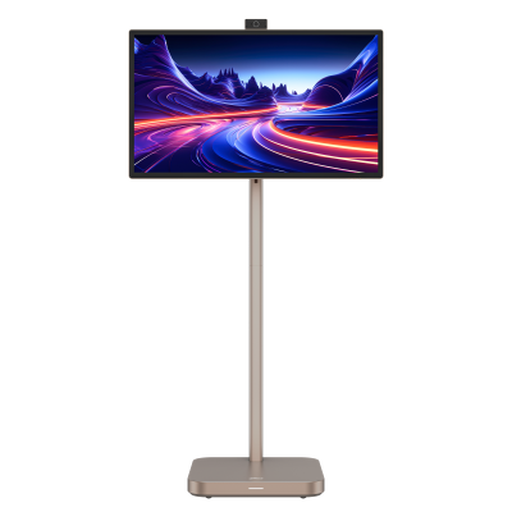 Image unavailable
Dahua 31.5-inch 4K Explorer portable smart monitor, 8GB+128GB
Consider its 31.5-inch 4K format if you want room for several holiday-comparison windows and can accommodate a large display at your desk.
The product name specifies Android 11 and a built-in battery. Confirm the panel type before buying, as the title and technical information disagree; also check the actual footprint and whether its Type-C connection meets your laptop’s video and charging needs.
Joybuy
Common questions
How should I position a monitor for home-office comparisons?
Place it directly in front of you, with the top of the screen around eye level and the display about an arm’s length away, following Health and Safety Executive guidance. Check that the monitor’s stand and your desk let you achieve that position alongside your keyboard and mouse.
Can one USB-C cable connect and charge my laptop?
It can if your laptop supports the required USB-C video connection and the monitor supplies enough power for that laptop. The limits differ by model: LG UK specifies up to 60W for the 32UN880K-B, Dell UK up to 140W for the U3225QE and BenQ UK up to 20W for the GW2490TC.
Do I need a 43-inch screen to compare holiday options?
Not necessarily: decide how many windows or computer sources you need visible together before choosing such a large panel. Dell UK specifies four FHD partitions via iMST and multi-PC connectivity for the 42.5-inch U4323QE, but those features may be unnecessary for planning on one laptop and require sufficient desk space.
What should I check before buying a clamp-mounted monitor?
Confirm that your desk edge or grommet arrangement meets the monitor manufacturer’s installation requirements and still allows a comfortable screen position. LG UK describes C-clamp and grommet mounting for the 32UN880K-B; consult its installation instructions for the permitted desk setup.


