What matters when choosing
Settle your intended output colour space first, then check how the monitor connects to your computer and fits the study desk.
| Concern |
What to check |
Who this matters to |
| Colour workflow |
Compare stated Rec.709, sRGB or DCI-P3 coverage with your intended output; check the exact model’s calibration claim. |
When my holiday clips are destined for SDR viewing or a managed wider-gamut workflow, I want the display mode to match what I will export. Around 42% of consumers put that colour-workflow fit first. |
| Laptop connection |
Check USB-C video support, the monitor’s power-delivery wattage and whether the cable supports the functions you need. |
I edit at a compact laptop desk and want to avoid juggling a separate display cable and charger, provided one connection can do both jobs. Roughly 33% of consumers prioritise that connection and desk simplicity. |
| Study-desk fit |
Measure the available desk space and compare stand adjustment and footprint; check audio controls if you plan to use built-in speakers. |
For longer sessions in a quiet study, I need to position the screen comfortably without unwanted audio. About 25% of consumers place study-desk comfort first. |
Relevant brands to consider
These model lines illustrate different specifications to compare; a brand name alone does not establish that a particular monitor suits your output or desk.
BenQ
The BenQ PD2705U is a 27-inch 4K IPS model with stated SDR-oriented colour coverage and USB-C connectivity.
- BenQ UK lists 99% sRGB and 99% Rec.709 coverage, average Delta E ≤3, 65 W USB-C power delivery and an adjustable stand.
- Its stated typical brightness is 250 nits. HDR10 support alone should not be taken as evidence of reference HDR capability.
ASUS ProArt
The ASUS ProArt PA279CRV is a 27-inch 4K IPS model aimed at colour-conscious video work and laptop connectivity.
- ASUS UK states 99% DCI-P3 coverage, factory pre-calibration to Delta E <2 and USB-C power delivery up to 96 W.
- Match its display mode to a colour-managed workflow, and check whether its charging limit meets your laptop’s needs.
LG UltraFine
LG’s 27UP650K and 27UP850K provide two distinct 27-inch 4K IPS configurations.
- LG UK lists 95% typical DCI-P3 coverage and stand adjustment for the 27UP650K; the 27UP850K adds USB-C with charging up to 90 W.
- Choose by exact model: the 27UP650K’s DisplayHDR 400 label does not establish reference HDR grading capability, and LG says Calibration Studio software is not included with the 27UP850K.
Dell UltraSharp
The Dell UltraSharp U2723QE is a 27-inch 4K IPS Black hub monitor that offers a useful specification comparison for SDR and wider-gamut workflows.
- Dell UK lists 100% Rec.709, 100% sRGB and 98% DCI-P3 coverage, plus 90 W USB-C power delivery.
- Check the exact model’s current availability and seller terms before treating it as a purchase option.
Joybuy monitor choices
These monitors offer different ways to put a 4K editing screen on a study desk, from a 27-inch IPS option to larger or OLED displays. Choose according to your output colour space, available desk room and the connections your computer needs; product labels alone do not establish quiet operation.
 No image available
Dahua curved 4K 165Hz OLED monitor, Type-C 65W
Consider this curved OLED model if your editing setup has room for a larger screen and your workflow calls for its stated 99% DCI-P3 coverage.
The title lists 3840 × 2160 resolution, 165 Hz and Type-C 65 W. Check that 65 W meets your laptop’s charging needs, and confirm the exact screen diagonal before planning its position on the desk.
If silence is essential, check the exact model’s operating-noise information rather than inferring it from its display features.
Joybuy
 No image available
iiyama ProLite XUB2792UHSU-B6 27-inch 4K UHD monitor
This 27-inch 4K UHD model is an option if screen size and editing workspace are your starting considerations.
Check its exact colour-space and calibration specifications against your intended output. If you want a one-cable laptop setup, confirm USB-C video and charging functions, wattage and cable compatibility before relying on them.
Joybuy
 No image available
ASUS ProArt PA27DCE-K OLED 4K UHD
Consider this OLED model if you are assessing display type as well as 4K resolution for a colour-managed editing setup.
Confirm the exact colour coverage and calibration requirements for your work. Check USB-C charging capability separately if the monitor needs to power your laptop, and check model-specific operating noise if silence matters.
Joybuy
 No image available
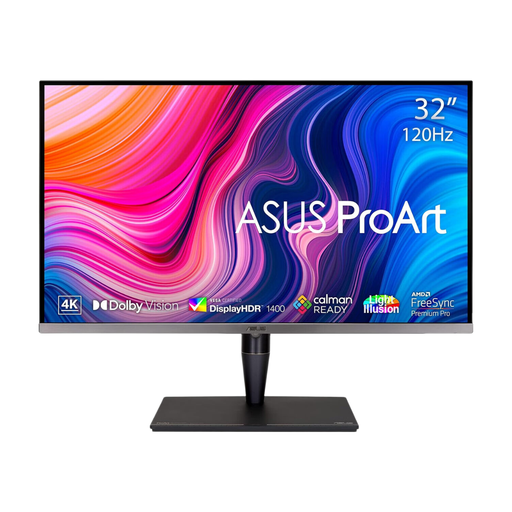
ASUS ProArt Display PA32UCG-K 32-inch 4K IPS Mini LED
This 32-inch model is worth considering when you have the desk space and a workflow that calls for comparing more detailed HDR and colour specifications.
Its title lists DCI-P3, hardware calibration and Thunderbolt 3. Confirm peak brightness for your intended HDR work before relying on a figure: the stated brightness figures conflict. Check laptop charging capability separately.
Joybuy
 No image available
LG UltraFine 27UP650K 27-inch 4K IPS monitor
Consider this model if you want a 27-inch 4K IPS screen with adjustable placement and do not require single-cable laptop charging to make the setup work.
LG UK lists 95% typical DCI-P3 coverage, DisplayHDR 400 and tilt, height and pivot adjustment for the 27UP650K-W. Check the exact variant’s Rec.709 or sRGB specifications if SDR colour matching is your priority; DisplayHDR 400 alone does not establish reference HDR grading capability.
Joybuy
Common questions
Do I need a 4K monitor to edit holiday videos?
No: 4K is a workspace and viewing-detail choice, not a requirement that settles the whole purchase. Check colour-space coverage, computer connections and desk fit separately, especially if you edit or export 4K footage.
Should I choose Rec.709/sRGB or DCI-P3?
Choose the colour space that matches your editing and delivery workflow. BenQ UK states 99% Rec.709 and 99% sRGB coverage for the PD2705U, while ASUS UK states 99% DCI-P3 for the PA279CRV; a wider stated gamut is not automatically useful for conventional SDR exports without appropriate colour management.
Can one USB-C cable handle video, charging and peripherals?
It can on a compatible monitor, laptop and cable, but a USB-C label by itself is not enough. ASUS UK lists up to 96 W power delivery for the PA279CRV, LG UK up to 90 W for the 27UP850K and BenQ UK 65 W for the PD2705U; compare the exact model’s video, data and charging functions with your laptop’s requirements.
Are built-in speakers a problem in a quiet study?
Not if you leave them unused, but speaker presence does not establish how quietly a monitor operates. BenQ lists built-in speakers for the PD2705U, whereas Dell lists none for the U2723QE; check the exact model’s audio controls and seek model-specific operating-noise information if silence is essential.
What should I do with an old monitor in the UK?
Check your local authority’s or retailer’s electrical-equipment collection and take-back arrangements when replacing it. GOV.UK identifies the Waste Electrical and Electronic Equipment Regulations 2013, as amended, as the UK framework for electrical-equipment waste; the available disposal route depends on your local arrangements.


