For reviewing maintenance calendars, invoices and service records in a quiet study, a 27-inch QHD monitor with an adjustable stand is a sensible starting point; consider a 4K display if higher resolution matters more to you. Prioritise USB-C docking only after checking your laptop’s video and charging requirements, and choose built-in call hardware only if you expect to use it.
Who is this setup for?
Home-maintenance dashboard users
If you review maintenance calendars, invoices and service records at a study desk, focus on room for documents and a screen position that works with your desk. The Health and Safety Executive includes home workers in its display-screen guidance where that guidance applies.
Laptop-first quiet-study users
If you want fewer cables on the desk, check what the monitor’s USB-C connection does and whether its stated power delivery meets your laptop’s charging requirement. A USB-C connector alone does not settle either question.
Occasional-call study users
If the same desk is used for calls or alerts, decide whether integrated speakers, a webcam and a microphone would replace devices you otherwise need—or whether headphones and your existing equipment are enough.
What matters when choosing?
Start with the space needed for records and the monitor’s position on your desk. Then decide whether laptop docking or occasional calls justify additional features.
| Concern |
What to check |
Who this matters to |
| Records and working space |
Compare native resolution, screen size and stand adjustment with your documents and available desk space. At 27 inches, QHD and 4K offer different resolution options. |
If I keep schedules, invoices and manuals open together, I want space to read them without a poorly positioned screen; around 42% of consumers put record viewing and working space first. |
| Laptop connection |
Check the laptop’s USB-C video support and charging requirement against the monitor’s display connection and stated power-delivery wattage. |
A laptop is my main computer, so I want to know whether one connection can handle the display and charging I need; roughly 33% of consumers prioritise a simpler laptop connection. |
| Audio and calls |
Decide whether you need speakers, a webcam or a microphone, and whether sound should instead stay in headphones. |
When I take an occasional call at the study desk, I want the necessary equipment without playing sound aloud unnecessarily; about 25% of consumers put audio and call flexibility first. |
Buying pitfalls
-
Assuming every USB-C monitor can replace a laptop charger
USB-C power delivery varies by model: LG specifies up to 15W for the 27U631A-B and up to 90W for the 27BA850-B. A connector labelled USB-C does not, by itself, establish that a monitor can charge your laptop.
Check the exact monitor’s stated wattage alongside your laptop’s charging requirement and supported USB-C display connection.
-
Buying speakers simply because the study is quiet
Built-in speakers can remove separate desk hardware, but they play sound aloud. They are not a substitute for headphones when you need private listening.
Decide whether you will play alerts or calls aloud before making integrated audio a requirement.
-
Expecting an adjustable stand to solve the whole workstation setup
The Health and Safety Executive advises considering the workstation and working environment, not just the display, when managing display-screen work.
Check stand movement and desk fit together with your chair, keyboard position and working routine. If you use display-screen equipment for work, follow the applicable workplace assessment process.
-
Comparing resolution without checking energy information
UK government energy-information guidance covers electronic displays. Resolution alone does not tell you how two exact monitor models compare on energy information.
Consult the energy label and product information for each model where available.
Relevant brands to consider
Dell
Dell offers productivity displays alongside USB-C models, making its range relevant when comparing stand adjustment with laptop connectivity.
- Dell lists the S2725QC as a 27-inch 4K USB-C monitor with a height-adjustable stand and two 5W speakers.
- Check the exact model’s connections and stand specification rather than applying S2725QC features to other Dell monitors.
LG
LG has USB-C options with substantially different stated power-delivery limits and peripheral features.
- LG specifies up to 90W USB-C power delivery, RJ45, a webcam, microphone and speakers for the 27BA850-B.
- LG specifies only up to 15W power delivery for the separate 27U631A-B; check the exact model against your laptop’s needs.
Lenovo ThinkVision
The ThinkVision T27QD-4v illustrates a monitor designed to combine a display, laptop docking and call equipment.
- Lenovo specifies a QHD screen, USB-C docking with up to 100W power delivery, a camera and two 5W speakers for the T27QD-4v.
- Confirm the exact configuration, laptop compatibility and current seller before choosing this model.
Joybuy monitor choices
These monitors offer different screen sizes and resolutions for reviewing household records at a study desk. Check each model’s stand and connection details against your setup, particularly if you want laptop charging through the monitor.
 No image available
ASUS ProArt PA278CFRV QHD IPS 100Hz
Consider this QHD model for a desk used to review maintenance records and schedules. Its name specifies an IPS panel and 100Hz refresh rate; check the exact variant’s stand, USB-C connection and speaker details if those features matter to you.
View on Joybuy
 No image available
ASUS ProArt PA278CV WQHD IPS
This WQHD IPS model is another option for reviewing calendars and documents. Check the exact variant’s stand adjustments and USB-C display and charging capabilities before planning a one-cable laptop desk.
View on Joybuy
 No image available
Lenovo L32p-30 31.5-inch 4K UHD IPS USB-C Monitor
The 31.5-inch 4K format is worth considering if you want a larger screen for detailed records and have room for it on the desk. The title identifies USB-C, but check its power-delivery wattage against your laptop before relying on monitor-based charging.
View on Joybuy
 No image available
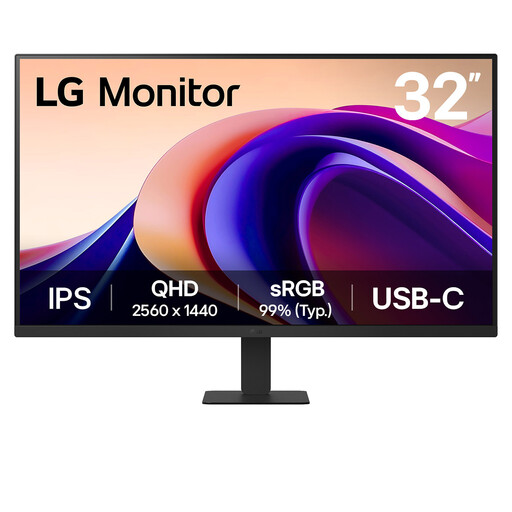
LG 32U631A 32-inch QHD IPS USB-C Monitor
This 32-inch QHD option provides a larger screen format for schedules and records. Its title also specifies 100Hz, HDMI and USB-C; check desk fit and the exact USB-C charging capability before treating it as a laptop dock.
View on Joybuy
 No image available
Dell P2425 24-inch Monitor
The stated 24-inch size makes this a format to consider for a compact study desk. Confirm the exact input connections before buying for USB-C use, and check the refresh-rate specification if it affects your choice.
View on Joybuy
Common questions
Will one USB-C cable show video and charge my laptop?
It can do both only when the laptop and monitor support the required display connection and the monitor supplies enough power for that laptop. LG, for example, specifies up to 15W for the 27U631A-B and up to 90W for the separate 27BA850-B, so check the exact model rather than the connector shape.
Does display-screen guidance apply when I work from home?
Yes, home workers can fall within the Health and Safety Executive’s display-screen equipment guidance when their work meets the relevant use conditions. If you use a screen regularly for work, follow your employer’s workstation assessment process; a personal household monitor purchase does not, by itself, establish that those work rules apply.
What should I do with an old monitor?
Use an appropriate electrical-equipment reuse or recycling route rather than putting the monitor in general rubbish. Recycle Your Electricals offers a postcode search for local recycling, repair and donation options.


