For landing-page design at home, start by checking for a monitor with an explicit sRGB mode or documented colour performance, enough workspace for your design tools and a stand that fits your desk. A 27-inch 4K display is one option shown in the manufacturers’ ranges; wider-gamut models are more relevant if you also prepare photography, video or other broad-gamut assets, but you will still need a suitable mode for ordinary web work.
Who this is for
Web-first landing-page designers
If your main output is browser-based pages, prioritise an sRGB-oriented colour path and enough screen space for a design canvas, browser preview and developer tools. BenQ’s PD2705U specifications illustrate the kind of explicit web-colour information to look for.
Mixed-media brand designers
If landing pages sit alongside photography, video or brand artwork, wider colour-space coverage may matter. ASUS’s PA279CRV and LG’s 27UP850K-W specifications give you model-specific colour claims to compare, while the mode used for web assets still needs attention.
Laptop-led home-office workers
If you want fewer desk cables, compare the monitor’s video connection and charging capability with your laptop. For sustained screen work, the Health and Safety Executive also advises a home workstation that supports a comfortable, sustainable posture.
What to check before buying
For a home-office landing-page design monitor, identify the one requirement that would drive your choice, then check the other features against your computer and desk.
| Concern | What to check | Who this matters to |
|---|
| Web colour |
Look for a stated sRGB mode or coverage and model-specific calibration information; check the mode you would use for web assets. |
If the colours in my landing-page assets need a dependable web-oriented reference, that matters more to me than extra desk features. Around 36% of consumers put colour reliability first. |
| Workspace and detail |
Check native resolution, screen size and whether your computer can drive the display through your intended connection. |
Keeping a design canvas, browser preview and supporting tools in view is my main difficulty; roughly 29% of consumers prioritise workspace and detail. |
| Laptop connection |
Confirm laptop video-output compatibility and compare the monitor’s stated USB-C power delivery with the laptop’s requirements. |
I want to connect my laptop at the desk without juggling separate display and charging leads. For around 21% of consumers, a simpler laptop connection comes first. |
| Desk positioning |
Check stand adjustments, desk depth and glare; confirm mounting compatibility if you plan to use an arm. |
During sustained screen work, I need to position the display comfortably in the space I have. Approximately 14% of consumers make desk positioning their primary concern. |
Buying pitfalls
-
Assuming a wider gamut settles web-colour accuracy
DCI-P3 or Adobe RGB coverage can matter for mixed-media work, but it does not by itself determine how an ordinary sRGB web asset will appear.
For web-first work, check the exact model’s sRGB capability and calibration information. If you choose a wider-gamut display, use an appropriate colour mode for the assets you deliver.
-
Assuming USB-C means one-cable compatibility
A USB-C socket alone does not establish that your laptop can send video through it or receive enough power from the monitor.
Check the laptop’s supported video output, the monitor’s port functions and power delivery, and the cable needed for that connection.
-
Choosing panel specifications without checking desk fit
Stand adjustment can help you position a monitor, but screen height, desk depth and lighting also affect the setup. The Health and Safety Executive advises a comfortable, sustainable posture for applicable home working.
Measure your desk and check the stand’s adjustment range or mounting compatibility before choosing a screen size.
A monitor arm or changes to the desk layout may be needed if the supplied stand cannot achieve the position you need.
-
Putting a replaced monitor in general household waste
An old monitor needs an appropriate electrical-waste route rather than disposal with general waste.
Ask the seller about its take-back arrangement when buying a replacement, or use a designated electrical-waste collection route. GOV.UK guidance describes retailer take-back duties for qualifying replacement purchases.
Brands to consider for this work
BenQ
The Creative Pro PD series is worth examining if your work centres on web colour and you want model-specific calibration information.
- BenQ lists 99% sRGB, 99% Rec.709 and a factory calibration report for the PD2705U.
- Its stated 65 W USB-C power delivery still needs to be checked against your laptop’s charging requirements.
ASUS
The ProArt PA279CRV is relevant when landing pages are part of a wider photography, video or brand-asset workflow.
- ASUS lists 99% DCI-P3, 99% Adobe RGB and factory pre-calibration to ΔE <2 for this model.
- For ordinary sRGB web assets, choose and manage the relevant colour mode rather than relying on gamut coverage alone.
Dell
The UltraSharp U2725QE is a model to examine if a 27-inch 4K workspace and integrated desk connectivity are priorities.
- Dell lists an IPS Black panel, USB hub and up to 140 W power delivery for the U2725QE.
- Check the exact colour-space modes against your design workflow before choosing it for colour-critical work.
LG
The UltraFine 27UP850K-W combines a 27-inch 4K IPS display with USB-C connectivity for a laptop-led desk.
- LG lists 95% DCI-P3 typical coverage, USB-C charging up to 90 W and height, pivot and tilt adjustment.
- LG says its calibration software is not included in the package; account for your intended colour workflow and equipment.
Joybuy monitors for landing-page design
These monitors offer different ways to approach a home landing-page workspace, from 27-inch 4K and WQHD screens to a larger creative-work display. Compare each model’s stated colour features, connection options and physical fit against your own workflow.
 No image available
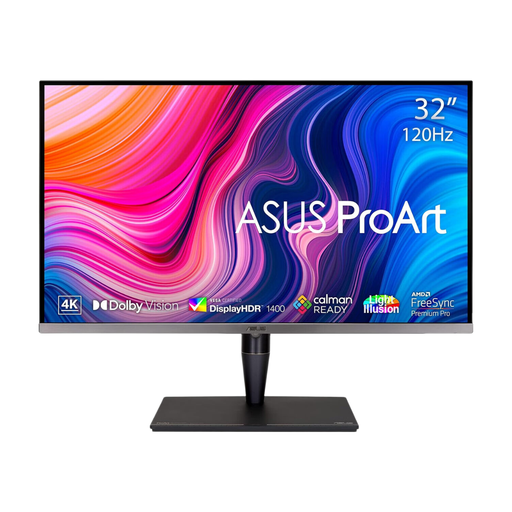
ASUS ProArt Display PA32UCG-K 32-inch 4K Mini LED monitor
Consider this larger screen if you have room for a 32-inch creative-work display; check desk depth and your preferred viewing distance.
The product name specifies an IPS Mini LED panel, 120 Hz refresh rate, hardware calibration and Thunderbolt 3. Confirm the colour mode you need for sRGB web assets and the port functions required by your computer.
View on Joybuy
 No image available
ASUS ProArt PA278CV IPS WQHD monitor
Consider this model if a WQHD screen gives you enough room for your design canvas and browser preview.
Its product name specifies an IPS panel and WQHD resolution, rather than 4K. If laptop charging matters, confirm the USB-C power-delivery level before buying.
View on Joybuy
 No image available
iiyama ProLite XUB2792UHSU-B6 27-inch 4K monitor
This 27-inch 4K format is a choice to assess if detailed layouts and browser previews are your main workspace concern.
The product name specifies 4K UHD resolution. For colour-critical work, check the model’s calibration information; confirm USB-C video and charging functions if you want a one-cable laptop setup.
View on Joybuy
 No image available
BenQ MA270UP 27-inch 4K Nano Glossy IPS Mac monitor
Consider this model for a Mac-led desk if its connection options and glossy screen finish suit your setup.
The product name specifies 4K resolution, USB-C and a height-adjustable stand. Check reflections in your desk lighting, computer compatibility and any calibration requirements for your work.
View on Joybuy
 No image available
LG 27UP650K 27-inch 4K IPS monitor
Consider this 27-inch screen if you want a 4K workspace and can connect through the display inputs named for this model.
The product name states 95% DCI-P3 coverage, HDMI and DisplayPort. Check its sRGB mode and calibration suitability before relying on it for web-colour matching; confirm that those connections suit your computer.
View on Joybuy
Common questions
Should I choose sRGB or a wider colour gamut for landing-page design?
Prioritise an explicit sRGB or Rec.709 path when landing pages and other standard web assets are your main output. Wider DCI-P3 or Adobe RGB coverage becomes more relevant if you also prepare photography, video or broad-gamut artwork; check the mode you would use for web work.
Can I connect my laptop to a monitor with one USB-C cable?
You can do so only when the laptop and monitor support the required video connection and the monitor provides enough power for the laptop. Check the laptop’s port specification, the monitor’s power-delivery rating and the cable before relying on a one-cable setup.
Do display-screen-equipment rules cover working from home?
They can apply to employees working at home permanently, long-term or on a hybrid basis who use display screen equipment daily for continuous periods of an hour or more. The Health and Safety Executive says employers should assess individual home-workstation needs; the rules are not a universal condition on every private monitor purchase.
What should I do with a monitor I am replacing?
Use an appropriate electrical-waste collection or retailer take-back route rather than general household waste. GOV.UK guidance describes take-back duties for qualifying retailers when a customer buys replacement equipment of the same type and function; ask the seller how its arrangement works.


