Bright-window home learners
If daylight reflects in your screen while you write, desk placement matters as much as the monitor finish. The Health and Safety Executive advises arranging the desk and screen to avoid glare and bright reflections.


Start with the desk position: the Health and Safety Executive advises arranging the screen to avoid bright reflections, particularly from a window directly facing it. Then look for a matte or anti-glare surface and enough positioning flexibility for your desk. Choose resolution according to how much text you need on screen at once, and consider USB-C features only if they suit your laptop.
If daylight reflects in your screen while you write, desk placement matters as much as the monitor finish. The Health and Safety Executive advises arranging the desk and screen to avoid glare and bright reflections.
If you spend extended sessions typing exercises and reading corrections, consider whether the screen can sit comfortably at your desk and whether it gives you enough room for the text you use together.
If your laptop drives the external screen, its video connection is an essential check. USB-C video and charging features are useful only when the laptop and monitor support the functions you need.
For language exercises beside a bright window, establish where the screen can sit before choosing its finish, text workspace and connections.
| Concern | What to check | Who this matters to |
|---|---|---|
| Reflections and daylight | Check for a matte or anti-glare surface and whether the desk and blinds let you keep bright window reflections off the screen. | If daylight crosses my desk, I need to read prompts without a window reflection covering the text. Roughly 45% of consumers put reflection control first. |
| Text space and positioning | Compare screen size and resolution, then check stand movement or VESA mounting for your desk. | When I keep an exercise and reference material open together, I need enough visible text and a screen I can position comfortably. Around 33% of consumers make text space and positioning their primary concern. |
| Laptop connection and features | Match the laptop's video output to the monitor input; for USB-C charging, check video support and the stated power delivery. | If I work from a laptop, I want the external display to connect without choosing docking features I cannot use. About 22% of consumers prioritise connection and feature fit. |
A matte screen can still be difficult to read when a bright window reflects directly in it. The Health and Safety Executive advises arranging the desk and screen to avoid such reflections.
Check whether you can place the screen away from the direct reflection and use a blind or curtain when needed.
BenQ UK lists the 27-inch GW2791 at 1920 × 1080, while Joybuy UK lists the 27-inch Dell U2724D at 2560 × 1440. Screen size alone therefore does not tell you how much detail a model displays.
Compare size and resolution together, and view text at your usual working distance if you can.
USB-C functions depend on the particular monitor and laptop. A USB-C port does not, by itself, establish that the laptop can send video or receive enough power through one cable.
Check the laptop's external-display support and charging requirement against the monitor's listed USB-C functions.
BenQ's GW2791 is a 27-inch Full HD IPS example for a straightforward writing desk.
The UltraSharp U2724D is a 27-inch QHD option for a desk where text space and stand adjustment matter.
The VA229QSB is a smaller Full HD IPS option when fitting and positioning a screen on a compact desk are priorities.
These monitors offer different approaches to a window-side writing desk: text space, screen positioning and laptop connection. Whichever layout suits you, arrange the screen to avoid direct reflections.
 No image available
Consider this for writing with reference material on screen when text space and adjustable positioning are priorities. Check the laptop's USB-C video support and charging requirements if you want a one-cable setup.
 No image available
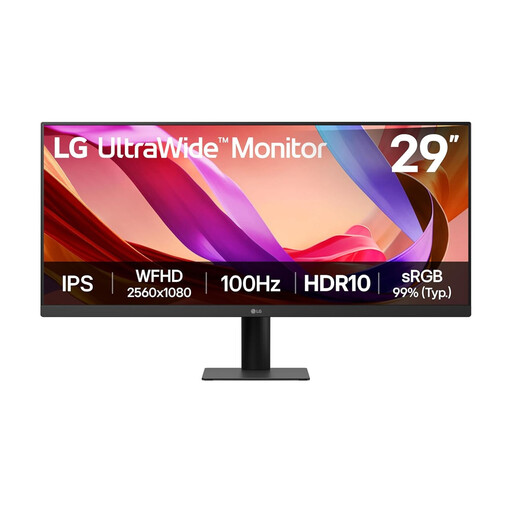
Consider the wide format if you want an exercise and reference material alongside each other. Check that your desk has room for the 29-inch screen and that tilt-only stand adjustment lets you avoid window reflections. The product name lists UWFHD 1080p resolution, HDMI and DisplayPort.
 No image available
For writing mainly in one document at a time, this is a matte-screen option if you can control direct reflections through placement. BenQ UK lists 1920 × 1080 resolution and a tilt-only supplied stand; check text at your working distance and consider whether you need a separate VESA mount for more positioning options.
 No image available
Consider this if you need flexible placement at your study desk, but check which mounting accessories suit the space. Its screen is described as both glossy and anti-glare, so confirm the finish for your window-side position. For USB-C video or charging, check laptop compatibility and charging requirements.
 No image available
Consider this if adjusting the screen position is important at your desk. Check its screen coating before choosing it for a bright-window setup: the Matte Black wording in the product name describes the finish, not necessarily the display surface.
Not by itself. The Health and Safety Executive advises arranging the desk and screen to avoid glare or bright reflections, often by keeping the screen from directly facing a window or bright light. Check the layout and window covering before relying on monitor brightness.
A monitor explicitly specified as matte or anti-glare is a sensible option for this setup, but its finish will not eliminate a direct window reflection. BenQ UK lists a matte coating for the GW2791; you would still need to position the screen to avoid glare.
Personal language study does not call for a particular monitor model under the UK workplace display-screen rules. Those rules concern work in the circumstances they define; the Health and Safety Executive notes that they can apply to home workers as well as people at fixed workstations. For your own study desk, focus on readable text, suitable positioning and controlling reflections.
For qualifying display-screen-equipment users, the Health and Safety Executive says employers must arrange an eye test on request. That employment duty is distinct from using a monitor solely for personal language study.