
24/7 Customer Support

Free returns

Same-day & Next-day Delivery

Quality Guaranteed

Unlock Your Welcome Offers: FREE Delivery | Up to 80% OFF | Free 30-day JoyPlus trial
Download the APP
Long hours spent in front of a computer screen are a reality for many of us, whether for work, study, or gaming. A common complaint is the persistent eye strain, headaches and fatigue that can come from a poorly lit desk. Traditional desk lamps often create glare on the monitor or take up valuable space, adding to the clutter.
A monitor light bar offers a streamlined solution. By mounting directly onto your monitor, it illuminates your desk without casting reflections on the screen, creating a more comfortable and focused environment. This guide is designed to help you understand the key features to look for and to present some carefully selected options that can enhance your home office lighting or gaming desk setup.
Selecting the right light bar for your monitor involves more than just picking the first one you see. Consider these factors to ensure you find a model that suits your specific needs.
The ability to adjust your lighting is crucial for comfort throughout the day. A quality dimmable screen bar allows you to increase brightness for detailed tasks and lower it for a more relaxed atmosphere in the evening.
Look for models that also offer adjustable colour temperature, measured in Kelvin (K).
Having this flexibility in an eye care monitor lamp can significantly reduce eye fatigue by adapting the light to your environment and personal preference.
The primary advantage of a screen light bar over a standard lamp is its light distribution. A well-designed model will feature an asymmetrical optical design. This means it projects light forward and downward onto your desk, illuminating your keyboard and workspace without shining directly onto the screen or into your eyes. This targeted lighting is essential for preventing distracting reflections and screen glare, which are major causes of eye strain.
Most monitor light bars are powered via a USB port, making them a convenient USB desk light that can be plugged directly into your monitor, computer or a USB hub, keeping your setup tidy.
Before purchasing, check the mounting mechanism. Most use a weighted clip system that rests on top of the monitor. It is important to verify the supported monitor thickness to ensure a secure fit, especially if you have an ultra-thin or a curved display. Many modern light bars are designed to be compatible with a wide range of screen shapes and sizes.
Here are a few recommendations that stand out for their features, design and user-focused functionality.

Why It Stands Out The Xiaomi Monitor Light Bar is notable for its minimalist aesthetic and user-friendly wireless remote control. The sleek, black metal body adds a touch of modern elegance to any desk, while the separate remote allows you to adjust brightness and colour temperature without reaching up to the bar itself.
Pros:
Who is it for? This is an excellent choice for home office professionals and students who appreciate a clean, minimalist design and the convenience of a wireless remote. It provides all the essential features without unnecessary complexity.
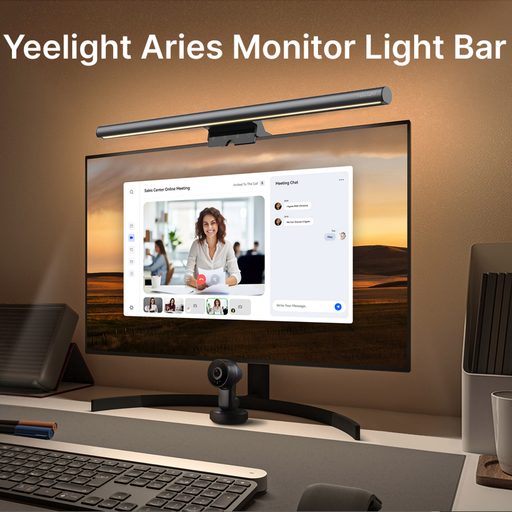
Why It Stands Out The Yeelight Aries places a strong emphasis on visual quality and eye care. It features a high Colour Rendering Index (CRI) of Ra95, which means it renders colours on your desk more accurately and naturally—a significant benefit for creative work. Its anti-glare design and flicker-free technology are engineered for comfort during extended use.
Pros:
Who is it for? Designers, artists, video editors and anyone for whom colour accuracy is paramount will find the high CRI of this light bar particularly useful. It is also a strong contender for users who are especially concerned with minimising eye strain.
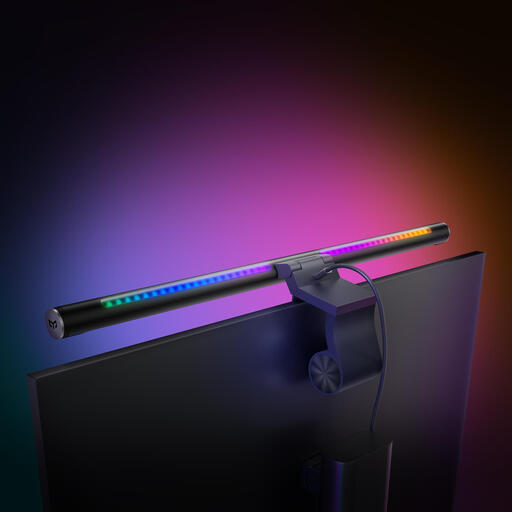
Why It Stands Out For the tech-savvy user, the Yeelight Libra 2 Pro offers a suite of smart features. Its compatibility with Matter, the new universal smart home standard, allows it to integrate seamlessly with Alexa, Google Home and Apple Home. This, combined with its intuitive wireless knob controller, provides an unmatched level of control and automation for your desk lighting.
Pros:
Who is it for? This is the ideal choice for smart home enthusiasts, gamers and tech professionals who want to integrate their desk lighting into their connected ecosystem. The advanced features and control options make it a centrepiece for any modern gaming desk setup.
While a monitor light bar is a fantastic solution for many, your specific needs might call for a different approach. From adjustable floor lamps to ambient strip lighting, there are many ways to illuminate your space.
Explore our full range of lighting fixtures to find the perfect solution for your home or office.
For a computer-focused workspace, a monitor light bar generally offers distinct advantages. Its asymmetrical lighting prevents screen glare, a common issue with traditional lamps. It also frees up valuable desk space, contributing to a more organised and minimalist setup.
Many modern light bars are designed with adjustable, counter-weighted clips that can accommodate the shape of a curved monitor. However, it is always important to check the product's specifications for the supported monitor thickness and curvature to ensure a stable and secure fit.
It helps by reducing the high contrast between a bright screen and a dark room. By providing a stable, flicker-free source of ambient light on your workspace, it creates a more balanced visual environment. This can help your eyes adjust more comfortably, potentially reducing the fatigue and strain associated with long hours of screen time.