
24/7 Customer Support

Free returns

Same-day & Next-day Delivery

Quality Guaranteed

Unlock Your Welcome Offers: FREE Delivery | Up to 80% OFF | Free 30-day JoyPlus trial
Download the APP
Long hours spent in front of a computer screen can often lead to tired eyes, headaches and a general feeling of fatigue. A common cause is poor lighting, which can create distracting glare on your monitor or leave your workspace unevenly lit. While a traditional desk lamp can help, it often takes up valuable desk space and can cast harsh shadows.
A monitor light bar offers a streamlined solution. By mounting directly onto your monitor, it illuminates your desk without shining on the screen, creating a more comfortable and focused environment. As the Joybuy Product Recommendation Officer, my role is to help you understand what makes a good lighting solution and highlight some practical options for your home office, study or gaming setup. This guide will walk you through key features to look for and present a few recommendations to consider.
Choosing the right light for your workspace involves more than just brightness. Here are a few important factors to keep in mind to ensure you get a product that genuinely improves your setup.
The ability to customise your lighting is crucial. Look for a dimmable LED monitor light that allows you to adjust brightness levels throughout the day. An adjustable colour temperature lamp is also highly beneficial.
Having this flexibility allows you to tailor the light to your specific task, reducing eye strain and boosting productivity.
The primary advantage of a monitor light bar is its ability to provide a glare-free desk light. A well-designed model will use an asymmetrical optical design, casting light forward and down onto your desk without reflecting off the screen. This prevents the distracting bright spots that can cause eye fatigue.
Additionally, look for features that prioritise eye health. Many modern lights are marketed as an eye-care desk lamp, often incorporating flicker-free technology to provide a stable, consistent light source that is less taxing on your eyes over long periods.
Compatibility is key. Before purchasing, check that the light bar's mounting clip is suitable for your monitor's thickness, especially if you have a curved or ultra-wide screen. Most are designed for tool-free installation and are powered via a simple USB connection, helping to keep your desk tidy.
Build quality also matters. Models constructed from metal alloys tend to offer better durability and heat dissipation compared to all-plastic alternatives, ensuring a longer lifespan for the internal LED components.
Based on features that deliver practicality and performance, here are a few standout options for different needs and workspaces.
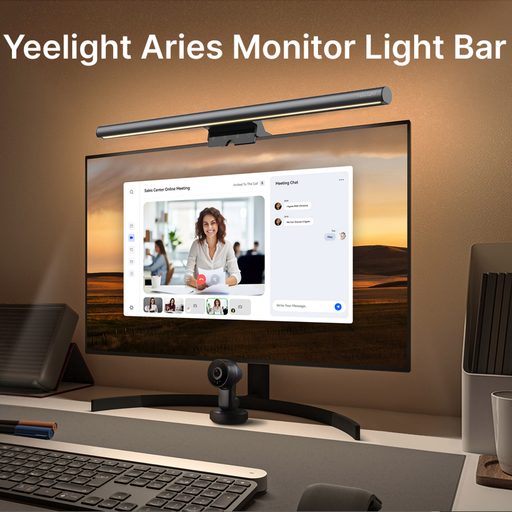
Why It Stands Out: The Aries Monitor Bar Light is a strong contender for those who require high-performance lighting. Its standout feature is the high Colour Rendering Index (CRI Ra95), which means it illuminates objects in their true, natural colours. This is particularly useful for designers, photographers and anyone for whom colour accuracy is paramount. The full-metal body aids in heat dissipation, and its intuitive controls include presets for work, reading and leisure.
Pros:
Who is it for: Professionals, creatives and tech enthusiasts seeking a premium lighting solution with superior colour fidelity and build quality.
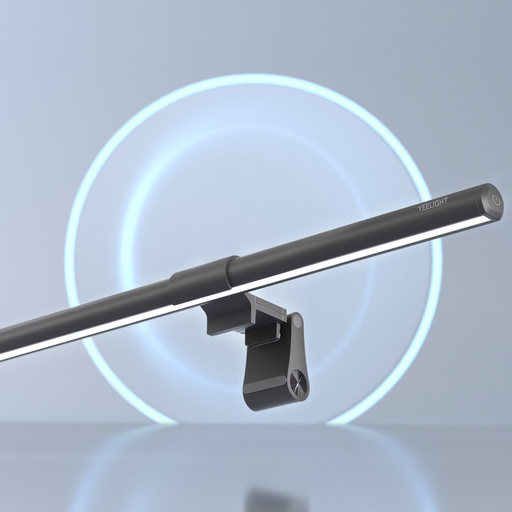
Why It Stands Out: The Pura Lite delivers the essential features of a quality monitor light bar in a straightforward package. It provides adjustable brightness and colour temperature, allowing you to easily switch between focused work light and a more relaxed ambient tone. Its simple clip-on design and USB power source make it a practical upgrade for almost any home office lighting setup, focusing on core functionality without unnecessary complexity.
Pros:
Who is it for: Students, remote workers and anyone looking for an effective and accessible way to improve their desk ergonomics and lighting.
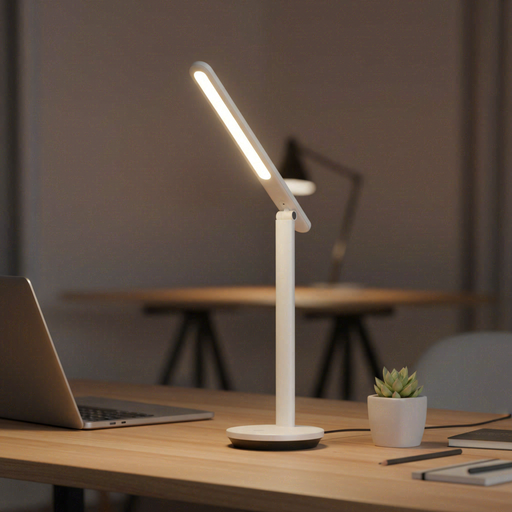
Why It Stands Out: While not a monitor bar, this lamp is an excellent alternative for those who value flexibility. As a rechargeable desk light, the Z1 Pro can be used anywhere without being tethered to a power outlet. Its built-in battery provides hours of light, and its foldable design makes it highly portable. You can move it from your desk to a reading chair or even take it with you. It still functions as a great eye-care desk lamp with five brightness levels and a stable, flicker-free light source.
Pros:
Who is it for: Users who need a versatile and portable lighting solution that isn't fixed to a single location.
The right lighting can transform your workspace, but everyone's needs are different. If you're still exploring different styles or features, we invite you to browse our full collection of Adjustable LED Lighting solutions to find the perfect fit for your setup.
1. Is a monitor light bar worth it? For many people, yes. It saves valuable desk space, reduces eye strain by eliminating screen glare and provides even, focused illumination for your work area. Its asymmetrical lighting is a significant improvement over traditional lamps that can create harsh reflections.
2. Can a screen bar light damage my monitor? No, these lights are specifically designed to be safe for monitors. They use lightweight clips, often with soft padding, that rest on the top bezel of the monitor. The weight is minimal and distributed so that it does not apply any harmful pressure to the screen itself.
3. Can I use a monitor light bar for gaming? Absolutely. A gaming light bar is an excellent addition to a gaming setup. It illuminates your keyboard and mouse area without casting distracting reflections on the screen, helping to enhance immersion and reduce eye fatigue during long gaming sessions.