What to check before choosing
Measure the usable desk area and viewing position first. Then decide whether space for development windows or a simpler laptop connection is the more important trade-off.
| Concern |
What to check |
Who this matters to |
| Desk fit and positioning |
Compare the dimensions with the supplied stand against usable desk depth; check adjustment and compatible mounting options. |
If the stand leaves too little room for my keyboard or puts the screen too close, a smaller diagonal alone will not solve the problem. Around 37% of consumers put desk fit and positioning first. |
| Development workspace |
Compare native resolution on similarly sized screens if code, DevTools and the page preview need to remain visible together. |
When I inspect a menu breakpoint, I want to see the page alongside the tools I am using rather than continually rearranging windows. Around 36% of consumers prioritise development workspace. |
| Laptop connectivity |
Check USB-C video support, stated power delivery and the peripheral connections you need against your laptop. |
If I work from a laptop, fewer desk connections matter only if the monitor can handle the functions my setup requires. Around 27% of consumers make laptop connectivity their primary concern. |
Joybuy monitor choices
These compact monitors offer different starting points for a small-desk setup: QHD or WUXGA workspace, flexible placement, or a Full HD screen. Check each model’s assembled footprint and required laptop connections before choosing.
 No image available
ASUS ProArt PA24ACRV IPS QHD
Consider this QHD model if you want a compact development workspace for a page preview and tools. Its name specifies an IPS panel; check the dimensions with the supplied stand and confirm the USB-C video and charging functions your laptop needs.
View on Joybuy
 No image available
ASUS ProArt PA248CNV IPS WUXGA
This WUXGA IPS model is worth comparing if you want development workspace in a compact setup. Check its assembled footprint against your desk, and confirm the exact USB-C charging output before depending on it to power a laptop.
View on Joybuy
 No image available
ASUS ZenScreen MB249C IPS USB-C
Consider this model if placement options matter on a constrained desk. Its name specifies IPS and USB-C; check the dimensions of the mounting arrangement you intend to use and whether its USB-C functions meet your laptop’s video and charging needs.
View on Joybuy
 No image available
Dell P2425 24.0-inch monitor
This 24.0-inch model is a compact-screen option for checking a browser preview. Confirm its native resolution, dimensions with stand and exact port functions before choosing it for side-by-side development work or laptop docking.
View on Joybuy
 No image available
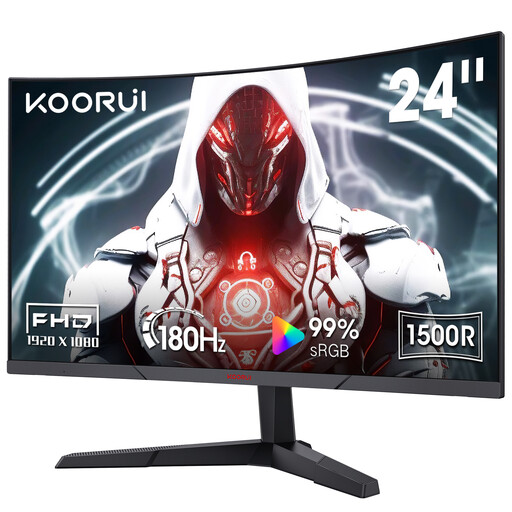
KOORUI MG24A12FV2 24-inch curved FHD VA
Consider this Full HD screen if its workspace is sufficient for your browser-preview setup. The product name specifies a 1500R curve, 180 Hz refresh rate, two HDMI inputs, DisplayPort, VESA compatibility and tilt adjustment; check the assembled stand footprint before placing it on a shallow desk.
View on Joybuy
Common questions
Can a desktop monitor replace a real phone for mobile-menu checks?
No: a monitor and Chrome DevTools Device Mode help you inspect responsive layouts, but they do not reproduce every characteristic of a phone. Chrome for Developers describes Device Mode as an approximation, so check important navigation behaviour on an actual target handset too.
How should I position a monitor on a small desk?
Allow enough depth to place the screen in front of you at a comfortable viewing distance. For a display-screen workstation, the Health and Safety Executive advises a screen about an arm’s length away with its top around eye level; measure the monitor with its stand, or check a compatible mounting arrangement, before ordering.
Will any USB-C monitor display from and charge my laptop?
Not necessarily: the connector name alone does not establish video support or sufficient charging power. Check your laptop’s USB-C video capability and power requirement against the exact monitor specification; the LG 24BA750-B and BenQ PD2506Q both list power delivery, but their other connection features differ.
What should I keep if a monitor differs from its UK listing?
Keep the listing, exact model specification and order record so you can identify which advertised features differ. Under section 9 of the Consumer Rights Act 2015, goods supplied under a UK goods contract must be of satisfactory quality, with their description among the relevant circumstances.


