What to check before choosing
For a small-desk multitrack setup, decide how much physical screen space you can use, then check the DAW layout at your preferred scaling. Stand position and laptop connections may change which otherwise suitable monitor works on your desk.
| Concern |
Buying check |
Who this matters to |
| Timeline space on a small desk |
Compare panel size with native resolution, then try your DAW at your preferred display scaling. |
If I need to inspect stacked waveforms without a screen that crowds my desk, compact timeline space comes first; roughly 46% of consumers would prioritise that need. |
| Screen position |
Measure desk depth and check the included stand’s height and angle adjustment. |
When I edit for long periods, I need the screen positioned around my desk equipment; around 27% of consumers would put adjustability first. |
| Laptop connection |
Confirm video-output support and compare the laptop’s charging requirement with the monitor’s USB-C power-delivery rating. |
If I connect a laptop at the recording desk, I want its display and power connections to suit my setup; roughly 18% of consumers would make that their primary concern. |
| Simple display setup |
Check that the resolution and stand meet your needs before choosing a simpler connection or adjustment arrangement. |
Sometimes I chiefly need an external screen and can accept fewer adjustments or less timeline detail; around 9% of consumers would put simplicity first. |
Joybuy monitors to consider
These monitors cover compact QHD, larger WQHD and 4K choices, plus a USB-C model for a space-constrained setup. Match the screen to your desk and DAW scaling first; check connection and charging requirements separately.
 Image unavailable
ASUS ProArt PA24ACRV IPS QHD
Consider this QHD option when timeline space matters but the desk limits screen placement. Measure the available area and check how your DAW scales before relying on it for your layout.
View on Joybuy
 Image unavailable
ASUS ProArt PA278CV IPS WQHD
Consider this larger-screen route if there is room beside your recording equipment. Check the desk dimensions and stand position, and confirm the charging requirement separately if you plan to connect a laptop.
View on Joybuy
 Image unavailable
iiyama ProLite XUB2792UHSU-B6 27-inch 4K UHD, Matte Black
This is a 27-inch 4K option to consider if the panel fits and your computer supports the resolution you want to use. Check your DAW’s appearance at your preferred scaling before choosing it for detailed timeline work.
- 4K UHD LED display with a 16:9 aspect ratio.
- Matte Black finish.
View on Joybuy
 Image unavailable
LG 27UP650K 27-inch 4K IPS, White
Consider this 4K screen when a 27-inch panel fits your desk and your computer can drive the display at a suitable setting. If laptop charging or a USB hub matters, check those requirements separately.
- 27-inch 4K IPS display with a stated 60 Hz refresh rate.
- HDMI and DisplayPort connections; White finish.
View on Joybuy
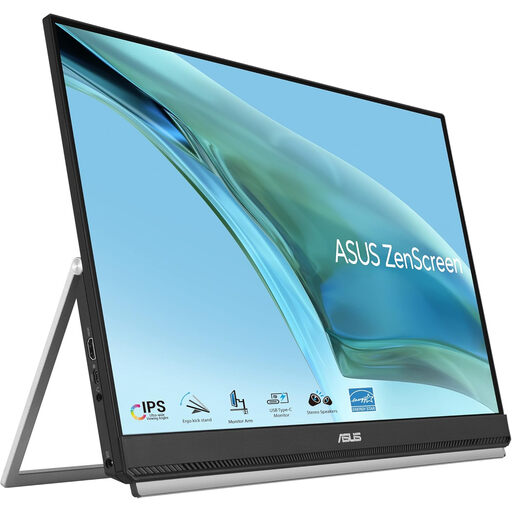 Image unavailable
ASUS ZenScreen MB249C IPS USB-C
Consider this option when placement and a USB-C connection matter on a constrained desk. Check the native resolution against the DAW timeline space you need, and confirm video and charging compatibility with your laptop.
View on Joybuy
Common questions
Can one USB-C cable display my DAW and charge my laptop?
It can if the laptop supports video through that port and the monitor supplies sufficient charging power. Dell UK states up to 90 W for the P2425DE, BenQ UK states 65 W for the GW2790QT, and LG UK states up to 15 W for the 27U631A-B; compare the relevant rating with your laptop’s requirement before leaving its charger aside.
Is a 27-inch Full HD screen better for alignment because it is larger?
Not necessarily: physical size and available pixels answer different needs. BenQ UK specifies 1920 × 1080 for its 27-inch GW2790, while Dell UK specifies 2560 × 1440 for its 23.8-inch P2425DE. Check how waveform detail and controls appear at the display scaling you would actually use.
What should I measure before putting a 27-inch monitor on a small desk?
Measure the available width and depth with your speakers, keyboard and laptop stand in place, then check whether the included stand can position the screen where you need it. BenQ UK specifies height, tilt, pivot and swivel adjustment for the GW2790QT; LG UK lists tilt adjustment for the 27U631A-B.
Will a higher-resolution monitor work with my DAW setup?
Check your computer’s video output and your DAW’s current requirements before relying on a higher resolution. Avid’s Pro Tools compatibility guidance calls for checking the supported computer and software configuration; also review the interface at your preferred display scaling, which affects how much timeline space is comfortable to use.


