For poetry formatting and proofreading, a 27-inch 4K monitor with an adjustable stand is a sensible starting point for inspecting text and page layout at a home-office desk. Consider a 32-inch screen if a larger physical page-and-reference view matters more than desk space, or a colour-focused model if you also review cover art or photographs. For a laptop setup, check video compatibility and charging requirements before relying on USB-C.
Who is this for?
Manuscript proofreaders
If you spend long sessions checking line endings, stanza spacing, punctuation and page flow, focus on readable text and a screen position that works at your desk. The Health and Safety Executive advises placing the top of a display at eye level and the screen about an arm’s length away.
Laptop-first home-office writers
If one monitor will serve as your main laptop display, check the laptop’s video-output mode, the monitor’s connections and whether its power delivery meets the laptop’s charging needs. A USB-C connector alone does not settle all three questions.
Writers reviewing book artwork
If your formatting work also includes a cover, illustrations or photographs, documented colour coverage and calibration features may matter. Those features are less relevant when the work is limited to manuscript text.
What matters when choosing?
Start with the size and text view you need for page proofs, then check how the screen will sit on your desk. Laptop connections and colour features matter when those tasks are part of your workflow.
| Concern | What to check | Who this matters to |
|---|
| Text and page view |
Compare screen size with resolution, then check that your software’s text scaling makes a manuscript page comfortable to read. |
When I proof line breaks and page balance, I need to see the text clearly without losing my sense of the whole page; around 36% of consumers would put manuscript viewing first. |
| Desk fit and positioning |
Check desk depth, stand adjustment and the space needed for your intended viewing distance. |
A shallow desk or long proofing sessions make screen position my main concern; roughly 29% of consumers would prioritise desk fit and positioning. |
| Laptop connection |
Confirm the laptop’s Thunderbolt or DisplayPort Alt Mode support and compare the monitor’s power delivery with its charging requirement. |
If I want my laptop connected through the monitor, video and charging both need to work for my setup; about 21% of consumers would make laptop connectivity their primary concern. |
| Artwork review |
For cover or illustration work, check the exact model’s stated colour coverage and calibration features against your workflow. |
When I review a cover alongside the poems, consistent on-screen colour matters more to me than it does for text alone; around 14% of consumers would put visual-asset review first. |
Buying pitfalls
-
Assuming every USB-C connection handles video and charging
USB-C ports have different capabilities. RTINGS says a laptop needs Thunderbolt or DisplayPort Alt Mode for USB-C video output to a monitor; charging also depends on the monitor’s power delivery and the laptop’s needs.
Check the exact laptop port and monitor connection specifications before planning a one-cable desk setup.
You may still need a separate charger or another way to connect the display.
-
Choosing a larger screen without measuring the desk
A 32-inch panel gives a larger physical viewing area, but that is useful only if you can position it comfortably. The Health and Safety Executive advises keeping the screen about an arm’s length away, with its top at eye level.
Measure usable desk depth and check the stand’s adjustments and footprint before ordering.
If the supplied stand cannot achieve the position you need, a compatible arm or different stand may be necessary.
-
Treating colour features as a requirement for text work
Calibration and wide colour coverage are relevant when reviewing covers or images, but they do not by themselves improve poetry text formatting or ensure a match with a particular printer and paper.
Decide whether visual assets are part of your work before prioritising colour specifications over text view, positioning and connections.
-
Comparing energy use by screen size alone
GOV.UK guidance calls for energy information for products within the UK energy-labelling rules. Screen size or resolution on its own does not establish a particular monitor’s energy use.
Compare the energy label and product information sheet for the exact models you are considering.
Brands to consider for these workflows
Dell
The UltraSharp U2725QE is a relevant example for a text-heavy, laptop-connected desk: Dell lists it as a 27-inch 4K monitor with an adjustable stand and hub features.
- Dell lists height and pivot adjustment for the U2725QE, useful features to check when planning your screen position.
- Its connections and stand features are specific to this model; check the exact configuration rather than assuming they apply across UltraSharp monitors.
ASUS
The 27-inch 4K ProArt PA279CRV is an example to consider when manuscript work includes cover art, illustrations or photographs.
- ASUS states that the PA279CRV is factory pre-calibrated, covers 99% DCI-P3 and 99% Adobe RGB, and offers USB-C power delivery up to 96W.
- Those model-specific colour specifications do not guarantee a match with a printer, paper or print provider.
BenQ
The 32-inch 4K PD3225U is an example for a larger manuscript-and-artwork view where documented colour features matter.
- BenQ states that the PD3225U offers factory calibration and covers 98% P3, 99% sRGB and 99% Rec.709.
- A larger creative display is not an automatic upgrade for text-only work; check whether its size fits your desk and viewing position.
Joybuy monitors for poetry formatting
These models cover 27-inch 4K options for manuscript work and creative-monitor options for reviewing artwork or using a larger screen. Compare their stated features with your desk space and laptop requirements; the colour-focused models are not necessary for every text-only workflow.
 No image available
BenQ MA270UP 27-inch 4K Nano Glossy monitor
A 27-inch choice to consider if you proof pages and also review visual material. Its product name specifies an IPS display, USB-C and a height-adjustable stand. Check video compatibility and charging needs for your particular laptop; stated colour features alone cannot establish print matching.
Joybuy
 No image available
MSI MD272UPSW Smart 27-inch 4K monitor
A 27-inch option for manuscript pages if its additional smart features suit your desk. The product name lists an IPS panel, Google TV and USB-C 65W power delivery. Confirm the USB-C video mode and whether 65W meets your laptop’s charging needs.
Joybuy
 No image available
iiyama ProLite XUB2792UHSU-B6 27-inch 4K monitor
A 27-inch model to compare for document-focused work. If you intend to use one USB-C cable for a laptop, confirm both video support and power delivery for this model before choosing that setup.
Joybuy
 No image available
LG 27UP650K 27-inch 4K IPS monitor
A 27-inch display to consider for page inspection when its connections suit your computer. The product name lists HDMI and DisplayPort, a 60Hz refresh rate and 95% DCI-P3 coverage. If you need USB-C for a laptop, check the exact model’s available connections first.
Joybuy
 No image available
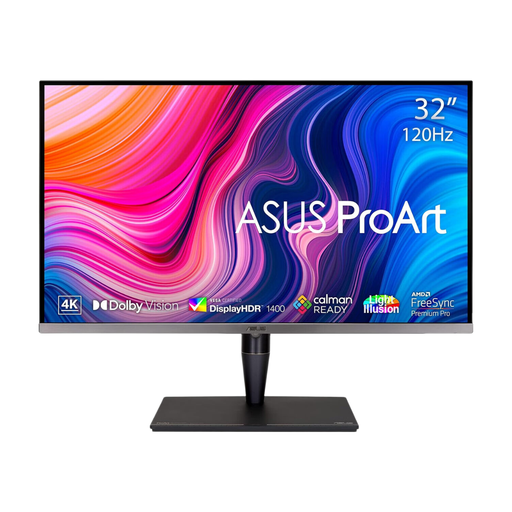
ASUS ProArt PA32UCG-K 32-inch 4K monitor
A larger-screen option if you need room to view a manuscript alongside visual material. The product name lists an IPS Mini LED panel, hardware calibration and Thunderbolt 3. Check that the screen and stand fit your desk, and confirm power delivery separately if you need the monitor to charge a laptop.
Joybuy
Frequently asked questions
Do I need 4K to format a poetry collection?
No. A 4K monitor is an option if you value a detailed view of text and page layout, not a requirement for formatting poetry. Compare resolution with screen size, viewing distance and comfortable text scaling in the software you use.
Will any USB-C monitor display my laptop and charge it?
No. RTINGS explains that USB-C video requires Thunderbolt or DisplayPort Alt Mode support on the laptop. You also need to compare the monitor’s power-delivery rating with the laptop’s charging requirement; a separate charger may still be needed.
How should I position a monitor for long proofreading sessions?
The Health and Safety Executive advises placing the top of the screen at eye level and the display about an arm’s length away. Check whether the supplied stand, or a compatible monitor arm, can achieve that position on your desk.
What energy information should I compare for a UK monitor purchase?
Compare the energy label and product information sheet for the exact models. GOV.UK says products within the UK energy-information rules must display an energy label at the point of sale; similarly sized monitors should not be assumed to use the same amount of energy.


