Shared-desk laptop users
If different people or laptops use the same desk, straightforward reconnection and a screen position that can be reset for each user matter as much as the display itself.


For text-led poetry layout at a shared desk, a 27-inch QHD monitor with an adjustable stand is a sensible starting point. Choose USB-C power delivery only after checking each laptop’s video and charging requirements; a built-in KVM matters if two computers must share a keyboard and mouse. Consider 4K resolution or documented colour features if the work also includes detailed artwork, and check how the screen and stand fit the actual desk.
If different people or laptops use the same desk, straightforward reconnection and a screen position that can be reset for each user matter as much as the display itself.
Checking line endings, stanza spacing and page flow calls for a workable viewing position and attention to reflections. The Health and Safety Executive advises considering the whole workstation, including its equipment, furniture and lighting.
If the same screen is used to inspect cover artwork or illustrations, documented colour-space coverage and the requirements of the publishing workflow become relevant alongside manuscript layout.
Start with how the laptops and peripherals will connect, then check whether each person can position the screen comfortably. Decide separately whether the work includes colour-sensitive images or close inspection of visual detail.
| Concern | What to check | Who this matters to |
|---|---|---|
| Shared-desk connections | Check each laptop’s USB-C or Thunderbolt video output and charging requirement. If two computers will share peripherals, check the exact monitor’s KVM and input arrangement. | If I move between laptops at one desk, I want to reconnect without rebuilding the whole setup. Around 42% of consumers put connection and device switching first. |
| Text-layout viewing | Check stand adjustment and desk footprint, then assess reflections where the monitor will actually sit. Consider the chair and space for manuscript pages too. | Long sessions checking line breaks and white space call for a screen position I can reset when the desk changes hands; around 33% of consumers prioritise text-layout viewing. |
| Colour and fine detail | If visual assets are part of the work, check the stated colour space against the publishing workflow. For 4K, check laptop output and preferred display scaling. | When I also review cover art or illustrations, I need to judge those files as well as the manuscript. Colour and fine-detail proofing comes first for around 25% of consumers. |
A USB-C connector alone does not establish that the laptop can send video through it or receive enough power. Dell lists up to 90 W power delivery for the U2724DE, while BenQ lists 65 W for the PD2705Q; those figures do not establish compatibility with a particular laptop.
Compare the laptop’s port capabilities and charging requirement with the exact monitor’s video and power-delivery specifications.
Height adjustment cannot resolve a cramped desk or reflections from nearby lighting. The Health and Safety Executive advises assessing equipment, furniture and work conditions together.
Measure the desk, allow space for manuscript pages and input devices, and check whether each user can reset the screen and chair position.
Colour-space specifications address a different task from checking stanza spacing and page breaks; they do not, by themselves, establish that printed artwork will match the screen.
Decide whether covers, illustrations or colour proofs are actually part of the workload before making those specifications a priority.
A result for the right model does not settle its current availability or the terms attached to a particular listing.
Before ordering, check the exact model, seller, availability, warranty and returns terms rather than assuming a similar-looking monitor has the same features.
Dell’s U2724DE illustrates a QHD hub-monitor route for a shared laptop desk.
BenQ’s PD2705Q is relevant when two-system peripheral switching and review of visual assets sit alongside manuscript work.
LG’s 27UP85ZK-W illustrates a 27-inch 4K USB-C option for reviewing layout detail and visual assets.
These monitors offer different ways to approach poetry layout at a shared desk, including QHD and 4K displays. Compare their connections and adjustment options against the laptops, users and visual work involved rather than treating any one feature as a complete docking setup.
 No image available
Consider this model if close layout review or visual assets are part of the work and its connection suits your laptop.
The title specifies a height-adjustable stand and USB-C connection. Check video and charging compatibility with the intended laptop, particularly if one-cable use is important.
 No image available
This QHD model is worth comparing for manuscript layout when screen positioning and visual-asset review also matter.
Check the exact version’s connections and charging output before planning to use it as a laptop docking display.
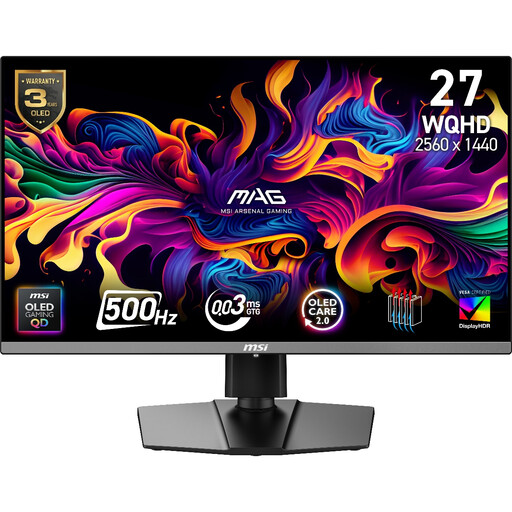 No image available
The WQHD display is an option to assess for manuscript layout, with the model’s visual-asset suitability depending on your actual workflow.
The product name also specifies 500Hz and 0.03ms gaming features; these are not reasons on their own to choose it for poetry formatting. Check whether its connections and laptop-charging arrangement suit the shared desk.
 No image available
Consider this model if 4K layout detail and use with two devices are both relevant to the shared desk.
Its name specifies USB-C 65W and Multi Control. Check whether each laptop can send video through the intended connection, whether 65 W meets its charging requirement and how the proposed keyboard-and-mouse switching would work.
 No image available
Its UHD mode is relevant if you want to inspect fine layout detail and can accommodate its connection arrangement at the desk.
The name distinguishes UHD 144Hz and FHD 288Hz as alternative modes. Check that the intended laptop supports the desired mode and that the planned HDMI or DisplayPort connection meets your shared-desk needs.
The Health and Safety Executive’s display-screen equipment guidance does not identify one monitor model or resolution for a shared desk. For work involving display screens, it directs attention to the whole workstation, including equipment, furniture and work conditions; its guidance also addresses hot-desking.
No: the laptop must support video through the chosen port, and the monitor’s power output must meet the laptop’s charging requirement. Dell lists up to 90 W for the U2724DE and BenQ lists 65 W for the PD2705Q, so check both devices’ specifications rather than relying on the USB-C connector alone.
Reset the screen position for the current user and check the chair, available desk space and reflections from lighting. The Health and Safety Executive treats screen adjustment as part of arranging the wider workstation, not a substitute for it.
Not for text layout alone; documented colour coverage becomes relevant if you also inspect covers, illustrations or other colour-sensitive assets. BenQ lists 100% sRGB and Rec.709 coverage for the PD2705Q, while LG lists DCI-P3 95% typical coverage for the 27UP85ZK-W, but neither figure alone establishes how a printed result will look.
Check the terms for the exact model and seller before ordering, including warranty coverage and any change-of-mind return conditions. BenQ’s UK PD2705Q page describes a three-year limited warranty and a 30-day returns policy subject to its terms; those listing terms are distinct from remedies for faulty or misdescribed goods.