For spreadsheet-heavy questionnaire analysis at home, a 27-inch QHD IPS monitor with an adjustable stand is a sensible starting point. Choose a USB-C hub model if a compatible laptop needs display, charging and peripheral connections at the desk; consider 27-inch 4K when finer detail matters enough to justify checking your preferred text scaling and computer connection. Whichever route you take, the stand must let you position the screen comfortably.
Who this is for
Spreadsheet-heavy questionnaire analysts
If much of your session involves sorting responses, comparing columns and writing findings, start by checking whether a 27-inch QHD screen gives you readable space for the views you use. Dell UK and BenQ UK list adjustable 27-inch QHD models that illustrate this route.
Laptop-first home-office workers
If you regularly connect a laptop at the same desk, a USB-C hub monitor may reduce separate display and peripheral connections. Check that your laptop supports video over USB-C and that the monitor’s stated charging power meets its requirements.
Detail-first report reviewers
If your work includes dense tables, small chart labels or detailed report graphics, consider a 27-inch 4K display such as the type listed by LG UK. Check the resolution your computer can output and whether text remains comfortable at your preferred scaling.
What matters when choosing
27-inch QHD with an adjustable stand
Choose it when: Spreadsheet tables, charts and report writing are the main tasks, and a built-in laptop hub is not essential.
Trade-off: It has less pixel detail than 4K at the same size, and a separate hub may be needed for peripherals.
27-inch QHD USB-C hub
Choose it when: A compatible laptop needs display output, charging and peripheral access through the monitor.
Trade-off: The one-cable setup depends on the laptop’s video capability and the monitor’s charging power.
27-inch 4K
Choose it when: Inspecting fine chart details or high-resolution report material takes priority over the QHD starting point.
Trade-off: You may need to adjust text scaling, and a 4K resolution alone does not establish USB-C charging capability.
| Concern | What to check | Who this matters to |
|---|
| Readable workspace |
Compare resolution and your preferred text scaling. Dell UK lists the P2725D at 2560 × 1440; LG UK lists the 27UP85ZK-W at 3840 × 2160. |
If I regularly compare response columns with charts, I want room to read both without making text uncomfortably small. Roughly 40% of consumers put readable workspace first. |
| Laptop connections |
Confirm USB-C video support on the laptop and compare its charging requirement with the monitor’s power delivery. BenQ UK lists 65 W for the GW2790QT; LG UK lists up to 90 W for the 27UP85ZK-W. |
When I return to my desk with a laptop, I want to reconnect my display and peripherals without handling several cables. Around 30% of consumers prioritise that connection simplicity. |
| Screen positioning |
Check the stand’s height and tilt range against your desk setup. The Health and Safety Executive advises placing the screen top around eye level and the screen about an arm’s length away. |
During long analysis sessions, I need the screen at a workable height and distance rather than adapting my posture to a fixed stand. Approximately 30% of consumers make positioning their primary concern. |
Buying pitfalls
-
Treating 27 inches as a complete display specification
Monitors of the same size can have different resolutions: Dell UK lists the P2725D at 2560 × 1440, while LG UK lists the 27UP85ZK-W at 3840 × 2160. Size alone therefore cannot tell you how fine text and chart details will appear.
Compare the exact resolutions and preview text at the scaling you expect to use before choosing between QHD and 4K.
-
Assuming a USB-C socket guarantees a one-cable desk
A connector alone does not establish laptop video support or sufficient charging power. BenQ UK specifies 65 W power delivery for the GW2790QT, while LG UK specifies up to 90 W for the 27UP85ZK-W.
Check the laptop’s USB-C video and charging specifications against the exact monitor model before relying on that connection.
-
Choosing eye-comfort branding instead of checking placement
Monitor features cannot replace a workable screen position. The Health and Safety Executive advises keeping the screen directly in front of you, with its top around eye level and the screen about an arm’s length away.
Check your desk depth and seated eye height, then confirm that the supplied stand—or a compatible mount—can achieve the position you need.
If the supplied stand cannot do so, you may need a separate arm or riser and room for it on the desk.
Relevant monitor brands for reference
Dell
Dell’s P2725D represents the adjustable 27-inch QHD route, while the P2725DE is a QHD USB-C hub option.
- Dell UK specifies a 2560 × 1440 IPS panel and height, pivot, swivel and tilt adjustment for the P2725D.
- If choosing the P2725DE for laptop use, check its connections against your laptop rather than assuming every USB-C feature you need is available.
BenQ
The GW2790QT is a 27-inch QHD USB-C option for a laptop-centred desk.
- BenQ UK specifies USB-C DisplayPort Alt Mode, 65 W power delivery, USB ports and a stand with 110 mm height adjustment for the GW2790QT.
- Its connection features require a compatible laptop; eye-care branding is not a substitute for suitable screen placement.
LG
The 27UP85ZK-W represents a 27-inch 4K USB-C option for people prioritising fine visual detail.
- LG UK specifies a 3840 × 2160 IPS panel, height, pivot and tilt adjustment, and USB-C charging up to 90 W.
- Check your computer’s connection and preferred text scaling; 4K does not make every application more comfortable to use.
Joybuy monitor choices
These monitors offer QHD or 4K options for reviewing questionnaire tables, charts and reports at a home desk. Compare each exact model’s connections and screen adjustments with your computer and workspace.
 Image unavailable
BenQ MA270UP 27-inch Nano Glossy IPS 4K USB-C Mac Monitor
Consider this model if detailed tables or report graphics are your priority and you use a compatible computer.
Its product name specifies a 27-inch 4K IPS display, USB-C and a height-adjustable stand. Check the features you need against your particular computer and try your preferred text scaling at 4K.
View on Joybuy
 Image unavailable
ASUS ProArt PA278CV IPS WQHD Monitor
The QHD format makes this a model to consider for spreadsheet and chart work.
If laptop docking matters, confirm USB-C video support on your laptop and the exact monitor’s charging capability before planning a one-cable setup.
View on Joybuy
 Image unavailable
ASUS ProArt PA278CFRV IPS QHD 100 Hz Monitor
Consider this QHD model for questionnaire spreadsheets and charts when your main requirement is a desk display.
Its product name specifies an IPS panel and 100 Hz refresh rate. USB-C features can vary by regional configuration, so check this exact variant before depending on laptop video or charging through the monitor.
View on Joybuy
 Image unavailable
LG 27UP650K 27-inch 4K IPS Monitor
Consider this 4K model if inspecting detailed charts or report assets matters more to you than a QHD starting point.
Its product name lists a 60 Hz display with HDMI and DisplayPort. Check text scaling and computer compatibility; if monitor-based USB-C charging is essential, confirm that feature for this exact model before choosing it.
View on Joybuy
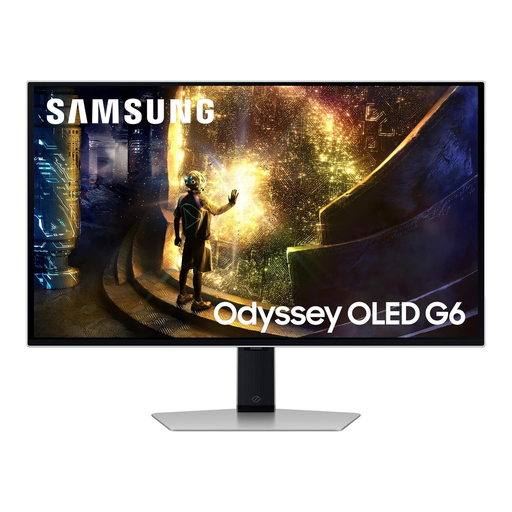 Image unavailable
Samsung Odyssey G6 S27DG612 27-inch QHD OLED Monitor
This QHD display is another option for comparing questionnaire tables and charts, though its gaming specification is not a requirement for that work.
The product name specifies OLED and 240 Hz, rather than the IPS panel found in the other QHD examples. Check the available connections if laptop video or monitor-based charging is important.
View on Joybuy
Common questions
Is 27-inch QHD enough for analysing questionnaire results?
A 27-inch QHD monitor is a sensible starting point for spreadsheet, chart and report work. Dell UK’s P2725D and BenQ UK’s GW2790QT are examples; consider 4K instead if finer detail is a priority and you have checked computer compatibility and comfortable text scaling.
When is USB-C charging in the monitor useful?
It is useful when a compatible laptop can send video through USB-C and you want the monitor to provide charging at your desk. BenQ UK lists 65 W power delivery for the GW2790QT and LG UK lists up to 90 W for the 27UP85ZK-W; compare the exact figure with your laptop’s requirements.
Which stand adjustments should I check?
Start with enough height and tilt adjustment to position the screen for your desk and chair. The Health and Safety Executive advises placing the screen top around eye level and the screen about an arm’s length away; pivot may also help if you work with long portrait documents.
Do UK display-screen-equipment rules cover home working?
They can apply to an employer when a home worker regularly uses display screen equipment as a significant part of normal work. The Health and Safety Executive describes this as daily use for continuous periods of an hour or more; whether the duties apply depends on the worker’s actual use, rather than the monitor being at home.


