For reading race-result tables beside a bright window, a 27-inch QHD IPS monitor with an anti-glare surface is a useful starting point, provided you can position the screen to avoid reflections. Consider 4K if fitting more columns or dashboards on one screen matters to you, and check your laptop’s video output and preferred text size. Extra brightness or refresh rate will not remove a window reflected directly in the screen.
Who this setup suits
Bright-window data readers
If daylight makes small timing figures hard to see, screen placement and control of reflections matter alongside the monitor’s specifications. The Health and Safety Executive advises arranging the desk and screen to avoid glare and bright reflections.
Dense-results multitaskers
If you compare standings, spreadsheets, PDFs and browser dashboards, resolution affects how much you can keep visible. ENERGY STAR notes that higher resolution can help with multitasking and fitting more words on screen.
Laptop-based race analysts
If a laptop drives your results display, check its video connection and charging needs before choosing a USB-C monitor. Stand adjustment also matters when the window limits where the screen can sit.
What to check when choosing
Work out where the screen can sit relative to the window, then decide how much table space you need. Treat a higher refresh rate as a separate consideration if you also watch fast-moving footage.
| Concern |
What to check |
Who this matters to |
| Window reflections |
Look for a stated anti-glare surface and check whether you can angle the screen away from the window or control daylight with blinds. |
If window light obscures timing figures, I need to tackle reflections before relying on a brightness rating. Around 45% of consumers put reflection control first. |
| Table space |
Compare 27-inch QHD at 2560 × 1440 with 27-inch 4K at 3840 × 2160; check your computer’s output and the text size you find comfortable. |
When I compare several results sources at once, keeping columns and documents visible is my priority. Roughly 33% of consumers place information density first. |
| Laptop setup |
Check USB-C video support and power delivery against your laptop, plus the stand adjustments needed for your desk position. |
With a laptop at the desk, I want a connection and screen position that work for my setup. About 22% of consumers prioritise laptop connectivity and adjustment. |
Common buying mistakes
-
Choosing refresh rate to solve glare
A higher refresh rate is relevant to moving footage, not to a window reflected in a static results table. The Health and Safety Executive advises changing screen and desk position to avoid bright reflections.
For a results-focused setup, check the screen surface and available positioning adjustments before treating refresh rate as a priority.
-
Assuming every USB-C connection does the same job
Video support and charging power depend on the exact monitor and laptop. BenQ states 65W power delivery for the GW2790QT, while Dell states up to 90W for the P2725QE; neither figure establishes compatibility with every laptop.
Confirm USB-C video output on your laptop and compare its charging requirement with the monitor’s stated power delivery.
If the connection does not meet both needs, you may still need your laptop’s charger or a separate dock.
-
Expecting a brightness rating to guarantee readability
ENERGY STAR identifies screen brightness as important in a brightly lit room, but a rating does not tell you whether the window will reflect directly into your screen.
Position the display away from direct reflections and use blinds or curtains where needed, then compare the panel finish and rated brightness of suitable models.
Relevant brands to consider
Dell
A reference point for a 4K, USB-C-connected results workspace.
- Dell specifies 3840 × 2160 resolution and up to 90W USB-C power delivery for the P2725QE.
- Check that model’s screen finish, positioning options and connection requirements against your desk and laptop.
BenQ
A reference point for laptop connectivity and physical adjustment.
- BenQ lists USB-C data transfer, 65W power delivery and height, tilt, pivot and swivel adjustment for the GW2790QT.
- Compare its charging output with your laptop’s requirement; these features are specific to the GW2790QT.
LG
The 27QN880 provides a specification reference for a QHD, anti-glare desk setup.
- LG lists 2560 × 1440 resolution, anti-glare treatment, 350 cd/m² typical brightness and extensive screen-position adjustment for the 27QN880.
- LG’s UK page labels the 27QN880 discontinued, so use its features as points of comparison rather than assuming the model is available.
Acer
A reference point if the monitor will also show fast-moving content.
- Acer lists a WQHD IPS panel and a 144Hz refresh rate for the VG271U.
- Acer lists no height adjustment for that model; check how you would position it at a window-side desk.
Monitors to compare on Joybuy
These monitors span QHD options for results tables, a high-refresh QHD option for mixed use and 4K options for denser on-screen work. For each one, check the exact screen finish, positioning options and laptop connections needed at your desk.
 No image available
ASUS PROART PA278CV IPS WQHD
Consider this IPS WQHD model for comparing results tables and browser windows. Check its screen finish and adjustment options for your window-side desk, and confirm USB-C video and charging details if you use a laptop.
View on Joybuy
 No image available
ASUS PROART PA278CFRV IPS QHD 100Hz
This QHD IPS model is worth comparing if you read results and also want its stated 100Hz refresh rate. Confirm the exact variant’s screen finish, stand adjustment and USB-C video and charging functions before choosing it for a laptop desk.
View on Joybuy
 No image available
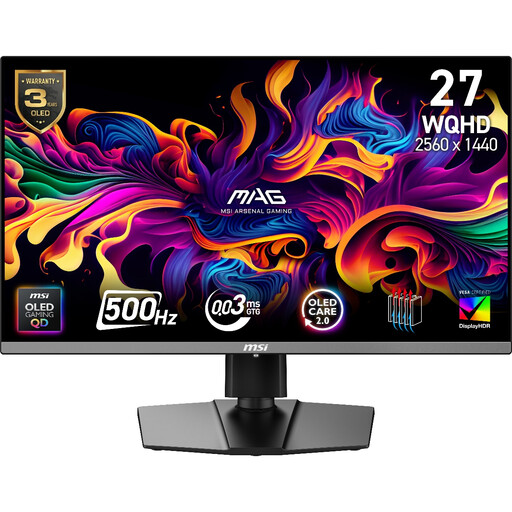
MAG 272QP QD-OLED X50 27-inch WQHD 500Hz
Consider this 27-inch, 2560 × 1440 QD-OLED model if the same screen will show results and fast-moving content. Its stated 500Hz refresh rate does not address direct window reflections; check the screen finish, positioning options and laptop connection against your setup.
View on Joybuy
 No image available
ASUS PROART PA27DCE-K OLED 4K UHD
Consider this OLED 4K UHD model if fitting more result columns or documents on screen is your priority. For a bright-window desk, confirm its typical brightness and screen finish separately from any peak-brightness figure; check USB-C video and charging compatibility with your laptop.
View on Joybuy
 No image available
iiyama ProLite XUB2792UHSU-B6 27-inch 4K UHD
This 27-inch 4K UHD model is an option to compare when you want more room for dense results. Check its panel surface for your window-side position, and confirm USB-C video and charging functions if a laptop will drive the display.
View on Joybuy
Questions about this setup
Will a brighter monitor solve glare from a window?
No, brightness alone will not remove a direct reflection. ENERGY STAR identifies brightness as useful in a brightly lit room, while the Health and Safety Executive advises arranging the screen away from glare and using blinds or curtains where needed.
Do I need 4K to analyse race results?
Not necessarily: 27-inch QHD is a starting point for tables and browser windows, while 27-inch 4K is worth considering if you need more columns or documents visible together. ENERGY STAR links higher resolution with easier multitasking; check that your computer can output the chosen resolution and that text remains comfortable at your preferred scaling.
Can one USB-C cable connect and charge my laptop?
It can if your laptop supports compatible USB-C video output and the monitor provides enough charging power. BenQ states 65W power delivery for the GW2790QT and Dell states up to 90W for the P2725QE; compare the exact monitor’s connections and supplied cable with your laptop’s video and charging requirements.


