For a compact desk and one main worksheet at a time, consider an adjustable 23.8-inch Full HD monitor; choose QHD if finer native detail or more room for source material matters, and consider a 27-inch screen only if it fits your desk. Check the exact model’s stand, screen finish and reading controls, and assess USB-C video and laptop charging separately.
Who is a study monitor for?
Long-session worksheet preparers
If you spend extended periods reading, editing and scrolling through exercises, prioritise a screen you can position comfortably and whose reading controls suit you. The Health and Safety Executive’s display-screen guidance makes positioning part of the setup, not an optional extra.
Compact-desk document workers
If desk space is limited, check whether the screen can be raised and angled without crowding your working area. BenQ and ASUS list height, tilt, swivel and pivot adjustment for the GW2490T and VA24EQSB respectively; those features should not be assumed for other models.
Multi-window study planners
If you compare a reading source, an exercise document and notes, consider how much usable desktop space you need. Dell lists a compact QHD option in the P2425DE, while LG lists a 27-inch QHD panel in the 27U631A-B; check text scaling and desk fit as well as resolution.
What matters when choosing a study monitor?
Start with a screen position that works at your desk, then decide how much space your documents need and which reading controls and connections you will use.
| Concern |
What to check |
Who this matters to |
| Reading comfort |
Check the exact model’s screen finish and documented reading, flicker-reduction or low-blue-light settings. Try a standard colour mode when colour accuracy matters. |
During long stretches of reading and editing, I want a screen surface and settings that feel comfortable without relying on an eye-care label alone. Around 33% of consumers put reading comfort first. |
| Screen positioning |
Measure desk depth and check the stand’s height, tilt, swivel and pivot range. The Health and Safety Executive advises placing the screen roughly an arm’s length away, with its top at eye level. |
On a shallow study desk, I need to get the screen to a workable height and distance before adding more display area. Positioning is the primary concern for around 25% of consumers. |
| Text and workspace |
Compare native resolution and panel size; check operating-system scaling if QHD text appears too small. |
When a passage, exercise draft and notes need to stay visible together, I value usable document space over a single-window setup. Around 25% of consumers prioritise text and workspace. |
| Laptop connection |
Confirm USB-C video support on the laptop, the monitor’s stated power-delivery wattage and whether a suitable cable is included. |
If I regularly connect a laptop, I want a straightforward display connection without assuming it will also replace my charger. Connection simplicity comes first for around 17% of consumers. |
Buying pitfalls for a quiet study
-
Choosing an eye-care label without checking the stand
Reading settings do not solve a screen-placement problem. The Health and Safety Executive’s display-screen guidance addresses height, distance and placing the display directly in front of you.
Check the supplied stand’s adjustments. If you plan to use a monitor arm, check mounting compatibility and space for its desk clamp.
A separate arm or riser may be needed if the supplied stand cannot place the screen appropriately.
-
Assuming USB-C will charge the laptop
USB-C display connectivity and laptop charging are separate considerations. LG specifies up to 15W power delivery for its 27U631A-B and says the USB-C cable is sold separately.
Compare the monitor’s stated power delivery with your laptop’s requirements, confirm USB-C video compatibility and check cable inclusion.
You may still need your laptop’s charger or a separate dock.
-
Picking panel size before measuring the desk
A larger screen needs to fit at a usable viewing distance. The Health and Safety Executive advises positioning a display about an arm’s length away.
Measure the available depth and width, including the stand footprint, before choosing between a compact screen and a 27-inch model.
-
Overlooking arrangements for an old monitor
GOV.UK sets out same-type electrical waste take-back duties for retailers and distributors when customers buy a replacement item.
Check the retailer’s take-back arrangement before ordering so you know how to hand over the old monitor.
Monitor brands and models to consider
These manufacturer-listed models illustrate different reading, adjustment and workspace choices; features vary across each brand’s range.
BenQ
The GW2490T is a compact Full HD example for a reading-focused desk setup.
- BenQ lists a 23.8-inch matte IPS panel, ePaper mode and 110 mm of height adjustment, plus tilt, swivel and pivot.
- Check whether its Full HD workspace is enough for the documents you want visible together.
Dell
The P2425DE is a compact QHD option for readers who want more native detail alongside stand adjustment.
- Dell lists a 23.8-inch 2560 × 1440 IPS panel, height, pivot, swivel and tilt adjustment, and TÜV 4-star eye-comfort certification.
- Check that your preferred display scaling leaves text and controls comfortable to read.
LG
The 27U631A-B represents a larger QHD workspace with USB-C display connectivity.
- LG lists a 27-inch QHD IPS panel, Reader Mode and USB-C power delivery of up to 15W.
- Its supplied stand is tilt-adjustable, the USB-C cable is sold separately, and its stated power delivery may not meet a laptop’s charging requirements.
ASUS
The VA24EQSB is a compact Full HD example for a desk where screen adjustment matters.
- ASUS lists a 23.8-inch IPS panel, 130 mm of height adjustment, tilt, swivel and pivot, plus TÜV Rheinland-certified Flicker-free and Low Blue Light features.
- Decide whether Full HD offers enough native document space for your working layout.
Joybuy monitors for reading and document preparation
These monitors offer Full HD, QHD and 4K options for preparing documents. Compare each model’s stated resolution with the space you need, then check stand adjustment, screen finish and connections for your particular desk.
 No image available
ASUS ProArt PA278CFRV QHD IPS 100Hz
Consider this QHD model when you want room to compare reading material with an exercise draft. Check that its stand, connections and any required accessories suit your desk and computer.
View on Joybuy
 No image available
ASUS ProArt PA24ACRV QHD IPS
Consider this QHD model if you want more native document detail without choosing a larger screen. Check your preferred text scaling, the screen finish and the connection and cable arrangement for your laptop.
View on Joybuy
 No image available
BenQ GW2791 27-inch Full HD IPS 100Hz
This 27-inch Full HD option may suit work centred on one main reading document. Check whether its stand can place the screen at a comfortable height and confirm the inputs needed for your computer.
View on Joybuy
 No image available
ASUS Eye Care VY27UQ 4K UHD 60Hz
Consider this 4K option if native detail is important for your document layout. Check text scaling at your viewing distance, along with stand adjustment and the screen finish.
View on Joybuy
 No image available
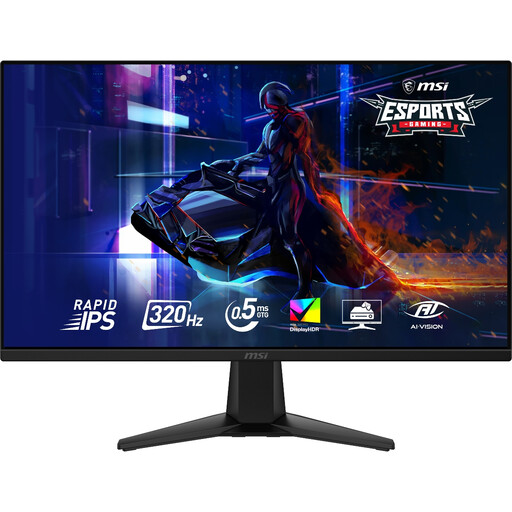
MAG 275QF X32 27-inch QHD 320Hz Rapid IPS
Its listed 2560 × 1440 resolution makes this a QHD option for arranging study documents on a larger screen. The 320Hz refresh-rate listing does not replace checks of desk fit, stand adjustment and screen finish for reading.
View on Joybuy
Questions about study monitors
How should I position a monitor for reading exercises?
The Health and Safety Executive advises placing the top of the screen at eye level, roughly an arm’s length away, with the display directly in front of you. Check whether the supplied stand can achieve that position with your desk and chair, or whether you need a compatible arm.
Do I need QHD to prepare reading exercises?
No: a compact Full HD monitor can suit work centred on one main document. Consider QHD when you want more native detail or room for source text and an exercise draft together, and check display scaling if small text is uncomfortable.
Will a USB-C monitor charge my laptop?
Not necessarily: USB-C video connectivity does not establish that a monitor supplies enough power for your laptop. LG specifies up to 15W power delivery for the 27U631A-B and says its USB-C cable is sold separately; compare those details with your laptop’s requirements.
What should I do with an old monitor when buying a replacement?
Check the retailer’s electrical waste take-back arrangement before ordering. GOV.UK states that retailers and distributors must offer take-back of electrical waste of the same type as the item a customer buys; confirm the available handover route for your old monitor.


