What matters when choosing
For a shared recipe-index desk, decide whether laptop changeovers, detailed documents, calls or physical adjustment will drive the purchase. A wider screen can help with side-by-side sources, but check its desk footprint and vertical resolution rather than judging it by diagonal size alone.
| Concern |
What to check |
Who this matters to |
| Laptop changeovers |
Check the monitor’s USB-C video, data and charging functions, then confirm that each laptop and cable supports the functions you need. Check downstream USB and Ethernet connections if peripherals will stay at the desk. |
If I swap laptops often, I want to reconnect the display and desk peripherals without rebuilding my setup each time. Around 31% of consumers would make easier laptop changeovers their primary concern. |
| Detailed documents |
Compare native resolution and screen size, then check how recipe fields and spreadsheets look at usable software scaling. Consider desk depth and reflections under the office lighting. |
When I cross-check long ingredient lists against source pages, I need enough readable space for the information I use together. For around 25% of consumers, document detail would come first. |
| Video calls |
Check whether the exact monitor includes a webcam, microphone and speakers, and whether they meet the organisation’s meeting and privacy requirements. |
If this desk hosts frequent calls, I would rather not set up separate call equipment at every changeover. Integrated call facilities would be the main concern for around 19% of consumers. |
| Workstation adjustment |
Check height adjustment and any needed tilt, swivel or pivot movement alongside the chair, keyboard, lighting and available desk space. |
When several people use the same workstation, I need to reposition the screen for my own seated setup. Around 25% of consumers would put adaptability first. |
The Health and Safety Executive advises positioning the top of the screen at about eye level and the display roughly an arm’s length away. Monitor adjustment helps with that setup, but the chair, desk and lighting matter too.
Brands to consider
These model-specific examples show different workstation features to compare; a brand name alone does not establish what a particular monitor includes.
Dell
The UltraSharp U2725QE is a 27-inch 4K Thunderbolt hub monitor for desks where resolution and hub connections are priorities.
- Dell Technologies UK lists the U2725QE as a 27-inch 4K Thunderbolt hub model.
- Check the exact model’s connections and audio requirements rather than assuming that all Dell monitors share its facilities.
LG
LG Electronics UK lists both a 27-inch conferencing-oriented monitor and a separate 27-inch 4K USB-C model.
- The 27BA850-B lists a webcam, microphone, speakers, Ethernet and 90 W USB-C power delivery; the 27U730A-B lists 4K and 90 W USB-C power delivery.
- Choose between those model-specific facilities according to whether calls or detailed screen space is the greater need.
Philips
Philips UK lists a 27-inch 4K USB-C docking model and a wider WQHD model with source-switching features.
- The 27B1U3900/00 lists 3840 × 2160 resolution and USB-C docking; the 34B2U3600C/00 lists WQHD, Smart KVM and USB-C-to-RJ45 connectivity.
- Check desk width and whether KVM switching is useful before choosing the 34-inch format over a 27-inch 4K screen.
Joybuy monitors for recipe-index work
These monitors offer different ways to set up a screen for detailed recipe-index work. Compare their listed connections with the laptops used at the shared desk; a 4K panel or USB-C port by itself does not establish a complete docking setup.
 Image unavailable
MSI MD272UPSW 27-inch 4K UHD Smart Monitor
Consider this model for detailed recipe fields on a shared desk where users also need to adjust screen position.
The listed features include an IPS panel, a four-way adjustable stand, built-in speakers and USB-C with 65 W power delivery. Check whether 65 W meets each laptop’s charging needs and whether the laptop and cable support the required video and data functions; confirm call-equipment requirements separately.
View on Joybuy
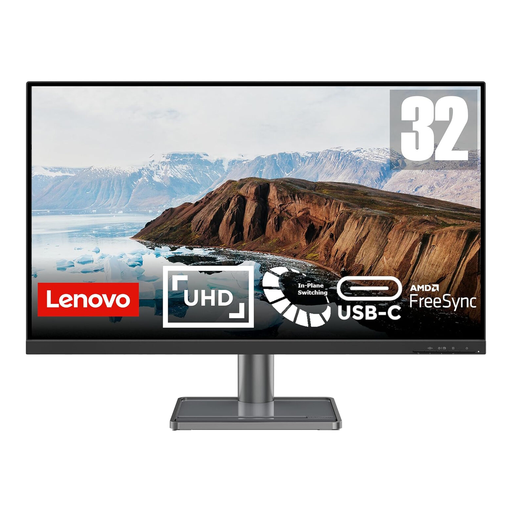 Image unavailable
Lenovo L32p-30 31.5-inch 4K UHD USB-C Monitor
Consider the larger screen if the shared desk has room for it and detailed recipe pages are a priority.
The listed features include a 31.5-inch IPS display, height adjustment and USB-C video, data and power delivery. Check the desk width and viewing distance, then confirm the USB-C charging output and connections needed for the office peripherals.
View on Joybuy
 Image unavailable
BenQ MA270UP 27-inch Nano Glossy 4K Mac Monitor
Consider this model for detailed work at a desk using a compatible MacBook, while checking how its glossy surface suits the office lighting.
The listed features include an IPS panel, height, pivot, swivel and tilt adjustment, USB-A downstream ports and USB-C with 90 W power delivery and data transfer. Confirm video, charging and data compatibility with the actual laptop before relying on one-cable use.
View on Joybuy
 Image unavailable
LG 27UP650K 27-inch 4K IPS Monitor, White
Consider this model when detailed documents and adjustable screen positioning matter, particularly if the desk already has a suitable way to connect its laptops.
The listed features include height, tilt and pivot adjustment, built-in speakers, HDMI and DisplayPort inputs. If laptop charging and peripheral docking are required at the monitor, check the connections and whether the desk needs separate equipment.
View on Joybuy
 Image unavailable
MSI MAG 275UPD E14 27-inch Dual-Mode 4K Gaming Monitor
Consider this model for 4K recipe pages and tables if its gaming-oriented features do not distract from the connections needed at the office desk.
The listed features include an IPS panel, a four-way adjustable stand, HDMI 2.1, DisplayPort and UHD 144 Hz/FHD 288 Hz modes. Check laptop connectivity and any need for a separate dock or charger before planning shared-desk changeovers around it.
View on Joybuy
Common questions
Does a UK shared office need a workstation assessment for a new monitor?
For workers who use display screen equipment daily as part of normal work for continuous periods of an hour or more, the employer must assess the workstation. The Health and Safety Executive says to consider the whole workstation, the work and individual requirements; a new workstation or a material change also calls for assessment.
Where should the screen sit during recipe-index work?
Position the display directly in front of the user, with its top at about eye level and the screen roughly an arm’s length away, following Health and Safety Executive guidance. Adjust the chair, keyboard and lighting as part of the same setup rather than relying on screen height alone.
Will any USB-C laptop work with a one-cable monitor setup?
No: the connector alone does not guarantee video output, charging and peripheral data through one cable. Check the exact laptop documentation, monitor specification and cable against the functions the shared desk needs.
Do shared-office recipe-index desks need a KVM monitor?
A KVM feature is worth considering when someone regularly switches the display and connected keyboard and mouse between two computers. For a desk used with one laptop at a time, check whether ordinary monitor connections meet the changeover need before choosing a wider KVM-equipped model such as the Philips 34B2U3600C/00.


