Start with the usable desk depth, stand footprint and viewing distance, then decide how much screen workspace your sessions need. A 23.8–25-inch display is a compact route; a 27-inch 4K display makes sense if you can position it comfortably. Choose USB-C power delivery for a laptop setup only after checking the laptop’s video and charging support. The monitor helps you see a session, not judge its sound.
Who is this for?
Compact-desk rehearsal organisers
If your monitor shares a desk with a keyboard, MIDI controller or audio interface, measure the space left for its stand and your viewing position before choosing a screen diagonal. Height adjustment or a suitable mount may matter more than a larger display.
Laptop-based track preparers
If you want fewer cables around a laptop, check whether its USB-C port carries display video and whether the monitor’s power delivery meets its charging requirement. A USB-C socket alone does not establish a one-cable setup.
Dense-session workflow users
If you keep arrangements, track lists, cue sheets and reference material visible together, QHD or 4K resolution may matter more to you than minimising the screen’s physical size. The larger display still has to fit at a comfortable distance.
What matters when choosing?
Check physical fit and screen position first; then weigh native resolution, laptop connections and any visual-asset work against the space each option takes.
| Concern | What to check | Who this matters to |
|---|
| Desk fit and position |
Measure clear width and depth around your music equipment. Compare stand dimensions and height adjustment; the Health and Safety Executive advises placing the screen about an arm’s length away, with its top at eye level. |
When the screen shares a shallow desk with rehearsal equipment, I need it to fit without sitting too close. Around 33% of consumers put fit and positioning first. |
| Session workspace |
Compare native resolution as well as screen size. LG specifies 1920 × 1080 for the 24BA750, BenQ 2560 × 1440 for the PD2506Q, and Dell 3840 × 2160 for the S2725QS. |
If I need arrangements, track lists and notes in view together, I prioritise room to organise those windows. Roughly 27% of consumers make workspace their primary concern. |
| Laptop connection |
Confirm that the laptop supports video over USB-C and check its charging requirement against the exact monitor’s power-delivery rating. Check the ports needed for your other equipment separately. |
With a laptop already surrounded by music gear, I want a simpler connection without assuming that charging will work. About 20% of consumers put compatible laptop connectivity first. |
| Visual references |
If you also prepare artwork or video, check the exact model’s colour-space and calibration specifications. BenQ documents colour-oriented features for the PD2506Q; they say nothing about audio-monitoring quality. |
When artwork or video references are part of my session preparation, I care how those visuals appear on screen. Around 20% of consumers prioritise visual-reference work. |
Buying pitfalls
-
Choosing by screen diagonal alone
A stand can take up usable desk depth even when the screen width looks manageable. BenQ specifies a 256.9 mm stand depth for the PD2506Q, while the Health and Safety Executive advises positioning the screen about an arm’s length away.
Measure the clear desk after placing your keyboard and audio equipment. Compare the exact stand dimensions, or check monitor, arm and desk compatibility before choosing a VESA mount.
-
Assuming USB-C makes every setup one-cable
A monitor’s USB-C power-delivery specification does not establish that a particular laptop can send video through its port or accept the available charging power.
Check the laptop’s port and power specifications against the monitor’s video and power-delivery functions, as well as the cable and peripheral connections you need.
-
Overlooking an older model’s status
LG marks the 24QP550-B as discontinued. Its 23.8-inch QHD specification may still look relevant to a compact desk, but the model’s status matters when assessing a listing.
Check the manufacturer’s current model page and the seller’s applicable warranty and returns terms before purchasing an older listing.
Brands and models to consider
These examples show different monitor configurations; the specifications apply to the named models, not every display from each brand.
LG
LG’s 24BA750 is a compact workstation example: LG specifies a 23.8-inch Full HD IPS display, USB-C power delivery, an adjustable stand and 100 × 100 mm VESA mounting.
- Its screen size and positioning options are relevant when desk space is tight.
- Its 1920 × 1080 native resolution provides fewer pixels for arranging windows than the QHD and 4K examples here.
BenQ
BenQ specifies a 25-inch 2560 × 1440 IPS display, 65 W USB-C power delivery and height adjustment for the PD2506Q.
- The QHD resolution offers more native pixels than Full HD without moving to the 27-inch example discussed here.
- Its specified 256.9 mm stand depth needs checking against the available desk space; colour features do not establish audio performance.
Dell
Dell specifies a 27-inch 3840 × 2160 IPS display and an adjustable stand for the S2725QS, a larger-screen option for organising several session windows.
- Its native resolution suits a workflow that places a high priority on visible session workspace.
- Check whether a 27-inch screen and its stand leave enough room to maintain a comfortable viewing distance on your desk.
Joybuy monitors for compact desks
These monitors offer compact-screen options for arranging rehearsal tracks, with different display formats and placement considerations. Check the exact stand and connection requirements against your desk and computer.
 No image available
ASUS ProArt PA24ACRV IPS QHD monitor
Consider this IPS QHD model if you want session detail on a compact desk. Check the stand dimensions against your available space; if laptop charging matters, confirm the required USB-C functions with your laptop.
View on Joybuy
 No image available
ASUS ProArt PA248CNV IPS WUXGA monitor
The IPS WUXGA format is worth considering if vertical space for track lists matters on a compact screen. Check the stand’s fit and position; for a laptop connection, confirm its video and charging requirements against the monitor’s ports.
View on Joybuy
 No image available
ASUS ZenScreen MB249C IPS USB-C monitor
This IPS USB-C model is worth assessing when a conventional stand is awkward to place among your equipment. Check the space, attachment requirements and included hardware for your chosen mounting arrangement, and confirm USB-C video and charging compatibility with your laptop.
View on Joybuy
 No image available
Dell P2425 24-inch monitor
Consider this 24-inch model if you want to assess a compact screen for session organisation. Check its stand position and the exact ports before planning a laptop connection; confirm the refresh rate if it affects your setup.
View on Joybuy
 No image available
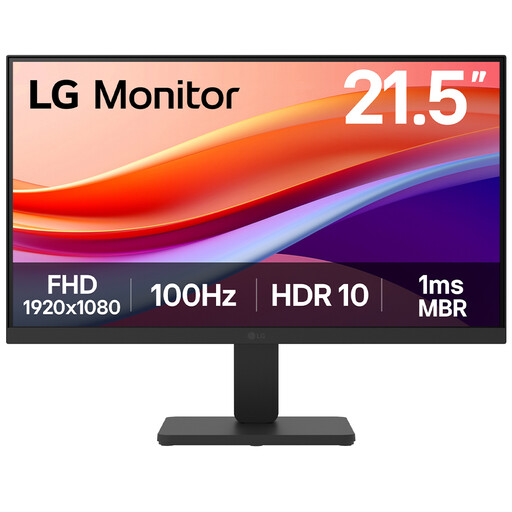
LG 22U401A-B 22-inch VA Full HD 100Hz monitor with HDMI
The 22-inch Full HD format is a smaller-screen option when desk width is particularly tight. Check whether the supplied stand lets you position the screen comfortably, or whether a compatible mount is needed.
View on Joybuy
Common questions
How far away should a monitor sit on a small desk?
Aim for about an arm’s length, with the top of the screen at eye level, in line with Health and Safety Executive workstation guidance. Measure after placing your keyboard and music equipment; if the screen ends up too close, reassess its size or a compatible mounting arrangement.
Should I choose Full HD, QHD or 4K for preparing rehearsal tracks?
Choose by the workspace you need and the screen you can position comfortably. The manufacturer-specified examples span Full HD on LG’s 23.8-inch 24BA750, QHD on BenQ’s 25-inch PD2506Q and 4K on Dell’s 27-inch S2725QS; the extra pixels are useful only if the corresponding setup works on your desk.
Will one USB-C cable run and charge my laptop?
Only if both the monitor and laptop support the necessary USB-C video and charging functions. Check your laptop’s display-output capability and power requirement against the exact monitor and cable; BenQ specifies up to 65 W power delivery for the PD2506Q.


