Detail-first plan readers
If much of your planning time goes into dimensions, annotations, room layouts and PDF drawings, prioritise legible text and a screen you can position comfortably for longer sessions.


For renovation planning, start by deciding whether detailed drawings on a compact desk or several documents visible together matter more: a 27-inch 4K monitor suits the former, while a 31.5- or 32-inch 4K screen gives the latter more physical room. Check desk fit, screen adjustment and your computer's display connection before choosing; colour-focused features are more relevant if digital mood boards or visualisations are a regular part of the work, but physical samples remain important for final material decisions.
If much of your planning time goes into dimensions, annotations, room layouts and PDF drawings, prioritise legible text and a screen you can position comfortably for longer sessions.
If you keep a drawing open alongside contractor messages, a schedule or supplier pages, the physical room for several windows may matter more than specialist design features. Check that a larger screen will fit the desk and your viewing position.
If mood boards, CAD-related views or rendered room images are a regular part of your work, documented colour specifications may help you assess digital material. They cannot tell you how a physical finish will look in the room.
For a renovation-planning monitor, decide which task has priority, then check the desk and computer against the screen you are considering. A larger display, a flexible stand and design-oriented colour features solve different problems.
| Concern | What to check | Who this matters to |
|---|---|---|
| Reading plans and dense documents | Check native resolution and screen size, then confirm that your computer can output the chosen resolution. Consider screen positioning for long reading sessions. | If dimensions and annotations are my main task, I want drawings and accompanying text to remain practical to read at my desk. Around 33% of consumers put plan detail first. |
| Working across several windows | Check whether the panel and available desk space accommodate the windows you use together. Look at laptop connectivity only if it serves your setup. | Keeping a drawing beside messages, a schedule and supplier pages matters more to me than working in one document at a time; around 25% of consumers prioritise that multi-window space. |
| Desk fit and screen position | Measure desk depth and rear clearance. Check the stand's adjustments, or the desk edge and mounting details if you plan to use a clamp or arm. | My planning desk has limited room, so I need to place the screen without crowding the workspace. For around 25% of consumers, positioning and desk fit are the primary concern. |
| Digital finishes and visualisations | Look for model-specific colour-space and calibration information if your work calls for it; assess physical samples in the intended room. | If I regularly compare mood boards or renderings, consistency across my digital work is important to me. Around 17% of consumers put this visual work ahead of the other monitor needs. |
A 31.5- or 32-inch display may give documents more physical room, but its stand still needs space. LG's 32UN880K-B, for example, uses a clamp-based mounting arrangement that must suit the desk.
Measure usable width, depth, rear clearance and, for a clamp, the desk edge. If you intend to use a separate arm, check the monitor's mounting details and weight.
A different stand or monitor arm may be needed if the supplied arrangement does not fit.
A USB-C socket on a monitor does not, by itself, establish that your laptop can send video through it and receive the charging power it needs.
Compare the exact monitor port and supplied cable with your laptop manufacturer's display-output and charging specifications.
Depending on that pairing, you may still need a separate charger, compatible cable or dock.
Specifications for a digital display cannot establish how paint, tile or fabric will appear on a particular surface under the lighting in your room.
Use digital images to organise choices, then inspect physical samples in the intended space before settling on a finish.
A refresh-rate specification does not answer whether you can read drawings comfortably, fit the monitor on the desk or connect the computer you use for planning.
Check resolution, physical size, screen adjustment and connections against your regular tasks before considering higher refresh rates for other uses.
These examples point to different monitor features worth checking; suitability depends on the exact model and your workstation, not the brand name alone.
Dell UK's UltraSharp U2725QE and U3225QE illustrate 27-inch and 31.5-inch 4K approaches to a laptop-centred desk.
BenQ's PD design-monitor line is relevant when renovation planning regularly includes CAD-related views, mood boards or other digital visual work.
LG's 32UN880K-B is an example to examine when a larger screen and adjustable placement are central to the decision.
Samsung's ViewFinity S80UD is relevant when a 32-inch 4K workspace must also serve a laptop or two connected computers.
These monitors include larger 4K screens for keeping renovation documents visible and a 27-inch 4K option for a more compact desk. Consider each model's screen format, stand and connection requirements against the way you plan to work.
 No image available
Consider this 32-inch screen if you want a larger display for renovation drawings and documents. Its title specifies 4K resolution and an IPS Mini LED panel; check desk fit and whether its connection and charging functions meet your laptop's requirements.
 No image available
This larger 4K option is relevant if you work across several renovation documents and use a compatible Mac. Check how its Nano Glossy surface behaves in your desk lighting, and confirm the display connection and charging requirements of your computer.
 No image available
Consider this larger display if a curved screen suits the way you read plans and arrange documents. The product title specifies 4K, OLED and Type-C 65W; check desk fit and whether its connection and charging functions meet your laptop's needs.
 No image available
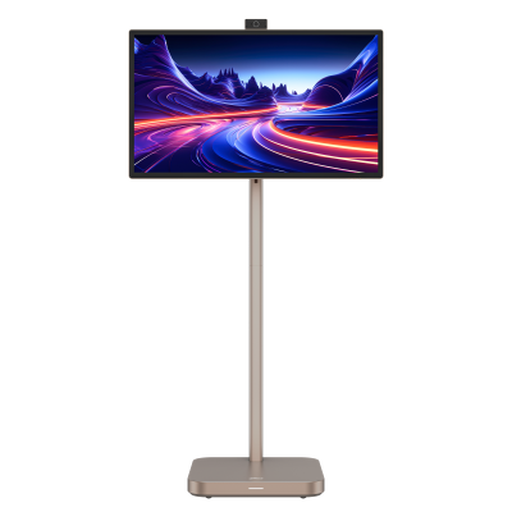
This 31.5-inch 4K model is an option to assess if you want a larger planning display with the smart-monitor features named in its title, including Android 11 and a built-in battery. Confirm whether the panel type suits your needs, what its Type-C port does with your computer and whether the screen fits your desk.
 No image available
The 27-inch 4K format is worth considering when reading renovation plans at a desk where a larger screen would be difficult to place. Check the screen surface in your lighting and confirm the exact port functions if you want a single-cable laptop setup.
A 27-inch 4K monitor is a sensible starting point if you mainly read plans, PDFs and messages on one laptop at a compact desk. Consider a 31.5- or 32-inch 4K screen if keeping several substantial windows visible together matters more, provided you have room to position it comfortably.
You need one chiefly if assessing digital mood boards or visualisations is a regular part of your planning. Even then, a monitor cannot establish how a physical finish will appear under your room's lighting, so inspect samples in the intended space.
One cable can handle both only when the laptop and monitor support the required display connection and the monitor supplies enough charging power for that laptop. Check both devices' exact port specifications and the cable you intend to use rather than relying on the presence of USB-C sockets.