Start with the desk: position the screen to avoid a direct window reflection, then compare the exact monitors’ stated brightness and screen-surface treatments. A 4K display may help when filter controls, results and testing tools need to share the screen, but check scaling before choosing it for small text. Prioritise laptop connectivity or colour-workflow features only if those are part of your testing setup.
Who this setup is for
The right monitor depends on whether daylight visibility, room for detailed checks, laptop connections or colour-sensitive work sets the limit on your testing.
Bright-window interface testers
If daylight reflects into the screen while you inspect filter labels and selected states, screen position and reflection handling deserve attention before additional display features. The Health and Safety Executive advises arranging a desk and screen to avoid glare and bright reflections.
Laptop-based QA testers and developers
If you move between a laptop and a test desk, consider the workspace you need for the browser and tools alongside the connections your laptop can use. Check video output and charging requirements separately.
Colour-sensitive product teams
If checking a search filter also means assessing product imagery, swatches or design-system colours, match the monitor’s stated colour capabilities to your team’s workflow. Those features need not drive a purchase focused solely on whether filters function correctly.
What matters when choosing
Deal with light falling on the screen first, then decide how much workspace and connectivity the test desk needs. The Health and Safety Executive recommends avoiding bright reflections through desk and screen placement; RTINGS.com also identifies room lighting, brightness and reflection handling as separate influences on what you see.
| Concern |
What to check |
Who this matters to |
| Daylight visibility |
Can you angle the screen away from the window? Compare explicit anti-glare or low-reflection claims and like-for-like typical brightness figures. |
If reflections obscure filter labels or selected states, I need to control the light before relying on a brighter display. Around 36% of consumers put daylight visibility first. |
| Detailed workspace |
Check screen size, resolution and the operating-system scaling and browser zoom you intend to use. |
When I need the filter, results and developer tools visible together, extra pixels help only if the text remains comfortable to read. Detailed workspace comes first for around 29% of consumers. |
| Laptop connection |
Confirm USB-C video support, the monitor’s power-delivery rating and the laptop’s charging requirement. |
If I connect a laptop for each test session, I want a dependable display connection without repeatedly rearranging cables. For around 21% of consumers, that connection is the primary concern. |
| Colour-sensitive checks |
Identify the colour space your work uses and whether its checking process calls for calibration. |
When filter testing includes imagery or colour-dependent states, I need a display that fits the team’s colour workflow. This is the leading need for around 14% of consumers. |
Buying pitfalls
-
Expecting brightness alone to remove window glare
A bright image can still have a distracting reflection when the screen faces the window. The Health and Safety Executive advises arranging the desk and screen to avoid glare or bright reflections.
Try a different screen angle and use blinds or curtains where needed. Then assess the exact monitor’s surface treatment and a comparable brightness specification.
-
Using an HDR label as a daytime visibility test
An HDR designation does not, by itself, tell you how the screen handles a window reflection or how bright it is during ordinary desktop use.
Look for the exact model’s typical brightness and surface description; consult reflection testing conducted under stated conditions where available.
-
Assuming a USB-C socket covers every laptop need
Monitors’ USB-C connections and power-delivery ratings differ, while laptops have their own video-output and charging requirements.
Check both devices’ specifications and the connection you plan to use before counting on one cable for the display and charging.
-
Assuming a product page confirms the exact variant is available
A listing can remain visible when a model cannot be ordered, and a similar suffix can identify a different configuration.
Confirm the current listing, model suffix, delivery details and warranty before ordering. If you switch variants, compare the screen surface, brightness, stand and ports again.
Brands to consider
These model-specific examples illustrate different priorities; a feature listed for one monitor should not be assumed to apply across its brand’s range.
ASUS ProArt
A reference point when bright-window testing overlaps with managed colour work. ASUS specifies a 27-inch 4K panel, 600 cd/m² typical brightness and an AGLR anti-glare, low-reflection surface for the PA27UCGE.
- The PA27UCGE has an explicitly specified surface treatment and typical brightness, giving you model-level details to compare.
- Its professional colour features may be unnecessary for functional filter checks; do not apply the PA27UCGE’s specifications to other ProArt models.
Dell UltraSharp
A reference point for a laptop-centred desk where changing room light and monitor connectivity matter. Dell identifies an ambient-light sensor and 120 Hz refresh rate on the 27-inch 4K U2725QE.
- The U2725QE’s stated ambient-light sensor is relevant if lighting changes during the working day.
- An ambient-light sensor does not remove a direct reflection; confirm the exact configuration and laptop connections you need.
LG UltraFine
A reference point for a 27-inch 4K IPS setup with an adjustable stand. LG identifies height, pivot and tilt adjustment on the 27UP850K-W.
- The specified stand adjustments give you options for positioning the 27UP850K-W at the desk.
- Its DisplayHDR 400 designation does not establish daytime reflection handling; check the current listing and the exact model before purchase.
Joybuy monitors for this setup
These monitors offer different ways to equip a search-filter test desk, from a conventional WQHD screen to larger 4K and ultrawide displays. Choose the format that fits your workspace, then check the exact model’s daylight and laptop requirements rather than treating an HDR figure as a reflection test.
 No image available
ASUS ProArt Display PA32UCG-K 32-inch 4K HDR IPS Mini LED monitor
Consider this format if your filter checks also involve colour-sensitive assets and you have room for a 32-inch screen.
The title identifies a 4K HDR IPS Mini LED display and Thunderbolt 3 connectivity. Check its typical brightness for ordinary daytime use rather than relying on a peak-brightness claim; confirm laptop charging capability separately if required.
View on Joybuy
 No image available
Acer Predator X49X 49-inch curved QD-OLED ultrawide monitor
Consider its wide format if you want filter states and other test windows on one screen and can accommodate a large monitor beside the window.
The title specifies a 49-inch curved 32:9 QD-OLED display with Dual QHD resolution and USB-C. Check desk space, typical brightness and whether your laptop supports the intended USB-C display connection.
View on Joybuy
 No image available
ASUS ProArt PA278CV IPS WQHD monitor
Consider this model if a WQHD workspace meets your filter-testing needs without moving to 4K.
The title identifies an IPS WQHD display. Check that its workspace is sufficient at your preferred scaling, and confirm the USB-C charging rating against your laptop if charging through the monitor matters.
View on Joybuy
 No image available
ASUS ProArt PA27DCE-K OLED 4K UHD monitor
Consider this 4K option when detailed interface checks also sit alongside colour-sensitive work.
The title identifies an OLED 4K UHD display. Assess ordinary-use brightness and how you will position the screen beside the window; check USB-C charging capability separately if the monitor must power a laptop.
View on Joybuy
 No image available
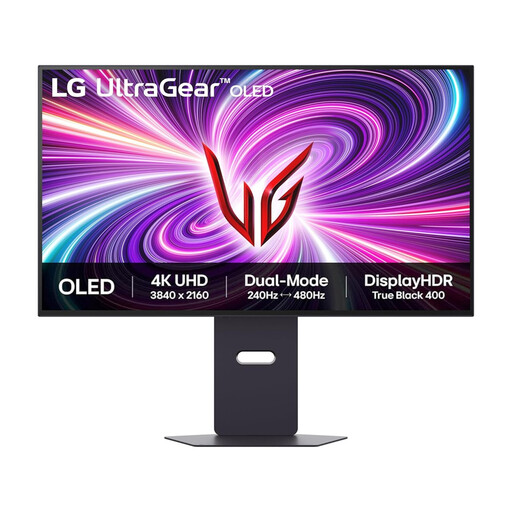
LG UltraGear 32GS95UV-B 32-inch OLED 4K monitor
Consider a 32-inch 4K workspace if you need room to compare filter and result states, but account for long periods showing a static interface on an OLED screen.
The listing title names 32GS95UV-B, while its product details identify 32GS95UV-W.AEU. Confirm which variant is supplied before relying on its specifications; an HDR peak-brightness figure should not be treated as typical daytime brightness.
Purchase link unavailable
Common questions
Will a brighter monitor solve glare from the window?
No, brightness alone will not remove a direct reflection. The Health and Safety Executive advises positioning the desk and screen to avoid glare or bright reflections; use window coverings where needed, then compare suitable monitors’ surface treatments and brightness figures.
Do I need 4K to test a search filter?
Not necessarily: choose 4K if the additional workspace helps you view the filter, results and testing tools together. Check operating-system scaling and browser zoom first, because interface elements can look smaller at native 4K scaling.
Where should the monitor go relative to the window?
Place it so the screen does not directly face the window or another bright light source where the desk layout allows. The Health and Safety Executive recommends arranging the screen to avoid glare and bright reflections; an anti-glare surface complements, rather than replaces, that positioning.


