Laptop-based shop managers with one spare socket
If you review daily sales at a counter or back-office desk, a compatible monitor that charges your laptop could let you leave its separate charger unplugged.


For a laptop-based sales desk with few spare sockets, consider a USB-C hub monitor that can carry video and provide enough power to charge your laptop. One-cable use depends on the laptop supporting display output and charging over USB-C, while the monitor still needs its own mains socket; choose screen resolution according to how much spreadsheet and dashboard detail you need to see.
If you review daily sales at a counter or back-office desk, a compatible monitor that charges your laptop could let you leave its separate charger unplugged.
If reports compete for screen space, compare FHD, QHD and 4K alongside the connections you need. More pixels can give you room to arrange rows, columns and windows, subject to your laptop’s display output.
If different laptops or peripherals use the same desk, check conventional video inputs and USB-C compatibility for each intended setup rather than planning around one computer alone.
Start with the laptop’s USB-C display and charging capabilities, then choose the screen space and desk connections that suit your sales-review work.
| Concern | What to check | Who this matters to |
|---|---|---|
| Fewer occupied sockets | Confirm laptop DisplayPort Alt Mode and USB-C charging support; compare its charging requirement with the monitor’s power delivery. | With only one spare socket, I want to avoid plugging in a separate laptop charger while reviewing sales. Around 36% of consumers put socket consolidation first. |
| Space for sales data | Compare native resolution and screen size, and check the laptop’s supported display output. | When spreadsheets and dashboards compete for room, I want to see more of them without switching windows so often. More visible workspace is the primary need for around 29% of consumers. |
| Connections for a shared desk | List required video inputs, USB peripherals and wired-network connections; verify any second-monitor setup with the computer. | If staff bring different laptops to the same desk, I need the existing devices and connections to remain practical. Around 21% of consumers prioritise connection flexibility. |
| Screen positioning | Check stand adjustments, anti-glare treatment and the available counter space. | During repeated report reviews, I need to position the screen where it fits the desk and is comfortable to view. Adjustable positioning comes first for around 14% of consumers. |
A USB-C connector alone does not establish that a monitor can receive a display signal from the laptop. The Video Electronics Standards Association identifies DisplayPort Alt Mode as the relevant USB-C display capability.
Check the laptop’s port specification before planning a one-cable desk setup.
Charging capability differs between monitor models, and a quoted maximum does not establish that it meets your laptop’s requirement.
Confirm that the laptop accepts USB-C charging and compare its requirement with the monitor’s stated power delivery before leaving the charger unplugged.
A monitor’s output port does not establish that the laptop can drive another screen through it. Dell specifies a Thunderbolt requirement for single-cable daisy chaining on its P2725QE.
Check the exact monitor connection and the computer’s multi-display support together.
GOV.UK identifies the Waste Electrical and Electronic Equipment Regulations as the UK framework for electrical and electronic equipment.
Arrange an appropriate route for the old monitor and confirm the business’s responsibilities with its supplier or waste provider.
Dell’s UK USB-C hub monitor range includes FHD and 4K options relevant to a laptop-based sales desk.
The GW2790QT is a 27-inch QHD option for buyers considering laptop charging and desk peripherals together.
The E27u G5 is a 27-inch QHD USB-C monitor with positioning options for a fixed or shared desk.
These monitors include larger 4K screens for detailed sales reports and a smaller FHD option for a constrained desk. Check each laptop’s USB-C capabilities before treating any monitor as a way to free a socket.
 No image available
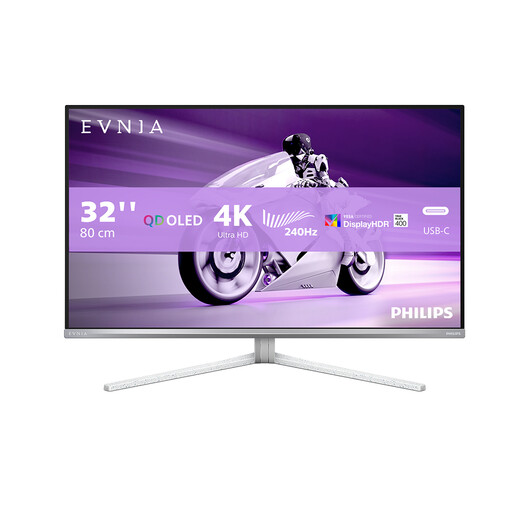
Consider this larger screen if detailed sales reports are the priority and the desk has room for it.
The product name specifies a 32-inch UHD OLED display and 240 Hz refresh rate. Confirm the exact screen-size variant and USB-C charging capability before planning a one-cable laptop setup.
 No image available
This larger curved screen is an option if there is room at the workstation for detailed reports.
The product name specifies 3840 × 2160 resolution, USB-C 65W and a USB hub. Confirm the exact screen-size variant and whether the laptop supports the required USB-C video and charging functions.
 No image available
Consider the 27-inch format if you want a 4K screen for sales dashboards without choosing a larger panel.
The product name specifies an IPS panel, Google TV and USB-C 65W. Check the laptop’s display output and charging requirement, plus the peripheral ports you intend to use.
 No image available
Consider this model when a smaller, more flexible counter setup matters more than the workspace offered by a larger 4K screen.
Check the exact version’s USB hub connections and the laptop’s charging requirements before relying on it for a one-cable desk. Confirm its weight if you plan to move it regularly.
 No image available
This larger display is an option for reviewing detailed reports where the counter or desk has enough space.
The product name specifies a 31.5-inch 4K IPS screen and USB-C. Confirm the monitor’s charging wattage, the laptop’s USB-C display support and the connections needed for peripherals before planning a one-cable setup.
No. For video over the USB-C connection, check that the laptop supports DisplayPort Alt Mode, as described by the Video Electronics Standards Association. Charging and USB data also depend on the capabilities of the particular laptop and monitor.
Choose according to the laptop’s charging requirement and whether it accepts USB-C charging. BenQ UK specifies 65W for the GW2790QT, while Dell UK specifies up to 90W for the P2725QE and up to 100W for the P2726HE; a monitor’s quoted maximum alone does not establish compatibility with your laptop.
Yes, if the monitor and computer support the same multi-display method. BenQ UK lists DisplayPort-out MST for the GW2790QT, while Dell UK says single-cable daisy chaining on the P2725QE requires Thunderbolt connectivity; check the intended setup before buying.
Arrange an appropriate route for the outgoing electrical equipment rather than treating disposal as an afterthought. GOV.UK identifies the Waste Electrical and Electronic Equipment Regulations as the relevant UK framework; confirm the business’s responsibilities with its supplier or waste provider.