Small-desk budget planners
You use spreadsheets and charts but also need room for a keyboard, mouse and paperwork. Compare each monitor’s full width and stand depth rather than relying on its diagonal size.


For household-spending spreadsheets on a small desk, start with a monitor around 23.8 inches and measure its full width and stand depth before choosing. QHD is worth considering when you want more pixel space for columns and charts; Full HD may suit you when a particular laptop connection matters more. Check screen adjustment and cable compatibility alongside resolution.
You use spreadsheets and charts but also need room for a keyboard, mouse and paperwork. Compare each monitor’s full width and stand depth rather than relying on its diagonal size.
You want to see more columns, categories or chart panels without moving to a physically larger screen. A compact QHD model is worth comparing with Full HD options, provided its text scaling works for you.
You prepare your household budget on a laptop and want fewer desk connections. Check that the laptop and monitor support the same USB-C video connection, and whether monitor charging meets the laptop’s requirements.
Measure the usable desk space first, then decide whether spreadsheet workspace, laptop connections or screen positioning is your main priority.
| Concern | What to check | Who this matters to |
|---|---|---|
| Desk fit | Measure the monitor’s width and depth with its stand, leaving room for peripherals and viewing distance. | I need to keep my keyboard, mouse and paperwork usable beside the budget screen; around 36% of consumers put desk fit first. |
| Spreadsheet space | Compare native resolution at the same screen size, and check whether text scaling suits you. | If I work across several spending categories and charts, I want more content visible at once. Around 29% of consumers prioritise that workspace. |
| Laptop connection | Check USB-C video support, the monitor’s stated power delivery and the cable required. | I would like fewer connections when I bring my laptop to the desk; roughly 21% of consumers make connection simplicity their main concern. |
| Screen position | Check the stand’s height and angle adjustments, or compatibility with a suitable mount. | When I spend longer reviewing figures, I need to place the screen at a workable height. About 14% of consumers put adjustability first. |
Stands can take up different amounts of desk depth even on similarly sized screens. LG UK specifies a 250 mm depth with stand for the 24BA750-B, while BenQ UK specifies 207 mm for the GW2490C.
Measure your usable desk width and depth, including space for the keyboard and mouse. The Health and Safety Executive advises placing the screen about an arm’s length away.
A separate monitor arm may be needed if the supplied stand does not fit your intended arrangement; check the mount and desk before choosing one.
LG UK specifies up to 65 W USB-C power delivery for the 24BA750-B; BenQ UK says the GW2490C’s USB-C connection does not support Power Delivery.
Check the laptop’s video-output support, its charging requirement and the cable specification against the exact monitor.
You may still need to use the laptop’s own charger or a separate dock.
A display feature does not determine where the screen sits relative to your chair, keyboard and lighting. The Health and Safety Executive advises putting the screen directly in front of you, with its top around eye level.
Choose the stand adjustment or compatible mount you need, then arrange the rest of the workstation around your viewing position.
UK government guidance says electrical products should be taken to an appropriate collection point rather than put in household rubbish.
When replacing a monitor, check your local electrical-waste collection options.
The Dell P2425D is a compact QHD option to consider when spreadsheet space and stand adjustment matter.
The LG 24BA750-B pairs a 23.8-inch Full HD IPS display with laptop-oriented connections and an adjustable stand.
The BenQ GW2490C is a Full HD option to compare when stand depth and USB-C display connectivity matter more than charging through the monitor.
These monitors offer compact-screen, spreadsheet-workspace and laptop-connection options for household budgeting. Measure the intended desk or mounting arrangement before choosing, especially if considering a larger display.
 Image unavailable
Consider this QHD option when spreadsheet and chart workspace is the priority. Check its width and stand depth against your desk, and confirm USB-C video and charging compatibility with your laptop if you plan to use that connection.
 Image unavailable
This USB-C option may suit a laptop-based budgeting desk. Check the space needed for the mounting arrangement you intend to use, as well as the laptop’s video and charging requirements.
 Image unavailable
Consider this 24-inch model for a household-budget workstation where screen positioning matters. Compare its complete stand dimensions with your desk, and confirm the exact input ports before planning a laptop connection.
 Image unavailable
Consider this WQHD model if your desk can accommodate a larger screen for charts. Its listed width with stand is 614.6 mm; measure the available width and depth, and check laptop charging requirements if you intend to use USB-C power delivery.
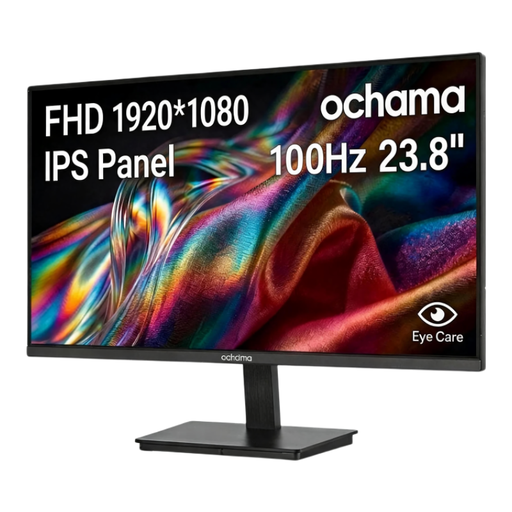 Image unavailable
This 23.8-inch Full HD option may suit straightforward spreadsheet and chart viewing. Check its full dimensions, stand adjustment and input connections against your desk and computer before buying.
A 23.8-inch screen is a useful starting point, but its stand determines much of the space it needs. LG UK specifies a 250 mm depth with stand for the 24BA750-B, compared with 207 mm for BenQ’s GW2490C; measure your desk and allow room for peripherals and viewing distance.
QHD is worth considering if seeing more spreadsheet content on a compact screen is your priority. Dell UK specifies 2560 × 1440 for the 23.8-inch P2425D, while the similarly sized LG 24BA750-B is 1920 × 1080; check that your preferred text scaling remains comfortable.
Only if the monitor provides suitable power delivery and your laptop supports the intended connection. LG UK specifies up to 65 W for the 24BA750-B, whereas BenQ UK says the GW2490C does not support USB-C Power Delivery; check your laptop’s video output and charging requirement too.
Place the screen directly in front of you, with its top around eye level and roughly an arm’s length away, as the Health and Safety Executive advises. For an old monitor, UK government guidance directs you to an appropriate electrical-waste collection point rather than household rubbish.