For covering-letter work on a small desk, check whether the monitor, keyboard and paperwork will fit before choosing a screen by its diagonal size. A height-adjustable 23.8–24-inch monitor is a useful starting point; consider QHD if you regularly compare documents side by side, or USB-C if a compatible one-cable laptop connection would reduce clutter.
Who needs what?
Small-desk letter writers
If the keyboard, mouse and paperwork share a shallow surface, compare stand depth and mounting options as well as screen size. The Health and Safety Executive advises keeping the screen and keyboard central, with the screen about an arm’s length away.
Laptop-based job applicants
If you want an external screen without a separate dock and more cables on the desk, check your laptop’s USB-C video output and charging requirements against the monitor’s connections and power delivery.
Detail-focused proofreaders
If you regularly compare a job advert, CV and letter draft, consider whether QHD resolution or a 16:10 screen gives you useful document space. Check text scaling too: more pixels need not mean a more comfortable text size.
What should you check?
Settle the monitor’s position on the desk first. Then decide whether your main reason to change screens is document workspace, fewer laptop cables or a simpler setup.
| Concern | Buying checks | Who this matters to |
|---|
| Desk fit and position |
Measure usable depth with the keyboard in place. Check the exact monitor’s depth with its stand and its height adjustment or mounting specification. |
I need space to write while keeping the screen directly in front of me at a workable distance; roughly 31% of consumers would put desk fit and positioning first. |
| Text and document space |
Compare Full HD at 1920 × 1080, QHD at 2560 × 1440 and 16:10 WUXGA at 1920 × 1200. Check whether text scaling suits you. |
When I compare my draft with an advert and CV, fitting the documents on a compact screen matters most; about 31% of consumers would prioritise document workspace. |
| Laptop connection |
Confirm USB-C video support and compare the laptop’s charging requirement with the monitor’s stated power delivery. Check which cable is supplied. |
I want fewer connections around my laptop without losing the ability to display my work and charge it; around 23% of consumers would make cable reduction their primary concern. |
| Simple setup |
Check that the computer and monitor have compatible connections and that the stand permits a suitable screen position. |
If I mainly work on one letter at a time, I want a straightforward external display rather than extra docking features; roughly 15% of consumers would put simplicity first. |
Buying pitfalls
-
Choosing by screen size alone
A compact panel can still have a deep base: BenQ specifies a 241 mm depth with the stand for the 23.8-inch GW2490T. That dimension matters if the keyboard and paperwork must fit in front of it.
Measure the usable desk surface, then compare the exact model’s dimensions with its stand. If considering an arm, check the monitor’s mount specification and whether the desk can accommodate the installation.
A monitor arm or suitable mounting hardware adds an installation step.
-
Assuming every USB-C connection replaces a laptop charger
Power delivery differs by model: Dell specifies up to 90W for the P2425HE, while LG specifies up to 15W for the 24U421A-B. The laptop must also support video through the relevant USB-C port.
Check the laptop’s port and charging specifications, the monitor’s power-delivery rating and the cable supplied with the exact model.
Depending on compatibility and what is supplied, you may still need your laptop charger or a suitable USB-C cable.
-
Using an eye-care label instead of setting up the workstation
Reading modes and low-blue-light features do not position the screen for you. The Health and Safety Executive’s display-screen guidance addresses screen height, viewing distance, central placement and breaks or changes of activity.
Set the screen and keyboard position first. Treat display modes as optional settings to adjust to your preference.
-
Overlooking the energy information for the exact model
Screen size alone does not tell you how two specific monitors compare for energy use.
Once you have narrowed your choices by fit and connections, compare their energy labels and product information sheets.
Brands to consider for these monitor types
BenQ
The GW2490T is a 23.8-inch Full HD option for checking how an adjustable monitor would fit a compact desk.
- BenQ specifies a 241 mm depth with the stand, 110 mm height adjustment and 100 × 100 mm VESA mounting for the GW2490T.
- Its Full HD resolution provides fewer pixels than a QHD screen; its eye-care features do not establish that it will prevent discomfort.
Dell
Dell offers distinct compact options for laptop connectivity and QHD document work.
- Dell lists up to 90W power delivery for the Full HD P2425HE and a 150 mm height-adjustment range for the QHD P2425D.
- These are different models: check the exact screen’s ports, charging capability and dimensions rather than combining their specifications.
Lenovo ThinkVision
The 23.8-inch ThinkVision P24h-30 combines a QHD display with connections intended for a laptop workspace.
- Lenovo specifies a 2560 × 1440 IPS panel, USB-C, Ethernet and USB hub connections for the P24h-30.
- Check laptop video and charging compatibility individually before relying on a single-cable arrangement.
ASUS ProArt
The PA248QV is a 24.1-inch option if extra vertical document space is more useful to you than a standard 16:9 layout.
- ASUS specifies a 16:10, 1920 × 1200 IPS display with height, tilt, swivel and pivot adjustment for the PA248QV.
- Its colour-focused features may matter less for covering-letter work; check the exact footprint before choosing it for a small desk.
Joybuy monitor choices
These monitor choices cover compact Full HD and QHD screens, plus 16:10 options for document work. Compare each model’s stand footprint and connections with your desk and computer before deciding.
 No image available
ASUS ProArt PA248CNV IPS WUXGA
Consider this 16:10 route if vertical space for your letter draft matters to you. Check its dimensions with the stand against your desk and confirm laptop compatibility before relying on USB-C for video or charging.
View on Joybuy
 No image available
ASUS ProArt PA24ACRV IPS QHD
The QHD display is relevant if you compare documents on a compact screen. Check the stand’s width and depth for your desk, and verify your laptop’s video and charging requirements if you plan to use USB-C.
View on Joybuy
 No image available
ASUS ProArt PA248CRV IPS WUXGA
This WUXGA option is worth considering if a 16:10 document layout appeals more than QHD resolution. Confirm the stand’s footprint and your laptop’s USB-C video and charging compatibility before buying.
View on Joybuy
 No image available
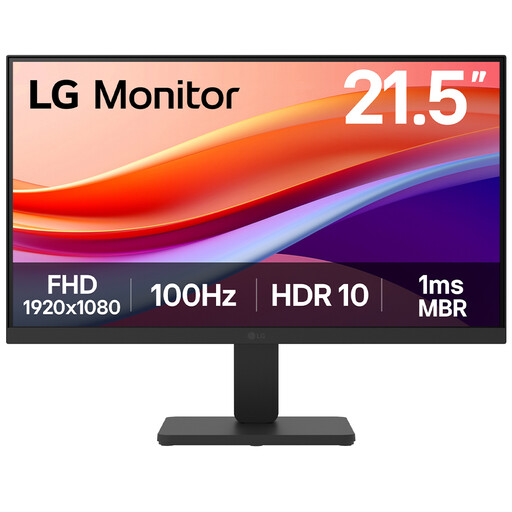
LG 22U401A-B 22-inch VA Full HD 100Hz monitor
Consider the smaller screen if physical space is your main constraint and its display area is enough for your documents. The title specifies HDMI; check the stand’s positioning options against your seating and desk height.
View on Joybuy
 No image available
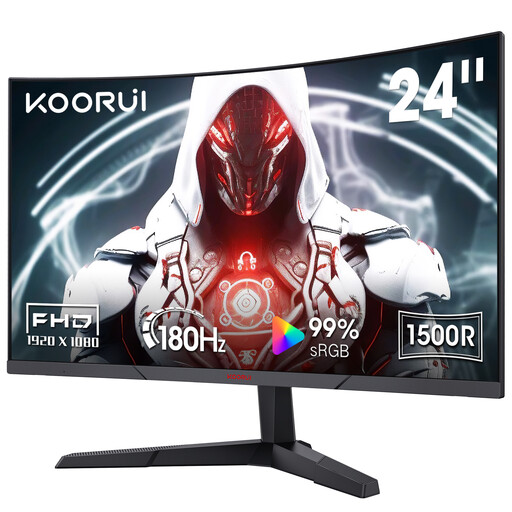
KOORUI MG24A12FV2 24-inch curved Full HD VA 180Hz monitor
This Full HD model is another compact-screen option, though its gaming-oriented refresh rate is not a reason on its own to choose it for writing. Check whether its curved screen and tilt adjustment suit your document layout and viewing position; the title also specifies HDMI, DisplayPort and VESA compatibility.
View on Joybuy
Common questions
Will a 24-inch monitor fit on a small desk?
It can, but the screen diagonal does not tell you how much desk depth the stand uses. Measure the space left after positioning your keyboard and paperwork; the Health and Safety Executive advises keeping the screen central, about an arm’s length away, with its top around eye level.
When is QHD useful for writing a covering letter?
QHD is worth considering if you regularly view your draft alongside a job advert, CV or notes on a compact screen. If you mainly use one document at a time, Full HD may meet that need; check text scaling before assuming that more pixels will make text easier for you to read.
Can one USB-C cable show video and charge my laptop?
It can when the laptop’s USB-C port supports display output and the monitor supplies suitable charging power. Check both devices and the cable: Dell specifies up to 90W power delivery for the P2425HE, whereas LG specifies up to 15W for the 24U421A-B.
How should I compare monitors’ energy use?
Compare the energy label and product information sheet for each exact monitor model you are considering. Do this after checking physical fit and connectivity rather than using screen size alone as a substitute for the model’s energy information.


