Who this setup suits

Standing-desk text editors

If you spend long periods revising minutes and alternate between sitting and standing, screen position matters as much as screen size. The Health and Safety Executive advises placing the top of the screen at eye level and the display about an arm’s length away.

Laptop-based hybrid workers

If you regularly reconnect a laptop at your desk, a monitor with suitable USB-C video, charging and peripheral connections can simplify the setup. Check those functions against your laptop rather than relying on the presence of a USB-C port alone.

Document-focused workers

If your main task is reading and editing text, decide how much room you need for a minutes document beside an agenda or chat window. A simpler display remains an option, provided its stand or a compatible arm can position it for standing work.

What to check when choosing

Check standing screen height first, then the space you need for text and the connections your laptop will actually use.

Concern What to check Who this matters to
Standing position Measure the screen-top height you need while standing. Check the stand’s adjustment range or whether a suitable monitor arm can achieve it. When I raise my desk, I need the screen to remain at a comfortable viewing height rather than looking down at it; around 42% of consumers put standing-position adjustment first.
Text workspace Compare native resolution at the screen size you want, and check that your computer can output it. I want to keep the minutes open beside an agenda or chat without constantly rearranging windows; roughly 33% of consumers prioritise text workspace.
Laptop connections Confirm USB-C video support on the laptop and whether the monitor’s power delivery meets its charging requirement. Reconnecting my laptop should not mean managing several display and peripheral cables; about 25% of consumers place laptop docking first.

Buying pitfalls

  • Assuming the desk alone fixes screen position

    A height-adjustable desk does not ensure that the monitor reaches eye level when you stand. The Health and Safety Executive advises keeping the top of the screen at eye level and the display about an arm’s length away.

    Measure the position you need while standing, then compare it with the monitor’s stand adjustment or a compatible arm’s positioning range.

    An arm or riser may be needed if the supplied stand cannot raise the screen sufficiently.

  • Assuming every USB-C port enables one-cable docking

    Video output and charging depend on both the laptop and the monitor. BenQ specifies USB-C video support and 65 W power delivery for the GW2790QT, but that does not establish compatibility with every laptop.

    Check your laptop’s USB-C video capability and charging requirement against the exact monitor specification.

    A separate charger or dock may still be needed if the connection does not meet those requirements.

  • Choosing a 27-inch Full HD screen without comparing resolution

    BenQ’s specifications put its 27-inch Full HD GW2790 at 82 pixels per inch and its 27-inch QHD GW2790QT at 109 pixels per inch. The QHD model has more pixels for arranging text at that screen size, although comfortable scaling remains a personal choice.

    Compare native resolution and the text scale you expect to use before deciding whether Full HD gives you enough working space.

  • Expecting a display feature to replace a suitable workstation setup

    Screen position, lighting and breaks still matter during extended document work; a monitor feature alone does not address the whole setup.

    Position the display, manage glare and take regular breaks rather than relying on a display mode to resolve discomfort.

Relevant brands to consider

Dell

The Dell UltraSharp U2724D is a 27-inch QHD IPS Black monitor with height, tilt, swivel and pivot adjustment.

  • Dell UK specifies a 150 mm height-adjustment range for this model, giving you a stated range to compare with your standing setup.
  • If you need laptop charging and peripherals through one cable, check the connections of the exact monitor you choose rather than assuming this model provides docking.

BenQ

The BenQ GW2790QT combines a 27-inch QHD display, a 110 mm height-adjustment stand and USB-C connectivity.

  • BenQ UK specifies 65 W USB-C power delivery and an integrated hub for this model, subject to laptop compatibility.
  • Check whether its 110 mm adjustment range reaches your standing eye level.

HP

HP specifies a QHD display and height, tilt, swivel and pivot adjustment for the E27u G5.

  • Its adjustable stand makes the model relevant when you alternate between seated and standing document work.
  • Check the exact connection and power-delivery requirements before choosing it for laptop docking.

Lenovo

The ThinkVision P27h-30 is a 27-inch QHD USB-C docking monitor with Ethernet, a USB hub and DisplayPort-out among its listed connections.

  • Those connections are relevant if your minutes workflow also uses wired networking, peripherals or another display.
  • Confirm its physical adjustment range against the screen height your standing setup requires.

Joybuy monitor choices

These monitors offer different screen formats for working on minutes alongside other windows. Check each model’s positioning options against your standing desk before choosing a larger screen or extra connections.

ASUS ProArt PA278CFRV monitor

ASUS ProArt PA278CFRV IPS QHD 100Hz Monitor

Consider this QHD model if you want a conventional-format display for editing minutes and viewing reference material. Its product title specifies an IPS panel and 100Hz refresh rate; confirm the stand’s height range for your standing position and the exact USB-C functions if laptop docking matters.

View on Joybuy

Dahua 4K curved OLED monitor

Dahua 32-inch 4K 165Hz Curved OLED Monitor

Consider the larger curved format if you have desk space for it and want to arrange several windows while editing. The title specifies 3840 × 2160 resolution, USB-C with 65 W power delivery and a USB hub; confirm laptop compatibility, the exact screen measurement and whether the monitor reaches your standing eye level.

View on Joybuy
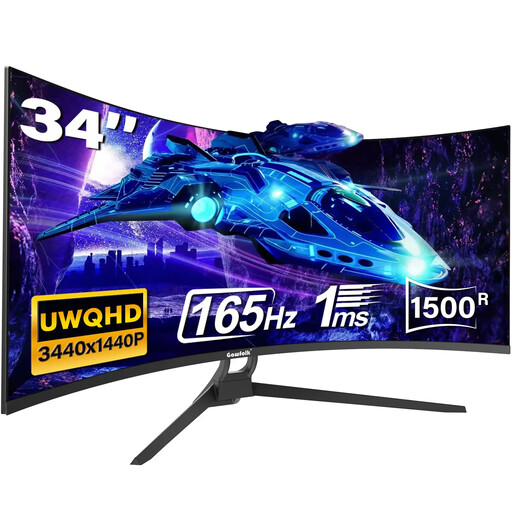
Gawfolk 34-inch curved ultrawide monitor

Gawfolk 34-inch 165Hz Curved UWQHD Monitor

The ultrawide format may suit a minutes document beside other windows if you have room for the wider display. Its title lists HDMI 2.1, DisplayPort 1.4, USB-C and VESA mounting; check the stand adjustment or a suitable arm for standing use, and confirm what the USB-C connection supports before relying on it for docking.

View on Joybuy

Frequently asked questions

What matters most in a monitor for a standing desk?

The screen must be positionable at your standing eye level, whether by its stand or a compatible arm. The Health and Safety Executive also advises keeping it about an arm’s length away, so measure your setup rather than judging adjustment by the monitor’s size alone.

Is 27-inch QHD useful for editing meeting minutes?

A 27-inch QHD screen is a useful starting point if you want the minutes and reference material visible together. BenQ UK specifies 109 pixels per inch for its 27-inch QHD GW2790QT, compared with 82 for its 27-inch Full HD GW2790; choose text scaling that remains comfortable at your viewing distance.

Will a USB-C monitor charge my laptop and display its video?

Only if the laptop supports the required USB-C video function and the monitor’s power delivery meets its charging needs. BenQ specifies video, data and 65 W power delivery over USB-C for the GW2790QT, but you still need to check your laptop’s requirements.

What should I check for a UK workplace screen setup?

If you regularly use display screen equipment as a significant part of your normal work, ask your employer about the workstation assessment and support that apply to your role. The Health and Safety Executive says employers must assess workstations to reduce risks and arrange an eye test for display screen equipment users who request one.