For notation-led string-quartet arranging, a height-adjustable 27-inch QHD display is a practical starting point: check that a score and its editing controls remain readable at your preferred scale. Consider 4K when you need more pixels for dense pages or several panes, or a tall display when vertical score space matters most; either choice still has to fit your desk, computer connection and viewing preferences.
Who is this for?
Notation-first string arrangers
If you move between a full score, individual parts and page-layout controls, focus on how much notation you can read comfortably. The MuseScore Studio Handbook covers these parts of score editing; colour-focused display features serve a different need.
Laptop-based home-office arrangers
If you want the screen to carry video and charge your laptop, check both devices rather than relying on a USB-C label. For example, BenQ UK lists 65 W USB-C power delivery for the PD2705Q, while ASUS UK lists 96 W for the PA279CRV.
Arrangers working at a constrained desk
If the desk is shallow or space around it is limited, the stand and its adjustment range may shape your choice as much as screen size. The Health and Safety Executive links poorly designed workstations with discomfort and fatigue; check the viewing position you can achieve in your room.
What matters when choosing?
Conventional 27-inch QHD
Choose it when: A familiar wide layout gives your score, notation controls and office windows enough room at a readable scale.
Trade-off: At 2560 × 1440, it has fewer pixels than a 27-inch 4K screen; USB-C docking also varies by model. Dell UK lists no USB hub or power delivery for the U2724D, while BenQ UK lists 65 W USB-C power delivery for the PD2705Q.
27-inch 4K
Choose it when: Dense score pages or several panes make extra pixel space useful, and you can set a comfortable display scale.
Trade-off: Confirm your computer can drive the intended resolution and connection. ASUS UK lists the PA279CRV at 3840 × 2160 with USB-C power delivery; its colour-calibration features are aimed at visual work, not a requirement for notation.
Tall 16:18 display
Choose it when: Seeing more of a score page vertically matters more to you than a conventional wide layout.
Trade-off: A tall shape may be less convenient for wide application timelines, and a clamp stand needs a suitable desk edge. LG UK marks the 28MQ780-B example as discontinued, so check the exact item’s condition and warranty before planning around it.
| Concern |
What to check |
Who this matters to |
| Readable score space |
Compare usable page and tool space at a comfortable display scale; check screen shape, resolution and reflections. |
I want to see more of a quartet score while editing without making its notation too small to read; around 36% of consumers would put score space first. |
| Laptop connection |
Check the laptop’s video output and charging requirements against the monitor’s USB-C video, power-delivery and hub features. |
If my laptop moves between the desk and other work, I want a straightforward connection without assuming every USB-C port does the same job; roughly 29% of consumers would make connectivity their main concern. |
| Desk fit and adjustment |
Measure desk depth and clearance; check stand movement or whether a clamp or compatible arm will fit. |
I need to position the score screen comfortably without crowding my home-office desk; around 21% of consumers would prioritise desk fit and adjustment. |
| Shared visual work |
If the screen also serves design, photography or video work, compare the exact model’s relevant colour specifications. |
My monitor also handles visual projects, so colour requirements affect my choice beyond music notation; about 14% of consumers would put that shared use first. |
Buying pitfalls
-
Assuming USB-C means one-cable docking
USB-C features differ between monitors. BenQ UK lists 65 W power delivery for the PD2705Q and ASUS UK lists 96 W for the PA279CRV; Dell UK lists neither an integrated USB hub nor power delivery for the U2724D configuration.
Check your laptop’s USB-C video mode, charging support and required wattage against the exact monitor before ordering.
Depending on that match, you may still need to use a separate charger, hub or dock.
-
Choosing the screen before checking the desk
A display that offers more workspace will not help if its stand cannot reach a usable position. Conventional stands and the C-clamp supplied with LG’s 28MQ780-B need different kinds of desk space.
Measure depth, height clearance and, for a clamp, the desk edge and structure. The Health and Safety Executive identifies workstation design as a factor in discomfort and fatigue.
If the supplied stand does not suit your setup, fitting a compatible arm may add another step.
-
Treating colour specifications as a notation requirement
ASUS UK lists wide colour-gamut coverage and factory calibration for the PA279CRV, but those visual-creative specifications do not establish a benefit for editing music notation itself.
Decide on readable score space, positioning and connections first. Compare colour features if the same monitor also has a defined visual-design role.
-
Planning around a discontinued tall model
LG UK marks the DualUp 28MQ780-B as discontinued. Its suitability as a screen shape does not establish that a particular offered unit is new or carries the warranty you expect.
Check the exact model, item condition, seller terms and warranty before choosing a desk setup built around it.
Brands to consider for these display layouts
Dell
Dell’s UltraSharp U2724D is a conventional 27-inch QHD example for score and office work.
- Dell UK lists a 2560 × 1440 IPS Black display, 120 Hz refresh rate and height, tilt, swivel and pivot adjustment for this model.
- The listed U2724D configuration has no integrated USB hub or USB power delivery; plan the laptop connection separately if you need those functions.
BenQ
BenQ’s PD2705Q combines a conventional 27-inch QHD layout with laptop-oriented USB-C features.
- BenQ UK lists 2560 × 1440 resolution, USB-C with 65 W power delivery and 140 mm of stand height adjustment.
- Its listed maximum refresh rate is 60 Hz. BenQ UK’s three-year limited warranty for new PD2705Q purchases excludes refurbished products and accessories; check the terms for the item offered.
ASUS
ASUS’s ProArt PA279CRV is a 27-inch 4K example for buyers who also have a defined visual-creative workload.
- ASUS UK lists a 3840 × 2160 IPS display, an adjustable stand and USB-C with up to 96 W power delivery.
- Its manufacturer-stated colour-gamut and calibration features are not necessary to establish a notation workflow. Check the exact model’s availability before making it central to a setup.
LG
LG’s DualUp 28MQ780-B illustrates a tall alternative for score-first desk layouts.
- LG UK lists a 27.6-inch, 2560 × 2880 display in a 16:18 format with a C-clamp stand.
- LG UK marks this exact model as discontinued. Check desk-edge fit as well as the condition and warranty of any unit offered.
Joybuy monitor choices
These monitors offer conventional QHD or 4K screen layouts for arranging at a home-office desk. Compare their readable workspace, surface finish, positioning options and laptop connections against your own setup rather than treating gaming or colour features as notation requirements.
 No image available
BenQ MA270UP Nano Glossy 27-inch 4K USB-C Monitor
Consider this 27-inch 4K option if you want to try a denser score-and-tools layout at your preferred display scale.
The product title specifies an IPS panel, USB-C and a height-adjustable stand. Its Nano Glossy finish makes room reflections worth checking, and your laptop’s video and charging requirements need to match the connection you intend to use.
View on Joybuy
 No image available
Dahua 4K 165Hz Curved OLED Monitor
This larger curved 4K option is worth assessing if you want space for a score alongside other application panes and have room for the screen on your desk.
The product title lists 3840 × 2160 resolution, 165 Hz, a USB hub and Type-C 65 W power delivery. Its screen size is described as both 32 and 31.5 inches in the listing, so confirm the exact diagonal before planning its fit; Type-C power delivery alone does not establish laptop video compatibility.
View on Joybuy
 No image available
MAG 274QP QD-OLED X24 27-inch WQHD Monitor
Its conventional 27-inch WQHD layout is one to consider if that screen shape gives your score and office windows enough room.
The product title specifies a QD-OLED panel, 2560 × 1440 resolution and 240 Hz. Check the connections against your laptop if charging or docking through the monitor is part of your plan.
View on Joybuy
 No image available
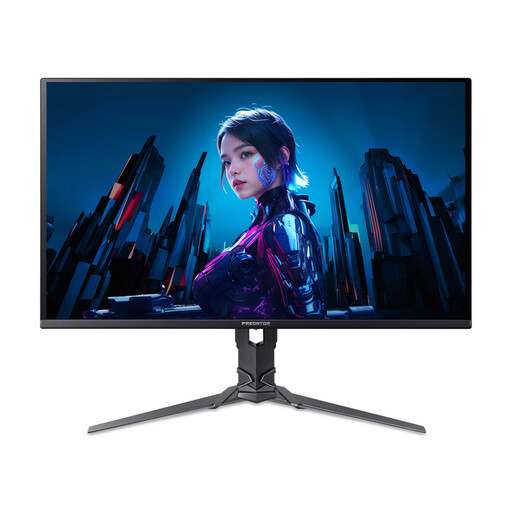
Acer X Predator X27U W3 26.5-inch QHD Monitor
This near-27-inch QHD screen may suit a conventional score-and-office layout if its dimensions and positioning work at your desk.
The product title specifies 2560 × 1440 resolution, QD-OLED and 240 Hz. Confirm the supplied stand’s adjustment options before relying on it for your preferred viewing position.
View on Joybuy
 No image available
HKC G27H2DPro 27-inch QHD Fast IPS Monitor
Consider this 27-inch QHD screen if you prefer a conventional wide layout for a score and nearby controls.
The product title specifies 2560 × 1440 resolution and 220 Hz. Its described glossy finish makes desk lighting worth checking; confirm the stand movements you need, since tilt is the adjustment described for this item.
View on Joybuy
Common questions
Is a 27-inch QHD monitor enough for arranging a string quartet?
A 27-inch QHD monitor is a sensible starting point if you can read the score comfortably while keeping the notation tools you use in view. Dell UK and BenQ UK each list 2560 × 1440 examples; try your preferred page zoom and window arrangement before deciding whether more pixels or a taller shape would help your workflow.
Will any USB-C monitor carry video and charge my laptop?
No: check video output and USB-C charging support on the laptop separately, then compare its power needs with the monitor’s specification. BenQ UK lists DisplayPort Alt Mode and 65 W power delivery for the PD2705Q, while ASUS UK lists USB-C DisplayPort support and 96 W power delivery for the PA279CRV; neither specification establishes compatibility with an unspecified laptop.
What should I check for a comfortable home-office setup?
Check that the screen and its stand or arm can reach a comfortable viewing position without crowding your desk. Measure depth and height clearance, and check the desk edge before choosing a clamp-mounted model. The Health and Safety Executive identifies poorly designed display-screen workstations as a contributor to discomfort and fatigue.
Does the monitor’s warranty cover a refurbished unit?
Check the warranty for the exact model, seller and item condition rather than assuming new-product terms apply. For example, BenQ UK states that its three-year limited warranty for new PD2705Q purchases excludes refurbished products and accessories.


