Laptop-first data cleaners
You want a display connection, laptop charging and access to peripherals without occupying another socket with a separate laptop charger. Whether one cable can do all three depends on your laptop and monitor ports.


Start with a USB-C monitor that can carry video and charge your laptop over one cable if you want to leave its separate charger unplugged; check the laptop’s video output and charging requirements before buying. QHD may be enough for your usual spreadsheet layout, while 4K offers higher native resolution for dense tables if text remains comfortable at your preferred scaling. Check stand adjustment and peripheral connections separately: neither follows automatically from the resolution or USB-C label.
You want a display connection, laptop charging and access to peripherals without occupying another socket with a separate laptop charger. Whether one cable can do all three depends on your laptop and monitor ports.
You move between survey responses, codebooks, formulas and cleaned outputs. The useful question is how much of your usual work remains readable at your chosen screen size and scaling.
You need to position the display within your desk setup, not just choose a resolution. The Health and Safety Executive advises placing the top of the screen at eye level and the screen about an arm’s length away.
For survey-data work at a desk with few plug sockets, establish whether a single laptop cable is possible, then choose the workspace and connections that fit your tasks.
Consider it when: Your usual tables fit a 27-inch QHD workspace and you want charging and peripheral ports at the monitor. BenQ specifies those functions for the GW2790QT.
Trade-off: Its stated 65W charging must be sufficient for your laptop, and QHD has a lower native resolution than 4K.
Consider it when: Dense tables and side-by-side applications make native resolution a priority. LG specifies a 27-inch 4K display and USB-C Power Delivery up to 90W for the 27U730A-B.
Trade-off: Check text size at your preferred scaling and viewing distance; the laptop must also support the intended video and charging connection.
Consider it when: A connection-focused workstation or future second display is more important to you. Dell describes the U2724DE as a Thunderbolt 4 hub monitor.
Trade-off: Dell says display daisy-chaining requires Thunderbolt and that some M-series chips may not support certain features; check your exact computer before planning around them.
| Concern | What to check | Who this matters to |
|---|---|---|
| One-cable connection | Check laptop USB-C video output, charging input and the monitor’s Power Delivery rating. | With few sockets, I want to leave my laptop charger unplugged without losing the display connection; around 36% of consumers put that single-cable need first. |
| Room for tables | Compare screen size and native resolution, then try your usual software at a readable scaling setting. | When I compare response columns with a codebook, I need both to remain legible on screen; roughly 29% of consumers prioritise workspace for dense data. |
| Screen position | Check the stand’s adjustment range or mounting option against your desk and seated position. | During long cleaning sessions, I need to place the screen where I can view it comfortably; about 21% of consumers make positioning their primary concern. |
| Peripheral access | Count the ports you need and confirm computer support for any planned Thunderbolt or second-display function. | If storage devices and a future second screen are part of my workflow, connections matter beyond laptop charging; approximately 14% of consumers put expansion first. |
USB-C describes the connector, not every function it provides. BenQ explicitly specifies DisplayPort Alt Mode and Power Delivery for the GW2790QT; a laptop must provide compatible video output and accept suitable charging for the intended one-cable setup.
Check the laptop’s port specifications, its charging requirement and the monitor’s stated functions before relying on one cable.
If those functions do not match, you may still need a separate charger, dock or compatible cable.
A 4K screen has higher native resolution than a QHD screen, but that does not settle whether your tables and application controls will be comfortable to read at 27 inches.
Check your data-cleaning software at the scaling and viewing distance you expect to use.
Height adjustment helps only if the screen can reach a suitable position in your complete desk setup. The Health and Safety Executive advises placing the top of the screen at eye level and about an arm’s length away.
Measure the available desk depth and your seated eye height, then check the stand’s range or the monitor’s mounting options.
The GW2790QT is relevant if you want a 27-inch QHD screen with laptop charging, a USB hub and stand adjustment.
The 27U730A-B is relevant if a 27-inch 4K workspace and USB-C laptop charging are your priorities.
The U2724DE is relevant if you are considering a QHD Thunderbolt hub display for a connection-focused desk.
These monitors offer different screen sizes and resolutions for survey-data work. Some product titles also specify USB-C or charging features; check the exact laptop connection and desk fit before choosing.
 No image available
Consider this larger display if you need room to arrange survey tables and other windows. Its title specifies a Nano Glossy IPS panel and a height-adjustable stand; check your laptop’s USB-C video and charging requirements before planning a one-cable setup.
 No image available
Consider its stated QHD IPS display if your usual spreadsheet layout does not call for 4K. Before relying on it to reduce desk connections, confirm USB-C video and charging with your laptop, along with the supplied cable and hub functions.
 No image available
This is a USB-C option to examine if the way a monitor fits your desk matters as much as screen space. Check its supplied mounting arrangement, port functions and compatibility with your laptop before counting on fewer separate connections.
 No image available
Consider the stated 3840 × 2160 display if a large workspace suits your tables and desk. The title specifies 65W Type-C and a USB hub, but check USB-C video support and your laptop’s charging needs before relying on one cable; the monitor also needs its own power connection.
 No image available
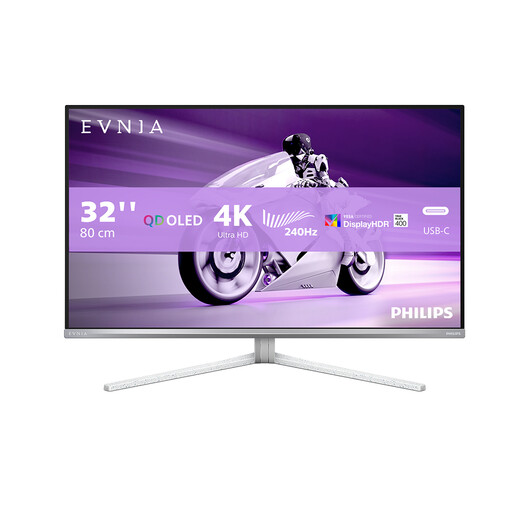
The stated UHD screen gives you a large display to assess for dense tables. Check its laptop video and charging connections and whether its stand fits your workstation; consider the product’s burn-in warning if your work keeps fixed tables on screen for long periods.
Yes, if it can charge your compatible laptop while carrying its display signal, you can leave the laptop’s separate charger unplugged. BenQ specifies video, data and 65W Power Delivery for the GW2790QT; check your laptop’s video output and charging requirements before expecting the same arrangement.
Choose by how much of your usual work remains readable, not by resolution alone. BenQ specifies 2560 × 1440 for the 27-inch GW2790QT, while LG specifies 3840 × 2160 for the 27-inch 27U730A-B; compare your tables and application windows at a comfortable scaling setting.
For workers who use display screen equipment daily as part of their normal work, continuously for an hour or more, the Health and Safety Executive says employers must carry out a workstation assessment. Choosing an adjustable monitor does not replace that assessment.
The Health and Safety Executive advises positioning the top of the screen at eye level and the screen about an arm’s length away. Check that the stand or mounting arrangement can achieve a suitable position with your desk and chair.
No. Dell says display daisy-chaining requires Thunderbolt and that some M-series chips may not support certain features. Confirm the capabilities of your exact computer and its ports before relying on a second-display setup.