For a small desk, start by checking whether a 23.8–24-inch monitor and its stand will fit at a workable viewing distance, rather than choosing a larger screen by default. A 16:10 WUXGA display gives long documents more vertical room, QHD provides more pixels for viewing several text panes, and Full HD suits simpler, one-document reviewing; check text scaling, stand adjustment and laptop connections before deciding.
Who this is for
Small-desk document reviewers
If you check translated drafts at a compact workstation, screen position matters as much as diagonal size. The Health and Safety Executive advises placing the top of the screen at eye level and the display about an arm’s length away; check whether the stand and your available desk depth allow that arrangement.
Long-document and side-by-side readers
If you compare source text, a translation, comments and terminology references, consider what needs to remain visible at once. The Dell P2425E’s 16:10 WUXGA format offers more vertical pixels than Full HD, while the P2425D’s QHD resolution offers more pixels on a similarly compact screen.
Reviewers of visual localisation
If your work also includes screenshots, branded layouts or colour-sensitive assets, colour specifications may affect your choice. ASUS lists colour-coverage and calibration features for the ProArt PA248QV; those features are not necessary for text-only proofreading.
What to check when buying
Measure the desk and decide whether you mainly need room for a long page, several text panes or one document at a time. Consider colour-work features separately if your translation reviews also include visual assets.
| Concern |
What to check |
Who this matters to |
| Desk fit and screen position |
Measure usable desk depth and the stand footprint; check height adjustment. |
If the screen crowds my desk, I need to position it comfortably in front of me before considering extra display space. Around 33% of consumers put desk fit and screen position first. |
| Vertical document space |
Compare aspect ratio and native resolution; check for pivot if you want portrait orientation. |
When I work through a long draft, I want more of the page visible without continually changing views. Roughly 27% of consumers make vertical document space their primary concern. |
| Text density and multiple panes |
Check resolution at the chosen screen size and whether your preferred text scaling leaves enough workspace. |
I need the draft, source text and references open together, but the interface still has to be readable. For about 27% of consumers, fitting several readable panes on a compact screen comes first. |
| Simple external-display setup |
Confirm the laptop’s video output, the monitor’s inputs and any cable you plan to use. |
If I mostly review one document at a time, I want a straightforward connection rather than features I will not use. Around 13% of consumers prioritise that simpler setup. |
Buying pitfalls
-
Choosing by diagonal size alone
A screen around 24 inches can have Full HD, WUXGA or QHD resolution, giving you different amounts of pixel workspace at a similar physical size.
Compare native resolution and aspect ratio with the way you arrange your draft and references, not just the diagonal measurement.
-
Assuming every stand offers the same adjustment
The Health and Safety Executive advises keeping the top of the screen at eye level and the display about an arm’s length away. A tilt-only stand may not let you reach a suitable height on your desk.
Check the exact model’s height and pivot adjustments, then measure the space available for its stand.
If the supplied stand cannot reach a suitable height, you may need a separate riser or monitor arm.
-
Choosing colour-work features for text-only reviews
Colour coverage and factory calibration are relevant when checking visual localisation, but do not replace a suitable screen position or document layout for proofreading.
Prioritise format, resolution, stand adjustment and compatible connections unless you also review colour-sensitive assets.
-
Putting an old monitor in general waste
An old monitor needs an appropriate electrical-waste collection route. GOV.UK describes retailer take-back arrangements for electrical equipment bought as a replacement.
Ask the seller which take-back method applies to your purchase, or check for a suitable electrical-waste collection option.
Relevant brands to consider
Dell
Dell’s compact P2425D and P2425E illustrate two different approaches to document workspace.
- Dell lists the P2425D as a 23.8-inch QHD monitor with height and pivot adjustment, while the P2425E is a 16:10 WUXGA USB-C hub model with up to 90W power delivery.
- Those features are specific to the named models. Check the exact stand and laptop connection before choosing either format.
BenQ
The GW2490 is an example of a compact Full HD screen for reading-focused setups.
- BenQ describes the GW2490 as a 23.8-inch Full HD monitor and offers an ePaper display mode intended for reading.
- Its Full HD resolution provides fewer pixels than the WUXGA and QHD formats discussed here. BenQ’s description of its reading mode is not evidence that it prevents eye strain.
ASUS ProArt
The PA248QV is relevant when translation checking also involves layouts, images or colour-sensitive material.
- ASUS specifies a 24.1-inch 16:10 WUXGA IPS panel, 100% sRGB and Rec. 709 coverage, factory calibration and an adjustable stand for the PA248QV.
- Colour-work specifications do not provide a necessary advantage for text-only proofreading.
Joybuy monitor choices
These compact monitors cover WUXGA and QHD choices for document workspace, alongside a simpler 24-inch display. Check each model’s physical fit and connections against your own desk and laptop.
 No image available
ASUS ProArt PA248CNV IPS WUXGA
Consider this WUXGA model if extra vertical document space is your priority. Check the stand’s fit on your desk and confirm laptop compatibility before relying on a USB-C display and charging setup.
View on Joybuy
 No image available
Dell P2425 24-inch (61 cm) Monitor
Consider this compact model for reviewing documents if its native display format suits your layout. Check the exact resolution and ports before ordering, particularly if you need USB-C video or charging; also confirm that its stand fits your desk.
View on Joybuy
 No image available
ASUS ProArt PA248CRV IPS WUXGA
The WUXGA format is worth considering when you want more vertical room for a translation draft. Confirm the stand footprint before choosing it for a small desk, and check laptop video and charging compatibility if you plan to use USB-C.
View on Joybuy
 No image available
ASUS ProArt PA24ACRV IPS QHD
Consider this QHD model if you want to arrange a draft and reference material on a compact screen. Check whether your preferred text scaling leaves enough usable space, and confirm the stand footprint against your desk.
View on Joybuy
 No image available
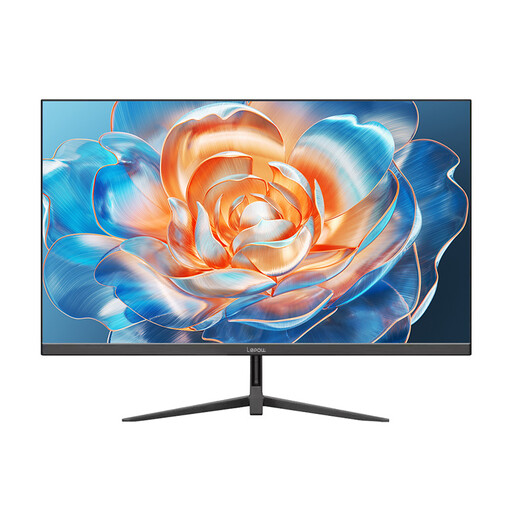
Lepow HC-24Z2 24-inch 100Hz Monitor
Consider this model for a compact setup used mainly to read one document at a time. If screen height, portrait orientation or an IPS panel matters to you, confirm those features for the exact model and measure the stand’s footprint.
View on Joybuy
Common questions
Is a 27-inch monitor automatically better for checking translations?
No. On a small desk, first check whether you can place the screen directly in front of you, with its top near eye level and the display about an arm’s length away, as advised by the Health and Safety Executive. A 23.8–24-inch monitor may be more workable when desk depth is limited; choose its resolution according to how much document space you need.
Should I choose 16:10 WUXGA or QHD for translation review?
Choose 16:10 WUXGA if extra vertical room for a long draft matters most, and consider a pivot-capable stand if you want a portrait view. Choose QHD if you want more pixels for several panes on a compact screen, but check that your preferred text scaling keeps them readable.
Can one USB-C cable carry video and charge my laptop?
Only when the exact monitor offers the relevant USB-C video and power-delivery functions and your laptop supports them. Dell lists up to 90W power delivery for the P2425E; compare that model’s connection specification with your laptop’s video output and charging requirements rather than assuming the same capability on another monitor.
What should I check for warranty and after-sales support?
Check the exact seller listing for its warranty terms, returns process and handling of faults before ordering. Do not infer those terms from the monitor’s brand or display specifications.
What should I do with an old monitor?
Use an appropriate electrical-waste collection route rather than putting the monitor in general waste. If you are buying a replacement, ask the seller which take-back arrangement applies; GOV.UK provides guidance on retailer take-back for electrical equipment.


