Start with the window and screen position, then look for a matte or anti-glare surface: a brightness specification alone will not remove reflections or direct light. A 27-inch QHD monitor with an adjustable stand is a practical starting point for arranging quiz text and reference material; consider 4K if you value its additional pixels, and check USB-C charging against your laptop before expecting one cable to do both jobs.
Who is this for?
Window-side quiz makers
If light falls across your desk while you read and edit vocabulary questions, deal with the window angle and reflections before relying on a higher brightness figure. BenQ UK describes glare from direct light, screen reflections and large brightness differences.
Long-session text organisers
If you keep question sets, dictionaries and source pages open together, compare resolution and stand adjustment as well as screen size. BenQ, Dell and ASUS specify different QHD and 4K configurations for the models discussed below.
Laptop-first study users
If you connect a laptop at the desk, check both its USB-C display compatibility and the monitor’s charging output. BenQ specifies up to 65W Power Delivery for the GW2790QT, while LG specifies up to 15W for the 27U631A-B.
What matters when choosing?
For quiz preparation beside a bright window, tackle light falling on or around the screen before deciding how much text workspace and laptop connectivity you need.
| Concern | What to check | Who this matters to |
|---|
| Window glare |
Check the exact screen coating and whether the stand lets you change the screen angle. Compare typical brightness, not just a peak-brightness figure. |
If window light reflects over my questions, I need to reposition the screen and control the surrounding light before changing resolution. Around 50% of consumers put reflection and contrast control first. |
| Text workspace |
Compare resolution at the screen size you want, then check stand movement and your preferred display scaling. |
When I edit prompts alongside a dictionary and source pages, I want enough room to arrange them while keeping text readable. Roughly 33% of consumers prioritise text workspace and desk comfort. |
| Laptop connection |
Confirm USB-C video compatibility, Power Delivery wattage and whether a suitable cable is included. |
I would like a simpler laptop setup, but not if the monitor leaves me relying on an unexpected charging arrangement. About 17% of consumers make connection and charging simplicity their primary concern. |
A 27-inch QHD screen is one route for keeping quiz material and references in view. A 27-inch 4K screen has more pixels, but check how your software scales text at your usual desk distance. Neither resolution settles the window-glare question: BenQ UK advises considering direct light, reflections and the brightness difference between the screen and its surroundings.
Buying pitfalls
-
Choosing by brightness alone
Direct light entering your eyes and light reflected off the screen are different problems. A brighter display does not remove either source of glare; BenQ UK identifies both, along with contrast between the display and its surroundings.
Where possible, position the screen so the window is neither directly in front of nor behind it. Adjust blinds or lighting, then check the monitor’s coating and the movement available from its stand.
-
Assuming USB-C replaces your laptop charger
USB-C charging output varies. BenQ specifies up to 65W for the GW2790QT, whereas LG specifies up to 15W for the 27U631A-B.
Compare the monitor’s Power Delivery figure with your laptop’s charging requirement, confirm USB-C video support and check cable inclusion.
You may still need your laptop’s charger; LG says a USB-C cable is not included with the 27U631A-B.
-
Treating every 27-inch screen as the same text workspace
Full HD, QHD and 4K describe different resolutions, even when the diagonal screen size is the same. The BenQ GW2790QT and LG 27U631A-B are QHD models; ASUS specifies 4K for the VY27UQ.
Decide how many quiz-writing and reference panes you want visible, then consider text scaling and your viewing distance rather than choosing on screen size alone.
Brands to consider for these monitor types
BenQ
The GW2790QT is a relevant QHD example if screen positioning and a laptop connection matter at a window-side desk.
- BenQ specifies a 27-inch QHD IPS display, matte coating, 350 nits typical brightness, 110 mm height adjustment, pivot and swivel, and USB-C Power Delivery up to 65W.
- Its Brightness Intelligence Gen2 and eye-care functions are manufacturer features, not proof that the monitor will eliminate window glare.
Dell
The S2725DS provides a specification reference for a fixed desk where anti-glare coating and stand movement are priorities.
- Dell specifies a 27-inch QHD IPS display, anti-glare 3H coating, 350 cd/m² typical brightness and 130 mm height adjustment, plus tilt, swivel and pivot.
- Check availability for this exact model before treating it as a purchase option.
LG
The 27U631A-B is a QHD option for someone who wants USB-C display connectivity without assuming it will replace a laptop charger.
- LG specifies a 27-inch QHD IPS display, Reader Mode, Flicker Safe and USB-C with up to 15W Power Delivery.
- LG describes tilt adjustment for the stand and says the USB-C cable is not included; check whether 15W meets your laptop’s needs.
ASUS
The VY27UQ is a 4K reference for readers prioritising additional pixels for text and on-screen panes.
- ASUS specifies a 27-inch 4K IPS display at 60Hz, with Blue Light Filter, Flicker Free and Eye Care Plus features.
- For a desk beside a bright window, confirm the exact screen coating and typical brightness rather than treating its 4K resolution or eye-care features as glare control.
Joybuy monitor options
These options include QHD and 4K monitors for arranging quiz text and reference material, as well as a gaming-focused QHD model. Match each screen’s surface and adjustment options to your window-side desk before choosing.
 No image available
ASUS ProArt PA278CV IPS WQHD
Consider this WQHD model if you want a QHD-class workspace for writing quizzes and consulting references. Its name specifies an IPS panel; check the screen surface and stand movement against your desk position. If you plan to connect a laptop by USB-C, confirm the charging wattage against that laptop’s requirement.
View on Joybuy
 No image available
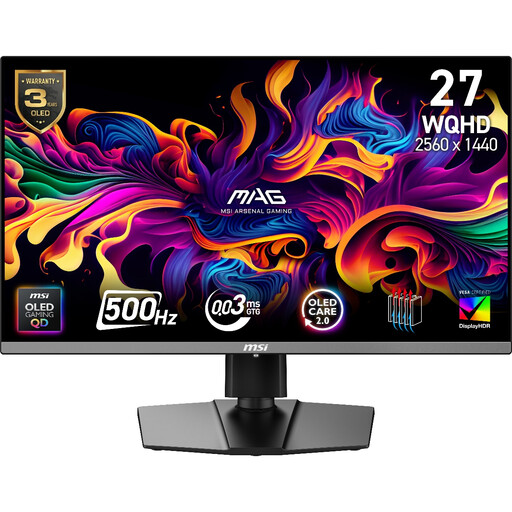
MAG 272QP QD-OLED X50 27-inch 500Hz monitor
This gaming-focused model is also an option if its 27-inch, 2560 × 1440 workspace suits your quiz-writing layout. Its stated 500Hz refresh rate is not, by itself, a reason to choose it for text work. Check the surface treatment for your window-side position and confirm whether its USB-C charging meets your laptop’s needs.
View on Joybuy
 No image available
iiyama ProLite XUB2792UHSU-B6 27-inch 4K UHD, Matte Black
Consider its 4K UHD resolution if you want additional pixels for quiz text and reference panes. Check your preferred text scaling and the exact screen coating before choosing it for reflected-light control. “Matte Black” identifies the finish, not necessarily the display surface.
View on Joybuy
 No image available
ASUS Eye Care VY27UQ 4K UHD 60Hz
The VY27UQ is a 27-inch 4K IPS option if additional pixels matter more to your quiz layout than a higher refresh rate; ASUS specifies 60Hz. Check the exact screen coating and typical brightness for a bright-window desk, along with whether its stand provides the positioning you need.
View on Joybuy
 No image available
ASUS ProArt PA24ACRV IPS QHD
Consider this QHD IPS model if you want to compare a different desk-size option with the 27-inch monitors above. Check its exact dimensions, screen coating and typical brightness for your window-side position, and confirm that its connection and charging arrangements suit your laptop.
View on Joybuy
Frequently asked questions
Will a brighter monitor solve reflections from a bright window?
No. BenQ UK distinguishes direct light, reflections from the screen and a large brightness difference between the screen and its surroundings. Adjust the screen position and lighting first, then consider a matte or anti-glare surface as part of the setup.
Can any USB-C monitor charge my laptop adequately?
No; charging output depends on the model and must be compared with your laptop’s requirement. BenQ specifies up to 65W Power Delivery for the GW2790QT, while LG specifies up to 15W for the 27U631A-B. Also confirm USB-C video compatibility and whether the cable you need is included.


