What to check when choosing
Choose the screen size and resolution for the material you read most, then check whether its connections and stand fit your workstation. A larger screen, a sharper text display and a convenient laptop connection address different needs; none establishes the right setup on its own.
| Concern |
What to check |
Who this matters to |
| Text clarity |
Compare native resolution and screen size together, particularly 27-inch 4K and 27-inch QHD. Confirm that your computer can output the chosen resolution. |
When I proofread dense steps and tables for long stretches, I want the text to remain easy to inspect; around 40% of consumers put text clarity first. |
| Laptop connection and workspace |
Check USB-C display capability on both devices and compare the monitor’s stated power delivery with your laptop’s needs. Consider how much room you need for documents side by side. |
If I move between a draft, reference material and a customer ticket on my laptop, I want a practical desk connection and room for those windows; roughly 30% of consumers make this their primary concern. |
| Screen positioning |
Check stand adjustment and desk depth before choosing a larger display or relying on portrait rotation. The Health and Safety Executive advises placing the screen top about eye level and the display about an arm’s length away. |
When I write for much of the working day, I need to place the screen comfortably at my desk; around 30% of consumers prioritise workstation fit. |
Joybuy monitor options
These monitors cover 27-inch 4K and QHD writing setups, plus a larger QHD option for reviewing documents alongside visual material. Compare each model’s connections and adjustments with the equipment already on your desk.
 No image available
BenQ MA270UP Nano Glossy 27-inch 4K USB-C monitor
Consider this 27-inch 4K IPS model if detailed text is your main focus and you want to check whether a USB-C connection fits your laptop setup.
Its product name specifies an adjustable-height stand. Confirm the USB-C display functions and charging output needed by your computer before relying on a one-cable connection.
View on Joybuy
 No image available
MSI MD272UPSW 27-inch 4K USB-C Smart Monitor
This 27-inch 4K IPS option suits a text-focused desk where a compatible laptop connection is also useful.
The product name specifies USB-C with 65W power delivery and Multi-Control. Check your laptop’s video-output capability and whether 65W meets its charging needs.
View on Joybuy
 No image available
ASUS ProArt PA278CFRV 27-inch QHD 100Hz monitor
Consider this QHD model if a 27-inch writing screen meets your workspace needs without making 4K resolution the priority.
The product name specifies an IPS display and 100Hz refresh rate. If laptop docking is important, confirm the USB-C video and charging functions of the exact variant before buying.
View on Joybuy
 No image available
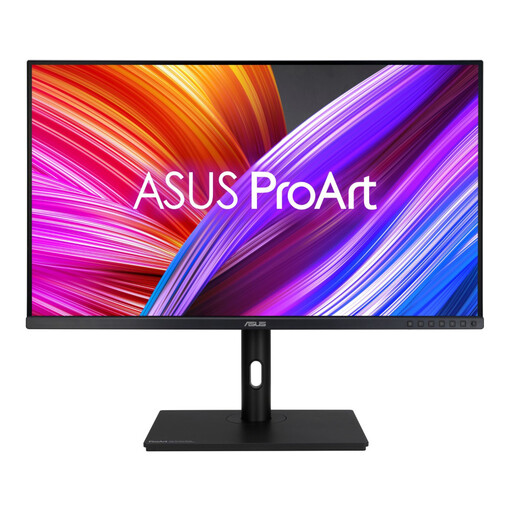
ASUS ProArt PA328QV 31.5-inch QHD monitor
Consider the larger screen when reviewing instructions beside screenshots or layout assets matters more to you than the pixel density of a 27-inch 4K display.
ASUS specifies a 31.5-inch QHD IPS panel and an adjustable stand for the PA328QV. Measure your desk depth, and confirm the connections you need for your computer.
View on Joybuy
 No image available
LG 27UP650K 27-inch 4K IPS monitor
This 27-inch 4K option is worth considering when drafting and proofreading text take priority over a one-cable laptop setup.
The product name specifies a 60Hz IPS display, HDMI and DisplayPort. If USB-C video or monitor-powered charging is essential, confirm those functions for this exact model before choosing it.
View on Joybuy
Questions about monitor setup
Will an adjustable monitor alone make long writing sessions comfortable?
No: screen adjustment is only part of the workstation. The Health and Safety Executive advises placing the screen directly in front of you, with its top about eye level and the display about an arm’s length away; also consider your desk, lighting, keyboard and mouse placement.
Can any USB-C monitor charge my work laptop?
No: the laptop must support the required display connection, and the monitor’s power delivery must meet its charging needs. Manufacturer specifications for the LG 27U631A-B, BenQ GW2790QT and Dell P2725QE state different charging outputs, so check the exact monitor and laptop rather than the connector name alone.
Should I choose 31.5-inch QHD instead of 27-inch 4K for instructions?
Choose the 31.5-inch QHD format if the larger physical canvas helps you review documents and screenshots together and your desk can accommodate it. If text density is the priority, compare it with 27-inch 4K before buying: QHD spread across the larger screen does not provide the same pixel density.
Should I take breaks when writing at a screen for long periods?
Yes: plan opportunities to step away from display-screen work or change activity. The Health and Safety Executive recommends short, frequent breaks rather than relying on fewer long ones; a monitor purchase does not replace a suitable work routine.


