Developers working beside a bright window
If daylight appears in the screen, monitor choice is only part of the decision. The Health and Safety Executive also advises moving the screen or using blinds to avoid glare.


For unit-test work beside a bright window, start with a matte or anti-glare screen that you can position away from reflections. Consider 27-inch QHD for code workspace without 4K’s higher pixel density, or 27-inch 4K if denser text matters and you are comfortable adjusting interface scaling; neither choice replaces glare control at the window. The Health and Safety Executive advises repositioning the screen or using blinds to avoid glare.
If daylight appears in the screen, monitor choice is only part of the decision. The Health and Safety Executive also advises moving the screen or using blinds to avoid glare.
Working across source files, failures and documentation makes resolution and comfortable text scaling worth assessing together. The cited LG and Dell 4K models offer a denser alternative to the cited QHD models.
If one cable is meant to carry the display signal and charge a laptop, check the laptop, cable and monitor capabilities together. LG documents display, data and charging over USB-C for its 27UP850K-W.
Set the screen’s position relative to the window first, then decide how much code workspace and laptop connectivity you need.
| Concern | What to check | Who this matters to |
|---|---|---|
| Reflections and positioning | Check for a documented matte or anti-glare surface and enough stand or mount adjustment to change the screen angle. Plan window control if reflections remain. | If daylight falls across my code, I need a screen position that lets me read it without persistent reflections. Around 42% of consumers put glare control first. |
| Text density and workspace | Compare screen size and resolution, then try your preferred operating-system scaling for code and test output. | When I keep source files and failing tests visible together, I need enough workspace without making text uncomfortable to read. Code workspace comes first for around 33% of consumers. |
| Laptop connection | Check that the monitor, laptop and cable support the required USB-C or Thunderbolt display and charging functions. | If I connect a laptop at this desk each day, I want to know whether one cable can handle the display and charging I need. Around 25% of consumers prioritise desk integration. |
A coated screen does not necessarily remove a direct window reflection. The Health and Safety Executive identifies screen repositioning and blinds as ways to avoid glare.
Check where the window will appear in the panel, and allow room to turn the screen or control the daylight.
Screen size does not tell you how much pixel workspace you get. BenQ lists the GW2790 at 1920 × 1080, while ASUS lists the 27-inch PA278QV at 2560 × 1440.
Compare resolution alongside size and decide whether Full HD leaves enough room for your IDE, test output and documentation.
Video, data and charging depend on the capabilities of the monitor, laptop port and cable.
Check your laptop’s display-output and charging requirements against the exact monitor connection before relying on one-cable use.
An HDR designation does not establish how a screen handles reflections from a nearby window.
Assess screen finish, positioning and brightness for this desk separately from HDR features.
Dell’s UltraSharp U2724D and U2725QE illustrate different QHD and 4K options for a code-focused desk.
The ProArt PA278QV is a documented 27-inch QHD option for assessing code workspace and screen finish.
LG’s UltraFine 27UP850K-W is relevant to developers considering a 27-inch 4K display with a USB-C laptop connection.
BenQ’s GW2790 is a 27-inch Full HD option for developers who can work with that resolution.
These models offer QHD, 4K and Full HD options for writing unit tests. Match the resolution to your code layout, then check screen positioning and reflections at the bright-window desk; the models have different connection and display features.
 No image available
Consider this WQHD model if code workspace matters more to you than moving to 4K. Check the screen finish and the positioning adjustments you need beside the window.
 No image available
This QHD option suits a desk where you want room for code and test output without choosing 4K. If laptop connectivity matters, confirm the exact model’s ports and their display and charging capabilities.
 No image available
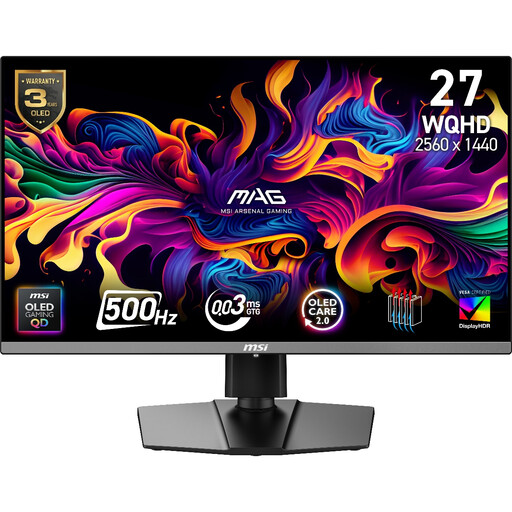
The 2560 × 1440 resolution makes this model worth comparing for a QHD code layout, though its gaming features need not drive a unit-test purchase. If static IDE panels remain on screen for long sessions, check the OLED-care guidance and burn-in warranty terms.
 No image available
Consider its 4K IPS display if you want denser text and can set a comfortable interface scale. The title lists USB-C 65 W; confirm your laptop and cable support the display and charging functions you need, and check the screen finish for your window position.
 No image available
Choose this Full HD option only if its 1920 × 1080 workspace accommodates your code and test-output layout. Check whether the stand or a suitable mount lets you position the screen away from window reflections.
No: brightness alone will not remove a direct reflection. The Health and Safety Executive advises repositioning the screen or using blinds to avoid glare.
Choose 27-inch QHD if its workspace and text size suit your IDE layout; consider 27-inch 4K if you want denser text and can set comfortable scaling. The cited 27-inch QHD and 4K models have resolutions of 2560 × 1440 and 3840 × 2160 respectively, according to Dell, ASUS and LG.
Yes, if it lets you change a viewing angle affected by the window. Check the specific adjustments on the supplied stand, or confirm mounting compatibility if you plan to use a separate arm; the Health and Safety Executive also advises repositioning screens to avoid glare.
The Health and Safety Executive says employers have the same health-and-safety duties for home workers as for office-based staff. Ask your employer how its display-screen-equipment assessment applies to your work arrangement and bright-window setup.