If you work at a fixed desk with a compatible USB-C laptop, a docking monitor can charge the laptop while displaying its video, freeing the socket otherwise used by its charger; the monitor still needs a mains socket. For a temporary desk, a host-powered portable monitor can avoid a separate monitor plug, provided your computer supports its connection and power requirements. Neither choice makes an overloaded or daisy-chained extension lead safe.
Who each setup suits
Laptop workers with one usable desk socket
If your laptop supports USB-C display output and charging, a docking monitor may let one mains plug serve both devices. Dell UK and Philips UK describe these functions for the P2426HE and 279P1/01 respectively; check your laptop’s requirements before choosing either model.
People working at temporary desks
If your workspace will change during the move, a compact screen powered by its host device may be easier to set up without another wall plug. ASUS specifies one USB connection for power and video on the ZenScreen MB16ACE, subject to its connection requirements.
Households sharing a limited number of outlets
If several devices already compete for sockets, assess the extension arrangement before adding a monitor. Electrical Safety First advises against connecting extension leads in a chain and says to use only one socket extension device per socket.
What matters when sockets are scarce
Decide whether your main need is to replace a laptop charger plug at a fixed desk or to avoid a separate monitor plug at a temporary one. Check the electrical load whichever screen you choose.
USB-C docking monitor
Choose it when: you have a fixed desk and a laptop that supports both USB-C display output and charging at the monitor’s available wattage.
Accept that: the monitor still uses a mains socket; it replaces the compatible laptop’s separate charging plug, not the desk’s need for power.
USB-powered portable monitor
Choose it when: you need a second screen at a temporary desk and your host device supports the screen’s power and video connection.
Accept that: the screen is smaller than a conventional desktop monitor, and connection modes can require software; ASUS says USB-A hybrid-signal use on its MB16ACE needs a DisplayLink driver.
| Concern |
What to check |
Who this matters to |
| Laptop charging at a fixed desk |
Match the monitor’s USB-C power delivery to your laptop’s charging requirement, and confirm USB-C display output. |
If I have one practical desk socket, I want the monitor to charge my laptop instead of plugging in its charger separately. Around 36% of consumers put that need first. |
| Power for a temporary screen |
Confirm the host port, required cable and whether the computer can supply the monitor’s power without an additional supply. |
When I work in different rooms during the move, I need a second screen that does not claim another wall socket. That is the primary concern for roughly 29% of consumers. |
| Space on a permanent desk |
Measure the new desk and compare the screen size and resolution you need; check charging compatibility if the monitor also serves as a dock. |
I still need room for work on a larger screen, even though the monitor will have its own mains plug. About 21% of consumers prioritise that desk setup. |
| Extension-lead safety |
Check the device’s marked rating against the connected load, and use no more than one extension device per wall socket. |
If several devices share the few available outlets, I need a safe power arrangement before choosing extra screen features. Around 14% of consumers put that concern first. |
Setup mistakes to avoid
-
Assuming any USB-C monitor will charge your laptop
USB-C describes the connector, not a guarantee that your laptop supports charging and external video through the intended port. Power delivery also differs by monitor model.
Compare the monitor’s stated wattage with your laptop’s charging requirement, then confirm that the laptop can send video through that USB-C port.
-
Treating a multi-way extension as unlimited capacity
More sockets on an extension device do not increase its marked electrical rating. An overloaded lead or adaptor can overheat.
Check the combined load, use one extension device per wall socket and never connect extension leads in a chain, as Electrical Safety First advises.
-
Overlooking a portable monitor’s connection requirements
A portable screen may need a particular host port, cable or driver. For example, ASUS specifies a DisplayLink driver for USB-A hybrid-signal use with the ZenScreen MB16ACE.
Check the requirements for the exact monitor and the computer you will use before relying on a one-cable setup.
-
Reusing damaged cables after the move
Damage to a plug, lead or casing can make an electrical setup unsafe, even if the desk layout otherwise works.
Inspect equipment while it is unplugged and do not use visibly damaged cables or devices. The Health and Safety Executive advises checking that electrical equipment is in good condition.
Brands and model lines to consider
These examples illustrate different ways to manage a limited-socket desk; their stated features apply to the named models, not every monitor from each brand.
Dell
The Dell Pro P2426HE is a fixed-desk USB-C hub monitor with a 23.8-inch FHD panel and a height-adjustable stand, according to Dell UK.
- Dell UK specifies USB-C power delivery up to 100W, relevant if you want the monitor to charge a compatible laptop.
- Confirm your laptop’s charging requirement and display connection; the monitor still needs mains power.
Philips
The Philips 279P1/01 combines a 27-inch 4K desktop display with USB-C docking, according to Philips UK.
- Philips states that a compatible laptop can use one USB-C cable for video, charging at up to 90W and Ethernet.
- Its conventional desktop size and mains connection make it a fixed-workstation option rather than a compact moving-day screen.
ASUS
The ASUS ZenScreen MB16ACE is a 15.6-inch portable screen intended for a host-powered second-display setup.
- ASUS specifies one USB connection for the MB16ACE’s power and video, avoiding a separate monitor wall plug with a suitable host.
- USB-A hybrid-signal use requires a DisplayLink driver, and ASUS limits automatic rotation to Windows.
LG
The LG 27UQ750-W is a 27-inch 4K desktop monitor for a setup where screen space matters alongside laptop charging.
- LG UK specifies USB-C power delivery up to 90W for the 27UQ750-W.
- Check laptop compatibility and the space available at the new desk; its gaming features need not drive a choice for ordinary office work.
Joybuy screens for temporary workspaces
These choices include compact second screens and a larger battery-equipped smart monitor for a changing workspace. Check how each would receive power and video before counting on it to reduce socket use.
 No image available
ASUS ZenScreen MB166CR FHD
For a desk that changes during the move, check whether your laptop’s intended port can provide the display signal and power this portable screen needs before relying on it without a separate supply.
FHD display.
View on Joybuy
 No image available
UPERFECT 14-inch 60Hz Touchscreen Portable Monitor
For a compact temporary second screen, confirm your computer’s video and power connection before planning a one-cable desk; a separate power supply may be necessary.
14-inch touchscreen, 60Hz, VESA compatibility and a 180° adjustable stand.
View on Joybuy
 No image available
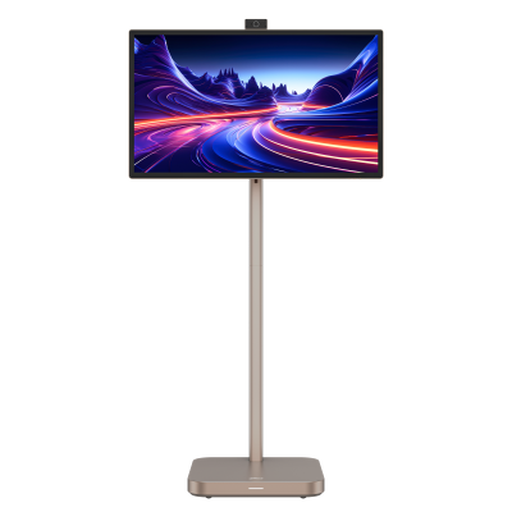
Dahua Explorer 31.5-inch 4K Smart Monitor with Built-in Battery
For a temporary workspace without an immediately available socket, the built-in battery is worth considering, but confirm charging arrangements and the runtime you can expect for your use. Do not assume a 31.5-inch screen will be convenient to move frequently.
4K IPS display, Android 11, 8GB RAM and 128GB storage. Battery life is advertised as up to four hours; check the conditions before relying on that figure.
View on Joybuy
Frequently asked questions
Can a USB-C monitor free up a wall socket?
Yes, it can free the socket used by a separate laptop charger if the monitor supplies enough power and your laptop supports USB-C charging and display output. The monitor itself still plugs into the mains; check both devices’ requirements before buying.
Can a portable monitor work without its own wall plug?
Some can receive power and video from a compatible host through one USB connection. ASUS specifies this for the ZenScreen MB16ACE, although its USB-A hybrid-signal connection requires a DisplayLink driver; check the exact model and computer you intend to connect.
Can I plug one extension lead into another during the move?
No. Electrical Safety First advises using only one socket extension device per wall socket and not connecting extension leads in a chain. Check that the combined load stays within the extension device’s marked rating.
What safety checks matter when setting up a monitor in Great Britain?
Check that the monitor, leads and any extension device are undamaged, and keep the connected load within the extension device’s marked rating. The Office for Product Safety and Standards states that the Electrical Equipment (Safety) Regulations 2016 set requirements for electrical equipment before it is placed on the Great Britain market; that does not replace checking the condition and suitability of your own setup.


