Dialogue and artwork readers
If you spend long sessions reading dialogue and looking at character art, compare resolution, anti-glare treatment and how easily you can position the screen before paying particular attention to gaming refresh rates.


Start with an IPS monitor whose resolution, screen size and stand suit long stretches of reading, rather than choosing by refresh rate alone. A 27-inch QHD model makes sense if your device supports 2560 × 1440 and you want more desktop space; a compact Full HD model may suit a smaller desk. Decide where your headphones will plug in, then check the exact display input and audio connections before ordering.
If you spend long sessions reading dialogue and looking at character art, compare resolution, anti-glare treatment and how easily you can position the screen before paying particular attention to gaming refresh rates.
If you play from a laptop or switch devices, work out the video connection and where your headphones will plug in. A monitor-side headphone socket and a USB-C video connection are separate features to check on the exact model.
If visual novels share your monitor with faster games, refresh rate and adaptive-sync support may influence your choice alongside text readability and desk fit.
For visual novels played with headphones, decide which need takes priority: reading comfort, screen space, connections or performance in faster games.
| Concern | What to check | Who this matters to |
|---|---|---|
| Reading comfort | Compare anti-glare treatment and the stand's height and tilt adjustments; check the exact model's stated low-blue-light or flicker-free features without treating them as a health guarantee. | When I read dialogue for long sessions, I want to position the screen comfortably rather than rely on a feature label alone. Around 31% of consumers put reading comfort first. |
| Text and artwork clarity | Compare native resolution with screen size and desk space. Check that your device and chosen connection support the resolution. | If I keep a guide or launcher beside a visual novel, I need enough screen space without choosing a display that overwhelms my desk. Around 31% of consumers primarily care about clarity and workspace. |
| Video and headphone connections | Match the monitor's HDMI, DisplayPort or USB-C input to your device, and identify whether headphones will connect to the monitor or another device. | With headphones and a laptop or console, I want to know exactly where video and audio will travel before I connect everything. For around 23% of consumers, connection fit is the primary concern. |
| Faster games | Check refresh rate, adaptive-sync support and whether your device can deliver the intended resolution and refresh rate through the selected input. | If I also play faster games, I may value smoother motion even though dialogue-heavy visual novels do not make it my starting requirement. Around 15% of consumers prioritise this mixed-game need. |
A higher refresh rate can matter more for moving content and faster games than for reading visual-novel dialogue.
Settle screen size, native resolution, positioning and device connections first; then consider refresh rate if you also play faster games.
Headphone connections vary by model, and a video input alone does not establish a monitor-side audio output.
Choose whether headphones will plug into the monitor, computer, console, dock or another audio device, then check the exact socket and connection path.
A single-cable arrangement depends on the laptop supporting video over USB-C and on the monitor's charging output meeting the laptop's needs.
Check the laptop's video-output and charging specifications against the exact monitor before planning around one cable.
Low-blue-light and flicker-free features describe a monitor's stated characteristics; they do not guarantee that an individual will avoid discomfort.
Compare those features with screen positioning and a brightness setting suited to your room, and take regular breaks.
The S2725DSM is a reference point for a 27-inch QHD IPS display that can serve visual novels and faster games.
The GW2790QT is relevant if a laptop-centred desk makes USB-C connectivity a priority.
The VA24EQSB and VA27DQFR provide model-specific examples to compare when monitor-side headphone connections matter.
These monitors offer different screen sizes and resolutions for visual-novel desks. If you want to plug headphones into the display, check the exact model's audio output; also match its video connection and positioning options to your setup.
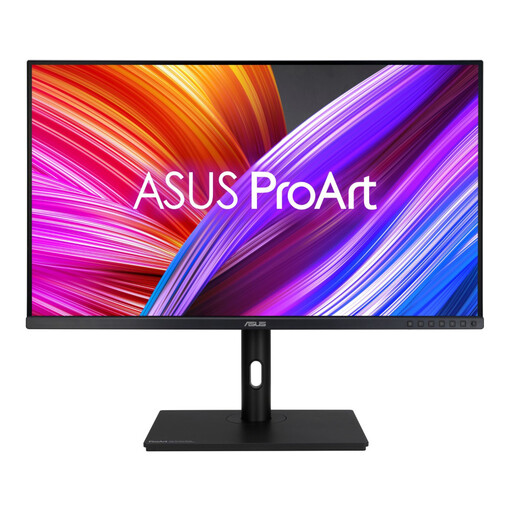 Image unavailable
Consider this IPS WQHD model if your visual-novel desk has room for a larger screen. Check desk fit, stand positioning, your device's WQHD output and the headphone connection you intend to use.
 Image unavailable
This 31.5-inch IPS model is an option if you have space for a larger visual-novel display. Confirm the native resolution, the stand's adjustment options and the video and headphone connections before buying.
 Image unavailable
This QHD IPS model suits a setup where screen positioning matters alongside visual-novel reading; its 100Hz rating may also interest players of faster games. Check whether the audio jack works as your required headphone output, whether the unit has the USB-C configuration you need, and whether your device supports QHD at 100Hz through your chosen input.
 Image unavailable
Consider this 4K UHD model if resolution is a priority for your visual-novel setup. Its stated stand adjustment is tilt, so check whether that meets your positioning needs, and confirm your device can provide the intended 4K output through the chosen connection.
 Image unavailable
This IPS WQHD model is worth considering if adjustable screen positioning matters during longer reading sessions. Confirm your device's video and charging compatibility before relying on USB-C, and check your intended headphone connection separately.
No. Speakers and a headphone connection are different features. If you want to plug headphones into the monitor, check that the exact model lists a suitable output; ASUS United Kingdom lists headphone connections for the VA24EQSB and VA27DQFR.
No; choose a higher refresh rate chiefly if you also value smoother moving content or play faster games. For dialogue-heavy visual novels, settle resolution, screen size, stand positioning and connections first.
Confirm that the laptop's USB-C port carries video and that the monitor's charging output suits the laptop. BenQ UK lists 65W power delivery for the GW2790QT, but that figure alone does not establish compatibility with your laptop.
Check the retailer's electrical-waste take-back arrangements before ordering a replacement. GOV.UK says retailers and distributors must offer to take back electrical waste of the same type as the item bought; confirm the applicable route and conditions with the retailer.